

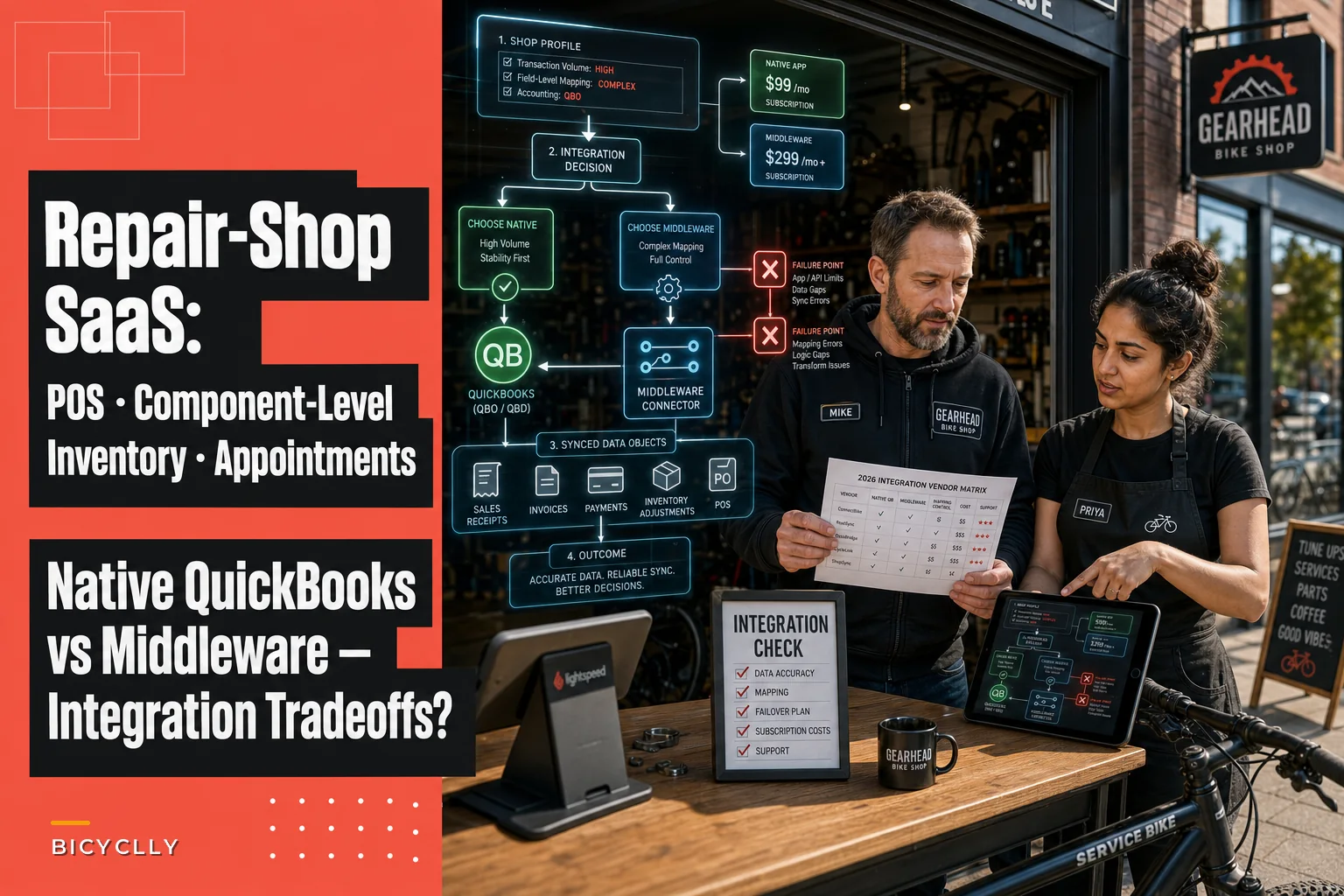

The hardest part of choosing shop software isn't the demo. Demos always look clean. The problem shows up three weeks after go-live, when your service writer is re-keying a repair ticket into QuickBooks because the "sync" only pushes daily sales totals — not itemized invoices — and suddenly your bookkeeper can't tell which $1,240 deposit came from a bike build versus a stack of tune-ups.
So this guide skips the marketing sheets. We're comparing the platforms that actually try to bundle point-of-sale, component-level inventory (meaning you can track a single XT rear derailleur by SKU, not just "drivetrain parts"), and appointment/repair scheduling in one system. And we're grading them on the two things that quietly wreck bike shop books: how they talk to QuickBooks, and whether they connect to the distributors you actually order from — QBP, J&B, Bike-Components, and the rest.
If your POS, inventory, and accounting numbers already drift apart, fix the mapping before you even start shopping. The reconciliation logic in our data-mapping and 30/60/90 reconciliation breakdown pairs directly with everything below — because no integration saves you if the underlying chart of accounts is already a mess.
The two integration questions that decide everything
Before the vendor table, you need to understand what "QuickBooks integration" actually means, because vendors use the phrase to describe wildly different things.
There are basically four levels, and they are not equal:
-
Summary journal entry only. The system posts one daily or weekly journal entry to QuickBooks — total sales, total tax, total payments. You lose all line-item detail. Fine for a tiny shop, a nightmare for anyone doing warranty work or tracking parts margin.
-
Itemized sales receipts / invoices. Each transaction flows as its own receipt or invoice, with line items mapped to income accounts. This is what most shops actually need.
-
Two-way inventory + bills. Sales push out, and purchase orders, vendor bills, and inventory adjustments flow between the systems. Now your COGS is real, not estimated.
-
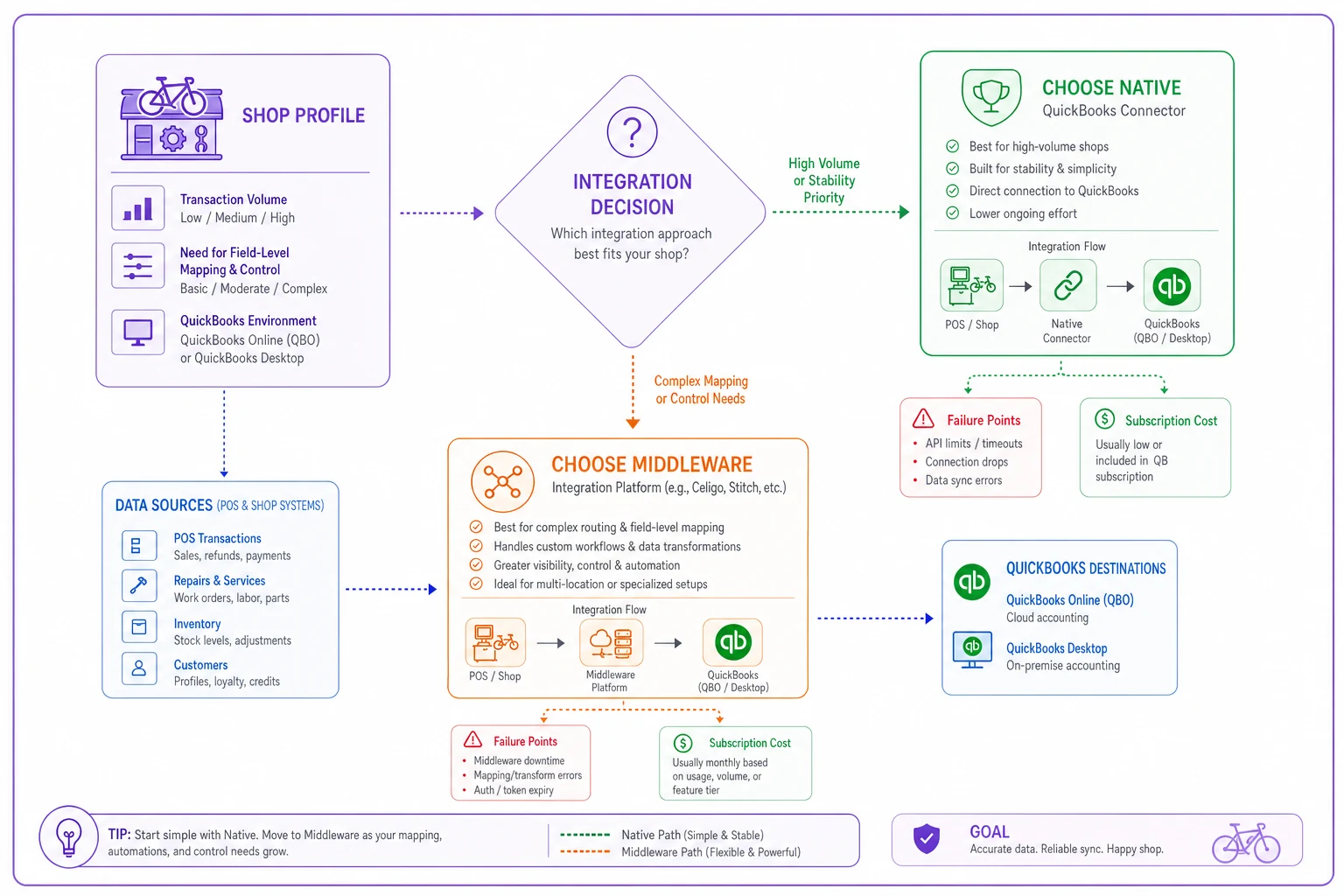
Native vs. middleware. "Native" means the vendor built and maintains the connector. "Middleware" means you're paying a third party — a connector service or a Zapier-style bridge — to translate between the two. Another subscription, another failure point, another place to debug when payments stop matching.
The second question — distributor connections — gets ignored until your mechanic is hand-typing a 40-line QBP order into your inventory system at 7pm. A real catalog or EDI connection to QBP, J&B, or your regional distributor means SKUs, costs, and stock levels import automatically. Very few POS platforms do this cleanly. Most rely on CSV import or a one-way catalog feed.
Keep both questions in mind as you read the comparison. A platform can nail scheduling and still cost you ten hours a week because its accounting sync is level 1.
The comparison table
Here's the honest shake-out of the platforms shops in the cycling space actually evaluate. Treat the distributor column as "what's realistically available," not a guarantee — these connections change, and you need to validate them yourself before signing anything. The test plan is further down.
Never miss a sale or service appointment again.
Bicyclly helps you manage every sale, repair, and booking with ease and accuracy.
- Unified inventory and sales tracking
- Automated customer notifications
- Service appointment scheduling
No credit card required
| Platform | QuickBooks sync | Sync direction & objects | Bike-distributor connections | Best shop size | Watch out for |
|---|---|---|---|---|---|
| Lightspeed Retail (X-Series/R-Series) | Native QBO; QB Desktop via export/middleware | One-way to QB: itemized sales receipts, payments, tax, daily COGS. POs & vendor bills stay in Lightspeed | Strong cycling catalog heritage (SIS/vendor catalogs), QBP-adjacent feeds, CSV + some EDI | 1–4 locations, retail-heavy | Desktop users get stuck on exports; inventory adjustments don't post as detailed JEs |
| Ascent360 / Ari (bike-focused POS) | QBO native on higher tiers; middleware otherwise | One/two-way depending on tier: invoices, receipts, payments; limited PO sync | Built for cycling — strong QBP and distributor catalog imports | Independent 1–3 location bike shops | Feature gating by tier; confirm your plan includes itemized sync |
| RepairDesk | Native QBO & Xero | Two-way-ish: invoices, payments, inventory items, some vendor data | Generic supplier/PO module; no deep bike-specific EDI | Repair-first shops, mixed-category | Built for electronics repair DNA; bike parts hierarchy needs setup |
| Shopify POS + Stocky + a sync app | Via connector app (Webgility, QuickBooks Connector, etc.) — middleware | Configurable: orders → invoices/receipts, payouts, refunds; inventory via Stocky | Catalog imports via CSV; distributor connections through third-party apps | Omnichannel shops that sell online heavily | It's a stack, not a suite — you're assembling and maintaining 3+ tools |
| Rapid Garage / generic repair-shop SaaS | Usually middleware (Webgility/Zapier) | Summary-to-itemized depending on build | Minimal cycling distributor support | Multi-trade service shops | Component-level depth for bike parts is often shallow |
| Vend-style legacy + Fishbowl/SOS inventory | Native to QB Desktop via inventory layer | Two-way inventory, POs, bills, COGS | Fishbowl EDI can reach larger distributors | 3+ locations, heavy inventory | Overkill and overpriced for a 1-bay shop; implementation is real work |
Two patterns jump out when you lay it side by side. First, the platforms with the best cycling distributor support often have the weakest QuickBooks Desktop story — they assume you've moved to QBO. Second, almost nobody syncs purchase orders and vendor bills back into QuickBooks with real detail. Sales flow out fine, but your buying side stays trapped in the POS. That's the gap where parts margin goes dark.
Native vs. middleware: when each actually makes sense
Native is worth it when your transaction volume is high enough that any manual re-entry compounds fast — say you're writing 40+ repair tickets a week plus retail. Native connectors fail less often and don't add a bill. The trade-off is you're locked to whatever objects the vendor decided to sync. If they don't push inventory adjustments, no amount of configuration fixes that.
Middleware makes sense when you've got an otherwise-great POS whose native QB connector is weak, and you need field-level control — mapping specific product categories to specific income accounts, routing tips, handling multi-location class tracking. Good middleware (the Webgility tier, not the duct-tape tier) gives you that control. The cost is another $50–$150/month and a tool you have to monitor during updates.
Middleware is a bad idea when you're a single-location shop with a part-time bookkeeper and nobody who enjoys troubleshooting field mappings. The first time a QuickBooks update breaks the connector mid-season, you'll lose a weekend you didn't have.
Who should NOT bundle everything into one suite
If you already run a stable QuickBooks Desktop setup your accountant loves, and you only do light service, forcing an all-in-one QBO-native platform on top can create more friction than it removes. Some shops are genuinely better off keeping a lean POS and doing a disciplined weekly reconciliation by hand. Software should eliminate re-entry — if it just relocates the re-entry to a different step, skip it.
A real scenario: the derailleur that got counted twice
A two-mechanic shop doing roughly 320–350 repair tickets a month ran Lightspeed for the counter and QuickBooks Desktop for the books. The "integration" was a CSV export the owner ran on Sundays.
The problem was warranty replacements. When a customer's XT derailleur failed and the shop swapped it under warranty, the mechanic pulled a new unit from stock and logged it on the ticket. The warranty credit from the distributor came in weeks later and got posted by hand into QuickBooks. For about four months, those two events never got linked. Inventory showed parts leaving, QuickBooks showed a mystery vendor credit, and COGS on the service side looked inflated by somewhere around $1,800–$2,200 over that stretch.
Nobody noticed until the owner tried to figure out why service margin looked soft despite a busy spring. The fix wasn't new software — it was moving to itemized invoice sync and tagging warranty parts with a dedicated SKU class so the credit and the consumption reconciled in the same account. The re-work took an afternoon. The clarity it bought was worth more than the subscription.
The lesson: the failure wasn't the tool. It was a sync level that threw away the detail needed to catch a completely normal bike-shop event. When you're evaluating platforms, ask specifically: what happens to a warranty part swap? If the vendor can't answer cleanly, that's your answer.
Component-level inventory: the question demos skip
Any POS can track "a tire." The real test for a bike shop is whether it tracks a tire by size, bead, and TPI as distinct SKUs with distinct costs, and whether it handles the hierarchy — brand → model → variant → serial (for frames).
Here's what to probe in a demo:
-
Can you track a single serialized frame through build, display, and sale, with the serial flowing to the invoice and to QuickBooks for warranty lookup?
-
Does the system support kits/BOMs — so a "tune-up" job automatically consumes cables, a chain, and brake pads from stock, decrementing component inventory when the ticket closes?
-
When you receive a QBP order of 40 line items, do costs update per SKU, or does it blanket-average across the order?
-
Can you run a margin report by component category (drivetrain vs. tires vs. accessories) without exporting to a spreadsheet first?
Shops that skip the kit/BOM test regret it most. Without it, every tune-up requires the mechanic to manually deduct each small part — which never happens consistently — which means your consumables inventory is fiction by June.
Validating distributor integrations (don't trust the sales rep)
The word "integration" on a feature page can mean a live EDI connection or a downloadable CSV from 2019. Run this before you sign anything.
Distributor connection test plan:
-
Ask the vendor to name the exact connection type for your main distributor — EDI, API, hosted catalog feed, or manual CSV. Write down the answer.
-
During the trial, import your actual distributor catalog, or a real subset. Check that costs, UPCs, and manufacturer part numbers come through — not just descriptions.
-
Place a small real purchase order in the system and push it to the distributor if the connection claims to support that. Confirm it arrives correctly on their end.
-
Receive the order partially (say 8 of 10 lines) and confirm the system handles backorders without corrupting stock counts.
-
Check how price updates propagate. Distributors change pricing constantly — does the feed refresh automatically, or are you stuck with stale costs until you manually re-import?
If step 3 or 5 fails, you don't have a distributor integration. You have a catalog import, which is fine — just price your time accordingly.
Validating the QuickBooks sync before you commit
Same discipline, different target. Never go live on faith.
QuickBooks sync test plan:
-
Map one week of real transactions. Run a parallel week where you process live sales in the trial and watch what lands in a QuickBooks sandbox.
-
Check line-item fidelity. Does a $480 tune-up-plus-parts invoice arrive itemized, or as a single lump? A lump means level 1 sync.
-
Test the ugly transactions a partial refund, a layaway deposit on a build, a split tender (card + cash), and a warranty credit. These are where syncs break.
-
Reconcile payments to deposits. Confirm the payment processor's payout matches what QuickBooks shows — fees handled correctly, not buried in a rounding line.
-
Confirm inventory/COGS behavior. When a part sells, does COGS post correctly, and does the inventory asset account move? If COGS is estimated or missing, your margin reports will lie.
-
Break it on purpose. Disconnect and reconnect the sync mid-week. See whether it double-posts or cleanly resumes. You will get disconnected eventually — better to know how it behaves now.
A platform that survives all six without manual cleanup is rare. One that survives four and fails gracefully on the other two is usually good enough — as long as you know which two.
Migration and pilot checklist
Switching platforms mid-season is how shops lose a month of clean books. Use a structured pilot instead.
-
- [ ] Export your current SKU list and dedupe before import — most catalogs have somewhere between 10–20% junk or duplicate SKUs that will pollute the new system.
-
- [ ] Freeze your chart of accounts mapping in writing before connecting QuickBooks. Decide which income accounts get labor vs. parts vs. accessories.
-
- [ ] Run the new system in parallel for 2–3 weeks, not as a cutover. Process the same transactions in both and compare end-of-day totals.
-
- [ ] Import open repair tickets and layaways manually and verify balances.
-
- [ ] Load a real distributor catalog and place one live PO before trusting it.
-
- [ ] Reconcile the pilot period to the penny before killing the old system.
-
- [ ] Pick a slow week — late fall for most shops — never spring.
-
- [ ] Document who owns the daily sync check for the first 30 days. Unowned syncs drift silently.
Document who owns the daily sync check for the first 30 days. Unowned syncs drift silently.
How to actually decide
Match the platform to your dominant workflow, not the flashiest demo:
-
- Retail-heavy, light service, QBO already in use Lightspeed or a bike-focused POS with native QBO. Prioritize itemized sales sync and catalog depth.
-
- Service-first, lots of repair tickets and warranties prioritize component-level BOM/kit support and a sync that itemizes labor and parts separately. Bike-specific platforms edge ahead here.
-
- Heavy online + in-store the Shopify stack can work, but accept that you're maintaining middleware, and treat the sync like a system you own rather than a feature you bought.
-
- Multi-location, serious inventory an inventory layer like Fishbowl or SOS feeding QuickBooks Desktop may be worth the heavier lift — but only if your volume actually justifies the cost and implementation time.
The thing nobody tells you upfront: the best platform for your shop is the one whose weaknesses you can live with, because every single one of these has them. A sync that drops PO detail is survivable if you buy in small batches. A sync that mangles warranty credits is not survivable if a third of your work is warranty. Know your own transaction mix first, then shop.
Downloadable comparison matrix
Build your own scoring sheet from the CSV below — copy it into a .csv file and open it in any spreadsheet. Add your own columns for pricing quotes and trial results as you test.
| Platform | QB Sync Type | Native or Middleware | Sales Detail Level | PO/Bill Sync | Inventory Adjustments | Component/BOM Support | Serialized Frames | Distributor Connection | Best Shop Size | Primary Risk |
|---|---|---|---|---|---|---|---|---|---|---|
| Lightspeed | QBO native / Desktop via export | Native (QBO) | Itemized receipts | No | Summary only | Yes | Yes | Catalog + partial EDI | 1-4 loc retail-heavy | Desktop export friction |
| Bike-focused POS | QBO native (higher tier) | Native | Itemized invoices | Limited | Partial | Yes | Yes | Strong cycling catalog | 1-3 loc indie | Tier gating |
| RepairDesk | QBO/Xero native | Native | Invoices + payments | Partial | Partial | Setup required | Limited | Generic PO module | Repair-first mixed | Bike hierarchy setup |
| Shopify + Stocky + sync | Connector app | Middleware | Configurable | Via Stocky | Via connector | Via Stocky | Limited | Third-party apps/CSV | Omnichannel | Stack maintenance |
| Multi-trade repair SaaS | Middleware | Middleware | Summary to itemized | Varies | Varies | Shallow | Varies | Minimal cycling | Multi-trade | Thin parts depth |
| Legacy POS + Fishbowl/SOS | QB Desktop native | Native (inventory layer) | Itemized | Yes | Two-way | Yes | Yes | EDI capable | 3+ loc heavy inv | Cost & implementation |
The columns that matter most for a bike shop specifically are Sales Detail Level, Component/BOM Support, and Distributor Connection. If a platform scores well on those three and your reconciliation already runs clean, the rest is negotiable. If it's weak on all three, no price is cheap enough — you'll pay the difference in your bookkeeper's hours and your parts margin every single month.
The columns that matter most for a bike shop specifically are Sales Detail Level, Component/BOM Support, and Distributor Connection. If a platform scores well on those three and your reconciliation already runs clean, the rest is negotiable. If it's weak on all three, no price is cheap enough — you'll pay the difference in your bookkeeper's hours and your parts margin every single month.
Ready to revolutionize your bike shop operations?
Join hundreds of bike shops using Bicyclly to save time, increase revenue, and deliver exceptional customer service.