



Your POS says you sold 47 inner tubes last month. Inventory shows 52 on hand. Accounting has $1,840 in tube revenue. None of these numbers make sense together, and now you're manually counting tubes at 8 PM on a Tuesday instead of being home.
This disconnect between bike shop POS inventory accounting sync isn't just annoying—it's eating your margin in ways you can't even track. The gaps compound. A $15 variance becomes a $150 problem becomes a quarterly mess that takes days to untangle. Meanwhile, you're making ordering decisions based on numbers that might be three weeks stale.
It gets worse when repair tickets enter the mix. That derailleur hanger you sold during a repair—did it get logged as a service part or retail sale? Did the mechanic remember to scan it out? Is it sitting in accounting limbo because your POS created a duplicate SKU when the barcode wouldn't scan?
Most bike shops treat these mismatches as isolated incidents. Fix them when you find them. Count inventory when things look really off. Run reports when the accountant asks. That reactive approach guarantees you're always behind—always fixing yesterday's problems while today's multiply.
Why bike shops specifically struggle with data sync
Bike shops face a genuinely unusual inventory situation. You're tracking serialized bikes worth $8,000 alongside bulk tubes worth $12. Service parts flow through repair tickets while retail sales process at the register. Trade-ins create negative inventory entries. Special orders bypass normal receiving workflows.
A single repair ticket touches multiple systems. The service writer creates it in your POS. Parts get pulled from inventory. Labor posts to service revenue. Parts post to parts revenue. Tax calculates differently for labor versus parts. Payment might split between credit card and warranty claim. Each handoff is a potential mismatch.
Think about what happens during a typical brake pad replacement. The mechanic grabs pads from the workshop bin, completes the repair, updates the ticket. But the pads came from a bulk box opened two weeks ago. The POS thinks you have 8 pairs. Physical count shows 5. That discrepancy usually traces back to three different tickets where techs grabbed pads but logged them under "misc hardware" because the specific SKU wasn't in the ticket system.
Scale this across 400 SKUs moving through both retail and service channels. Add seasonal staff who don't know your exact logging procedures. Mix in warranty replacements, customer-supplied parts, and rush jobs where documentation gets skipped. The data gaps aren't random—they're systematic.
Your accounting system piles on. It wants clean categories: inventory assets, COGS, service revenue, parts revenue. But your POS bundles things differently. A tune-up package includes labor plus consumables. A bike sale might include free assembly or paid accessories. The mapping between what your POS tracks and what your books need rarely aligns cleanly.
The field-level mapping spec that actually works
Forget trying to make your systems speak the same language perfectly. They won't. Build a translation layer that acknowledges how bike shop operations actually flow.
Never miss a sale or service appointment again.
Bicyclly helps you manage every sale, repair, and booking with ease and accuracy.
- Unified inventory and sales tracking
- Automated customer notifications
- Service appointment scheduling
No credit card required
Start with your repair ticket as the primary data source. Not the POS transaction, not the inventory movement—the ticket itself. Every part used, every labor line, every customer interaction originates here. Map your reconciliation from this starting point.
Create three distinct mapping levels:
Transaction-level mapping Link every repair ticket to its corresponding POS transaction, inventory movements, and accounting entries. Use ticket number as your primary key. When mismatches occur, you can trace the full flow instead of hunting through disconnected reports.
SKU-level mapping Build a crosswalk between how parts appear in tickets versus POS versus accounting. That "BR-PAD-105" in your POS might be "Shimano 105 Brake Pads" in tickets and "Parts - Brake Components" in accounting. Document these relationships explicitly.
Category-level mapping Define how service types, part categories, and labor classifications flow to your books. A "Basic Tune" might split into $35 labor revenue and $5 parts revenue. A warranty claim might book as a receivable rather than revenue. Make these rules explicit and write them down somewhere.
The key shift: stop trying to prevent mismatches entirely. Build your process assuming mismatches will happen and make them visible immediately. When your mechanic logs "brake adjust" but the POS shows "brake service," your mapping catches it that day—not during quarterly reconciliation.
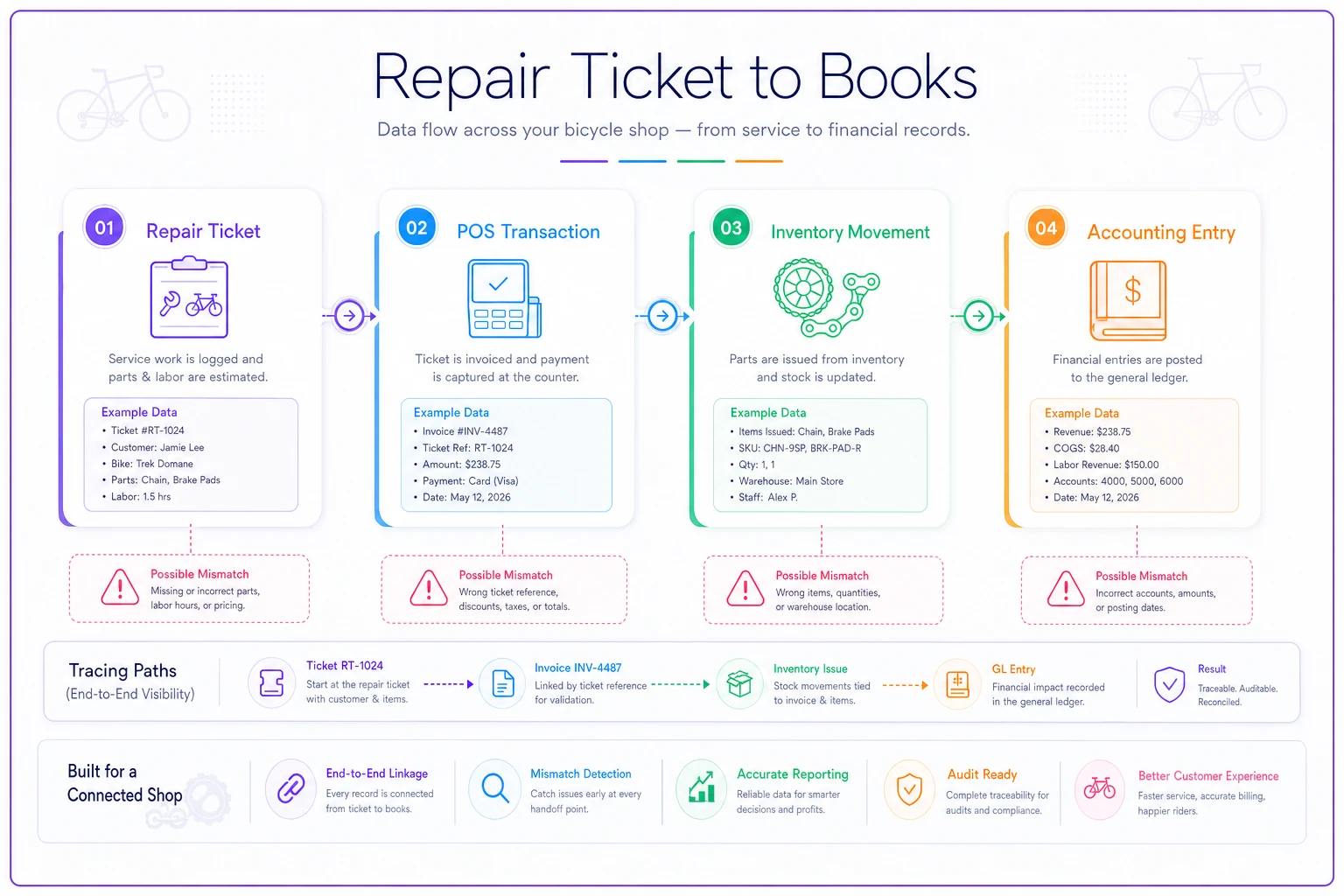
This visual shows the handoffs and the common points where mismatches appear in real shop workflows.
30/60/90 reconciliation cadence tied to operations
Traditional monthly reconciliation doesn't match bike shop rhythms. By the time you catch a problem, it's buried under hundreds of transactions. Tie your reconciliation cadence to your operational flow instead.
30-day cycle: High-velocity items Tubes, cables, chain lube, brake pads—anything that moves through service daily. These items generate the most transactions and the most recording errors. Check them monthly because the volume makes problems expensive fast.
Pull three numbers: POS sales quantity, inventory movement logs, and tickets showing these parts used. They should match within 5%. When they don't, the variance usually traces to one of three things: mechanics pulling parts without logging, front desk selling parts without tickets, or receiving errors where quantity received doesn't match what was entered.
60-day cycle: Serialized inventory and special orders Bikes, wheels, high-value components. These move slower but carry bigger financial impact. Every two months, match serial numbers between floor stock, POS inventory, and recent sales. Special orders should show clear paths from PO to receipt to sale or return.
90-day cycle: Full categorical alignment Every quarter, verify that your category totals align across all three systems. Service revenue in POS should match service revenue in accounting. Parts COGS should tie to inventory reduction. This isn't about individual transactions—it's about confirming your mapping logic works at scale.
| Cycle | Focus Area | Variance Threshold | Who Owns It |
|---|---|---|---|
| 30-day | High-velocity parts (tubes, pads, cables) | 5% | Parts manager |
| 60-day | Serialized inventory, special orders | Zero tolerance on bikes | Service manager |
| 90-day | Full category rollup across all systems | 2% on revenue, 5% on COGS | Bookkeeper + owner |
The quarterly check is where systematic issues surface. Maybe all warranty parts are posting to the wrong category. Perhaps refunds are creating orphaned inventory entries. These patterns only become visible when you look at categorical totals over time.
Remediation scripts for common sync failures
When mismatches surface, you need fast, consistent fixes. Random troubleshooting wastes hours and creates new problems. Build standard remediation scripts for your five most common sync failures.
Script 1: Phantom inventory (POS shows stock, shelf is empty)
-
Check recent tickets for the item logged under the wrong SKU or "misc parts"—around 60% of phantom inventory traces here.
-
Verify receiving records; sometimes items get received into the system but never make it to the floor.
-
Look for duplicate SKUs where the same item exists under multiple entries.
If none of these reveal the issue, adjust inventory to match physical reality and flag the item for daily counting for two weeks. This usually surfaces the procedural gap causing the mismatch.
Script 2: Orphaned transactions (ticket exists, no POS transaction)
-
Check for duplicate tickets—sometimes staff create a new ticket instead of reopening an existing one.
-
Verify payment status; the ticket might be complete but unpaid.
-
Look for tickets marked "warranty" or "internal" that shouldn't generate regular transactions.
For true orphans, create a balancing POS entry tagged for review. Don't delete the ticket—you need the service history intact.
Script 3: Category misalignment (parts revenue in service category)
-
Check the POS item setup first—many systems let you specify how bundled items split financially.
-
Then verify staff are using the right transaction types.
-
A "service with parts" transaction processes differently than a straight "parts sale."
Build a monthly exception report showing items appearing in unexpected categories. Fix the mapping rules, not just the individual transactions.
Script 4: Inventory cost mismatches
-
Identify which costing method each system uses, then build translation rules.
-
For most bike shops, forcing all systems to use the same costing method isn't realistic.
-
Track the variance and adjust quarterly.
For most bike shops, forcing all systems to use the same costing method isn't realistic. Track the variance and adjust quarterly. As long as it stays under 3%, you're fine.
Script 5: Payment reconciliation gaps
-
Credit card batches, split payments, and warranty claims create timing differences.
-
Money hits your bank before posting to accounting.
-
Warranty approvals lag transaction dates by weeks.
Build a standard three-day float window. Transactions within this window are "pending reconciliation." Only flag items outside this window as true mismatches requiring investigation.
Copy-paste reconciliation sheets designed for ticket-driven shops
Generic Excel templates don't match bike shop workflows. You need reconciliation sheets that mirror how work actually flows through your shop.
Daily Ticket Reconciliation Sheet Columns: Ticket #, Customer, Services Performed, Parts Used (SKU), Parts Quantity, Labor Hours, Payment Method, Tech Initials, Variance Flag. Each row represents one ticket. Your service writer completes this during ticket closeout—about 30 seconds per ticket. At day end, sum the columns and match against POS totals. Variances over $50 get investigated immediately. Everything else gets noted and reviewed weekly.
Weekly Parts Movement Tracker Structure: SKU | Starting Inventory (Monday) | Received | Sold (Retail) | Used (Service) | Adjustments | Ending Inventory (Sunday) | POS Ending Inventory | Variance. Focus on your top 20 moving parts. These typically represent around 70% of your parts transactions but only take 20 minutes to reconcile weekly. When these match, everything else usually follows.
Monthly Category Rollup Rows for each major category: Labor Revenue, Parts Revenue (Service), Parts Revenue (Retail), Bike Sales, Accessory Sales, Special Orders, Refunds/Returns. Three columns: POS Total | Accounting Total | Variance. Add a notes field for variance explanations. This single sheet becomes your monthly financial health check. It's not glamorous, but shops that run this consistently catch problems in days rather than quarters.
Building prevention into daily workflows
The best reconciliation is the one you never need to do. Once you've mapped your data flows and established catch routines, small workflow adjustments eliminate most mismatches before they occur.
Train mechanics to scan parts as they pull them, not after repairs. Sounds obvious, but this alone cuts inventory variance significantly in most shops. Mount scanners at workbench height. Create quick-pick lists for common items. Make the right process the easy process.
Require ticket review before payment. Your service writer should verify three things before processing: all parts are logged, labor categories are correct, totals match the quote. Takes 15 seconds and catches most data-entry errors before they hit your systems.
Build validation into receiving too. When parts arrive, count everything twice—once for receiving, once for put-away. Mark variances on the PO immediately. Don't assume you'll remember to fix it later, because you won't.
Create visual controls for special situations. Warranty parts get tagged with bright orange stickers. Special orders get customer name labels. Internal-use parts get logged to a shop supplies ticket. When everyone can see the exception, they handle it correctly.
Integration points where automation actually helps
Modern operational software handles the repetitive matching that burns hours weekly. Instead of manually comparing tickets to POS transactions, AI-powered platforms can spot variances as they occur—a repair ticket closing without corresponding inventory movement triggers an alert, or a payment posting without an attached ticket gets flagged before it becomes a quarterly headache.
The real value comes from pattern recognition over time. When the same SKU consistently creates mismatches, the system helps identify the root cause—maybe it's mapped wrong, maybe staff consistently use the wrong code, maybe the barcode is damaged. Instead of fixing individual transactions repeatedly, you fix the systematic issue once.
For multi-location shops or those with separate service centers, centralized data reconciliation matters a lot. Your downtown location might process different transaction types than your suburban store. AI-assisted platforms can maintain consistent mapping rules across locations while allowing for operational differences that are just part of running separate shops.
The integration should feel invisible to staff. Mechanics still write tickets their way. Service writers still process payments normally. But underneath, the system continuously validates data flows and catches mismatches before they compound. This isn't about replacing your existing systems—it's about connecting them so they work together instead of creating isolated silos that require manual reconciliation.
When quarterly books still don't balance
Sometimes you follow every process, run every reconciliation, and the numbers still don't tie. Before panicking, understand that perfect alignment is genuinely impossible in bike shops. You're dealing with thousands of small transactions, multiple staff members, and systems that weren't designed to talk to each other.
Set materiality thresholds. For most shops doing $400k–800k annually, variances under $500 per quarter are noise. Document them, look for patterns, but don't burn days chasing every $50 gap.
When variances exceed your threshold, start with categorical analysis—is the variance concentrated in service revenue? Parts inventory? Labor? That narrows where to focus. Then check for timing differences. Maybe December service revenue includes work completed but not invoiced until January. Perhaps a large parts order received on March 31 didn't post to accounting until April. These aren't errors—they're timing gaps that reverse themselves.
Look for duplicate transactions in your audit trail. Sometimes the same sale posts twice, the same inventory adjustment doubles up, or refunds process multiple times. Easier to spot when you know what you're looking for.
If variances persist after all this, consider whether the problem is structural. Your chart of accounts might not match operational reality. Maybe you're trying to track labor at a granularity your POS doesn't support. Sometimes the fix is adjusting your accounting structure to match what your systems can actually deliver, rather than forcing perfect alignment that isn't realistic.
The realistic data accuracy target
Perfect data sync is a myth. Even shops with solid systems and careful staff see variances. The goal isn't perfection—it's operational confidence. You should trust your numbers enough to make decisions without manually verifying everything.
For inventory accuracy, target 95% on high-movers, 90% on regular stock, 85% on slow-moving items. Your tube count might be off by a couple, but your $3,000 bike inventory should be dead accurate. Match effort to impact.
Revenue recognition should align within 2% monthly. If POS shows $47,000 in revenue and accounting shows $46,100, you're fine. The gap probably represents timing differences or rounding. Save the investigation for variances over 3%.
Cost of goods sold typically runs 3–5% variance in bike shops. This sounds high, but you're dealing with bundled services, warranty replacements, and shop supplies that don't always track cleanly. As long as the variance is consistent month-to-month, your margins are still reliable enough to use.
The practical litmus test: can you make purchasing decisions confident your inventory levels are roughly correct? Can you forecast cash flow knowing your revenue is properly tracked? Can you calculate real margins on service work? If yes, your sync is good enough. Shops that chase perfect reconciliation often sacrifice operational improvement for accounting precision—and that's a bad trade.
Moving from reactive fixes to proactive management
The shift from constantly fixing mismatches to preventing them requires changing how you think about data flow. Stop treating POS, inventory, and accounting as separate systems that occasionally need reconciliation. They're three views of the same operational reality.
Build daily habits that maintain sync. Morning counts of high-value items. Afternoon ticket reviews. End-of-day transaction matching. Five minutes here, ten minutes there—structured prevention beats marathon correction sessions every time.
Create accountability without overwhelming staff. Your service manager owns ticket accuracy. Your parts manager owns inventory counts. Your bookkeeper owns categorical mapping. When everyone owns a piece, the system self-corrects faster than any software can.
Bike shop POS inventory accounting sync is an operational challenge, not a technology problem. Better software helps, but success comes from building workflows that assume mistakes will happen and catch them before they cascade into something expensive.
Your shop's data will never be perfect. But it can be reliable enough to trust, accurate enough to base real decisions on, and clean enough that monthly books take hours instead of days. That's the realistic target—and it's what lets you focus on running your shop instead of constantly reconciling it.
Ready to revolutionize your bike shop operations?
Join hundreds of bike shops using Bicyclly to save time, increase revenue, and deliver exceptional customer service.