

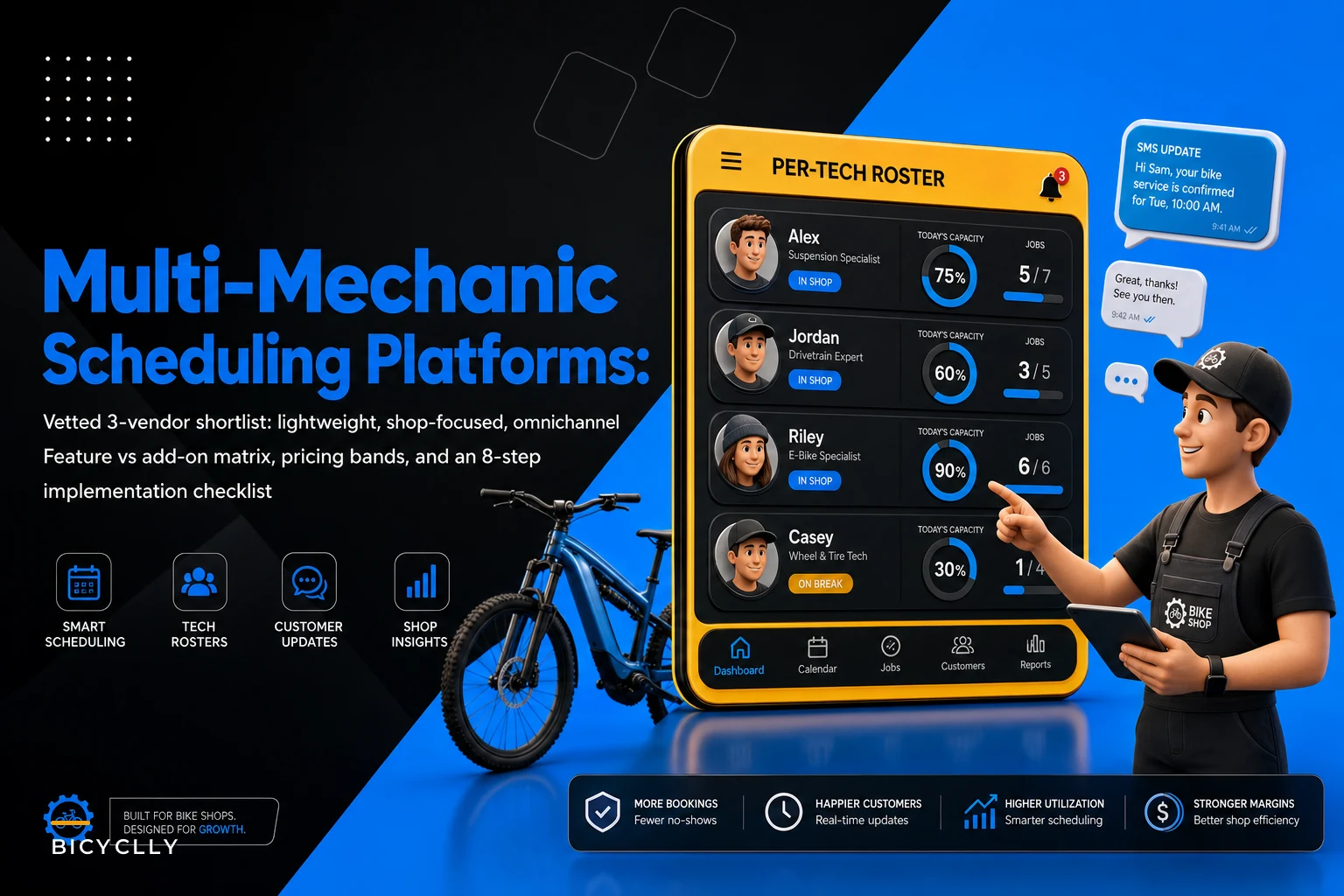

Most scheduling tools were built for hair salons, dentists, or solo service providers. They assume one person doing one thing at a time. The moment you have four mechanics — two who can do suspension overhauls and two who can't — plus a wheel-building queue that eats half a day, generic scheduling breaks down fast.
This guide skips the marketing-site feature lists and focuses on what actually matters when you're booking against tech capacity, not just open calendar slots. Three vendors, a feature-vs-vendor matrix you can use in an actual buying decision, rough pricing bands including the add-on costs people forget about, and an implementation checklist built around multi-mechanic workflows.
If you've already read Reduce Service No‑Shows: Layered Confirmation Sequences and Deposit Rules for Bike Shops, this is the companion piece — that article covered what confirmation sequences and deposit logic should look like. This one covers which platforms can actually execute them.
The core mismatch: calendar slots vs. tech capacity
Here's the problem almost every shop hits during peak season. A customer books a tune-up online. The system shows availability because the shop is open, not because a mechanic who can actually do tune-ups is free. By Saturday you've got six tune-ups stacked at 10am, one available bay, and two of your three wrenches tied up on warranty suspension work that isn't moving.
The scheduling tool did its job — it filled slots. But slots aren't the constraint. Mechanic-hours by skill tier are the constraint.
So the single most important question when evaluating multi-mechanic scheduling vendors isn't "does it do online booking." It's: can it book against per-tech or per-bay capacity, and can it respect that some jobs require specific skills?
Everything else — SMS confirmations, deposits, recurring bookings — is secondary to that. A gorgeous booking page that overbooks your suspension specialist is worse than a whiteboard.
What to actually evaluate (the six features that matter)
Before getting into vendor picks, here's the shortlist of features that separate a real multi-mechanic tool from a glorified calendar:
Never miss a sale or service appointment again.
Bicyclly helps you manage every sale, repair, and booking with ease and accuracy.
- Unified inventory and sales tracking
- Automated customer notifications
- Service appointment scheduling
No credit card required
-
Deposits at booking — native payment capture to reduce no-shows, not a bolt-on
-
Layered SMS + email confirmations with escalation — reminders that escalate to a phone-call queue when a customer goes silent
-
Per-tech / per-bay capacity OR pooled availability — the ability to model your actual constraint
-
Recurring bookings — for fleet accounts, race teams, delivery-bike contracts
-
Two-way SMS — customers reply to confirm or reschedule, and there's a real monthly message limit to watch
-
Multi-location / fleet support — shared or separate calendars, cross-location visibility
The trap is assuming all of these are "native." In practice, a lot of platforms fake half the list with connectors — a Zapier hop to a separate SMS provider, a third-party payment widget, a bolt-on for recurring billing. Connectors work until they don't, and when a confirmation fails silently at 7am on a Saturday, nobody's debugging a Zapier workflow.
Feature vs. Vendor Matrix
Three archetypes, mapped to the features above. Specific products change plans and pricing constantly, but these three profiles map cleanly to real products in the market.
| Feature | **Lightweight / Pay‑as‑you‑grow** | **Mid‑market / Shop‑focused** | **Enterprise / Omnichannel** |
|---|---|---|---|
| Deposits at booking | Native (basic, flat or %) | Native, per-service rules | Native, conditional by job value/customer |
| Layered SMS + email confirmations | Native email, SMS via add-on | Native both, basic escalation | Native both, full escalation + call queue routing |
| Escalation to call queue | Manual | Semi-automated (flags) | Automated queue with assignment |
| Per-tech / per-bay capacity | Pooled only | Per-tech and per-bay | Per-tech, per-bay, skill-tier routing |
| Recurring bookings | Limited / manual | Native | Native + contract/fleet terms |
| Two-way SMS | Add-on, ~500–1,000 msgs | Native, ~2,000–5,000 msgs incl. | Native, high/unmetered tiers |
| Multi-location / fleet | 1–2 locations | Multi-location native | Full fleet, cross-location visibility |
| Native vs. connectors | Several connectors needed | Mostly native, few connectors | Fully native stack |
A quick read on this table: the lightweight tier gets you booking and deposits cheaply but makes you build capacity logic through workarounds. The mid-market tier is where per-tech capacity becomes native — that's usually the sweet spot for a 3–6 mechanic shop. Enterprise only makes sense when you're running multiple locations or fleet contracts where the automation actually pays for the overhead.
Vendor 1 — The Lightweight, Pay‑as‑You‑Grow Pick
Best for: Single-location shops with 2–3 mechanics just moving off paper or phone booking, or shops testing online scheduling before committing to something heavier.
This tier covers your Square Appointments, Acuity, Calendly-type products — general scheduling tools with solid booking pages, native deposits, and clean mobile UX. Cheap, fast to set up, and your front desk will understand them in an afternoon.
Where they shine: Low commitment. You can be live in a day. Deposit capture is genuinely native, which cuts no-shows immediately. For a shop doing maybe 40–80 service bookings a week, this is often enough.
Where they fall short: Capacity modeling. Most of these treat availability as pooled — one calendar, slots open or closed. You can create separate "resources" to fake per-tech scheduling, but there's no skill-tier logic. A customer booking a wheel build and a customer booking a flat fix look identical to the system, even though one takes 20 minutes and one takes two hours.
Rough monthly pricing band: ~$20–$60/month per location for the base plan.
Expected add-ons: SMS is almost always extra — budget ~$10–$30/month for a message pack, often capped around 500–1,000 texts. Payment processing runs the usual ~2.6–2.9% + ~$0.10–$0.30 per transaction on deposits.
Use this to get off the phone and off the whiteboard, not to solve dispatch. When you start double-booking your skilled wrench during peak, you've outgrown it.
Vendor 2 — The Mid‑Market, Shop‑Focused Pick
Best for: Shops with 3–6 mechanics, mixed skill levels, and real bay constraints. This is where most growing shops should land.
These are purpose-built service-shop or field-service scheduling platforms — tools that model technicians and bays as separate capacity, let you tag services by required skill, and come with native two-way SMS and layered reminders. Think of the service-management platforms that started in auto repair or HVAC and adapted well to cycle service.
Where they shine: Per-tech and per-bay capacity is native, not faked. You can set a wheel build to only be bookable against mechanics flagged for it, and block the bay for the full duration. Confirmations are layered — email plus SMS — with basic escalation flags when a customer doesn't respond. Recurring bookings for fleet and team accounts work natively rather than through a billing workaround.
Where they fall short: Setup is heavier. You're configuring service types, durations, skill tags, and capacity rules up front. Budget a couple of weeks to get it dialed in, not an afternoon. The "omnichannel" side — unified customer records across retail POS, service, and marketing — is usually partial, so you may still need to connect it to your POS separately.
Rough monthly pricing band: ~$90–$250/month depending on seats and features.
Expected add-ons: Two-way SMS is often bundled (commonly ~2,000–5,000 messages included), with overage packs beyond that. Payment fees are similar to the lightweight tier. Some charge per-mechanic seat, so a five-wrench shop costs more than the headline number — check whether pricing is per-user or per-location before committing.
This tier earns its cost the first busy Saturday it doesn't overbook your suspension specialist. If capacity accuracy is the real pain, this is the pick.
Vendor 3 — The Enterprise / Omnichannel Pick
Best for: Multi-location operations, shops with meaningful fleet or B2B contracts (delivery bikes, rental fleets, corporate programs), or groups that need cross-location booking visibility.
These are full platforms — scheduling is one module inside a larger system that handles customer records, marketing automation, payment, and reporting across locations. The automation runs deep: conditional deposits based on job value or customer history, fully automated escalation queues that route silent-customer follow-ups to a named staffer, and skill-tier routing that assigns the right mechanic across any location.
Where they shine: Everything is native, so nothing breaks at the seams. If you run three stores and a fleet contract that needs the same five bikes serviced every two weeks across locations, this is the only tier that handles it cleanly. The escalation queue is the standout feature — it turns "nobody confirmed and we didn't notice" into a managed, assigned task list.
Where they fall short: Cost and complexity. You're paying for capabilities a single-location shop will never touch. Implementation takes real project management, and you'll likely need someone to own the system ongoing.
Rough monthly pricing band: ~$300–$800+/month, often with onboarding fees on top.
Expected add-ons: SMS usually sits in high or effectively unmetered tiers. Payment fees are negotiable at volume. Watch for per-location and per-seat multipliers that compound fast.
Don't buy this to look professional. Buy it when multi-location coordination or fleet contracts are actively costing you money through missed or misrouted bookings.
Mapping your workflows to product features
The parent no-show article laid out three core workflows. Here's how each maps to features you should test during a demo — not take on faith from a sales page.
-
1. Active confirmation (customer must affirmatively confirm, not just receive a reminder). Map to: two-way SMS where a reply updates booking status automatically. Test it live. Ask the rep to send you a confirmation text and reply "C" or "yes" — does the booking actually flip to confirmed in the dashboard, or does someone have to read the reply and update it manually? Lightweight tools usually fail this. Mid-market and enterprise generally pass.
-
2. Escalation queue (silent customers get chased before the slot is wasted). Map to: an escalation rule that, after a set number of hours with no response, flags the booking and ideally generates a call task assigned to a specific person. Lightweight = manual, someone scans for gaps. Mid-market = flags you can filter. Enterprise = assigned queue with routing. The question to ask in any demo: "When a customer doesn't confirm by T-minus-24-hours, what happens automatically?"
-
3. Reschedule friction ladder (easy to reschedule early, harder or deposit-protected close to the appointment). Map to: time-based rules on self-service rescheduling plus deposit forfeiture logic. Can the customer reschedule freely at 72 hours out but lose the deposit inside 24 hours? Few lightweight tools do this. Mid-market sometimes. Enterprise reliably. This is the feature that actually protects your Saturday.
The workflow below shows how a booking moves from initial request through confirmation, escalation, and resolution — which is the sequence you're configuring when you set up any of these platforms.
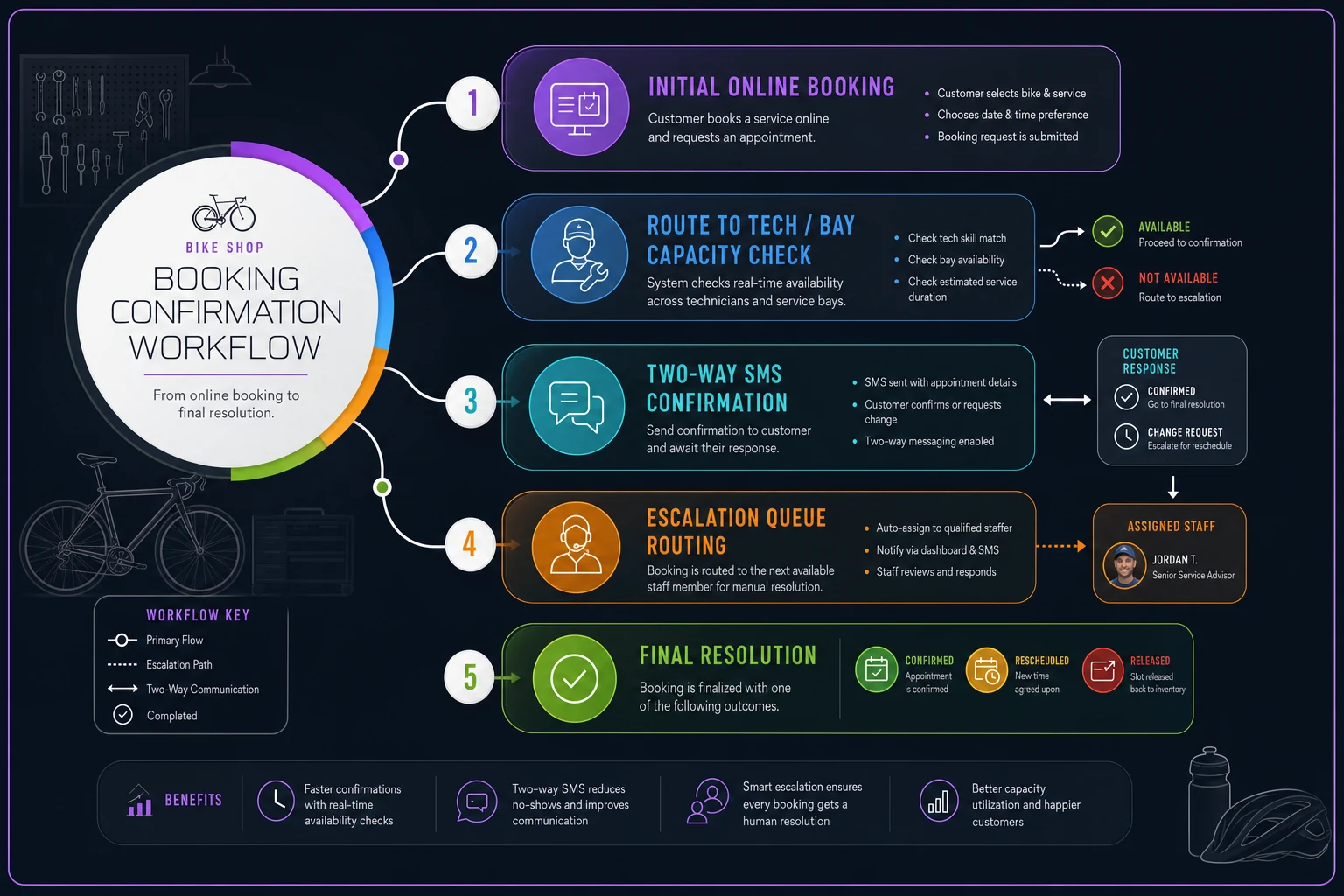
Understanding where each tool intervenes in that sequence is the fastest way to cut through vendor demos.
Suggested confirmation and deposit message templates
Keep these short. Long confirmation texts get ignored, and every character costs SMS budget. Two-way means the reply has to be dead simple.
> Hi {name} — your {service} is booked for {date} at {time} with {shop}. A ${deposit} deposit is held and applies to your final bill. Reply C to confirm or R to reschedule.
> {name}, we haven't heard back on your {service} tomorrow at {time}. Reply C to keep it or R to reschedule — unconfirmed slots may be released. — {shop}
> {name}, your {time} slot tomorrow isn't confirmed yet. We'll release it to the waitlist at 5pm today unless you reply C. Need a different time? Reply R.
> {name}, quick confirm for your {service} tomorrow at {time}? Reply C and you're all set — or R and we'll find a better time. Thanks!
Run A against B for a few weeks specifically on the escalation message. Loss-framed ("we'll release it") typically pulls a higher confirm rate but slightly more annoyed replies. Convenience-framed is softer but confirms a touch slower. Pick based on how much your waitlist pressure justifies urgency. Measure confirm rate within 2 hours and no-show rate — not open rate.
8‑Step Implementation Checklist (multi‑mechanic specific)
Do these in order. Skipping straight to "turn on online booking" is how shops end up overbooked in week one.
-
1. Map your real constraint first. Document each mechanic's skill tiers (flat/basic, drivetrain, suspension, wheel builds, e-bike diagnostics) and your bay count. This is the spine everything hangs on.
-
2. Build service types with honest durations. A tune-up that really takes 90 minutes should be blocked for 90, not 60. Padding reality is how you get the 10am pileup.
-
3. Tag services to skill tiers and assign capacity. Configure which services route to which mechanics, and whether a bay is required. This is the step that actually prevents overbooking your specialist.
-
4. Set deposit rules by job type. Flat repair? Maybe no deposit. Suspension overhaul with ordered parts? Deposit required. Tie it to job value and parts commitment.
-
5. Build the layered confirmation sequence. Email at booking, SMS reminder at T-48h, escalation SMS at T-24h. Configure what a customer reply actually triggers. Reference the full sequencing logic in the no-show confirmation guide.
-
6. Configure the escalation queue and assign an owner. Decide who works the "unconfirmed inside 24h" list each day, and at what time. A queue nobody owns is just a filter.
-
7. Set the reschedule friction ladder. Free rescheduling until 24 hours out, deposit-protected inside that window. Test it as a customer before you go live.
-
8. Soft-launch on one service type. Turn on online booking for basic tune-ups only for two weeks. Watch for capacity errors, SMS delivery failures, and confirmation flow gaps before opening everything up.
Test two-way SMS and the reschedule flow with a real phone number during the soft-launch.
Work through all eight before you open booking to the public. Shops that skip to step 8 and circle back are the ones that spend the first month firefighting overbooking problems that were entirely avoidable.
Staffing the escalation and exception queue
A tool can flag silent customers and generate call tasks, but someone still has to make the calls and handle the messes automation can't — the customer who shows up a day early, the warranty job that blew past its estimate, the fleet account that wants six bikes moved to next week.
What works in practice: assign the escalation queue to one named person per shift — usually the service writer or a front-desk lead — with a fixed daily window to clear it, say 2–3pm, working the next day's unconfirmed list. This matters because escalation calls have a decay window. A customer you call at 2pm the day before can still rearrange their schedule. A call the morning of accomplishes nothing but a verbal no-show.
For exceptions, designate a single decision-maker who can waive a deposit, bump a job's priority, or override capacity. Don't spread this authority across every counter person — you'll get inconsistent decisions and deposit leakage. One owner, clear rules, logged overrides.
A rough guideline: a shop doing around 300–400 monthly service bookings generates maybe 15–30 escalation touches per week during peak. That's not a full role — it's 30–45 focused minutes a day for one person, if the tool surfaces the queue cleanly. If you're spending hours chasing confirmations, the tool isn't doing its job and you should revisit steps 5 and 6 of the checklist above.
When each tier is the wrong choice
Don't buy lightweight if your real problem is overbooking skilled mechanics. It can't model capacity and no amount of configuration fully fixes that.
Don't buy mid-market if you're a solo or two-person shop doing low volume — you'll pay for per-tech capacity logic you don't need, and the setup time won't pay back.
Don't buy enterprise if you run a single location without fleet contracts. You're buying multi-location coordination you'll never use, plus the implementation overhead that comes with it. That money is better spent on an extra mechanic.
Real scenario: a 4‑mechanic shop moving up a tier
A single-location shop running four wrenches — two generalists, one suspension and e-bike specialist, one part-time wheel builder — was on a lightweight pooled-calendar tool. During spring peak they were booking roughly 70–90 service jobs a week. The problem: the pooled calendar kept stacking suspension and e-bike bookings on days the specialist was already full, because the system saw "open shop hours," not "specialist-hours remaining."
The visible symptom was turnaround times slipping and a steady trickle of no-shows on unconfirmed bookings. Deposits weren't being collected on higher-value jobs, so a no-show on a suspension overhaul cost a wasted half-day bay slot with nothing to show for it.
They moved to a mid-market shop-focused platform, spent about two weeks on setup — skill tags, durations, deposit rules, confirmation sequence — and soft-launched on tune-ups first. After roughly a season, the specialist-overbooking problem effectively stopped. Bookings routed to actual available skill capacity. No-shows on deposit-required jobs dropped sharply because the deposit plus layered confirmations did the filtering. Monthly cost went from around $40 to roughly $180 all-in with SMS, but the recovered bay time and reduced no-shows on high-value jobs covered that several times over.
The lesson isn't "spend more." It's that they were already paying — in wasted specialist hours — for a capacity problem the cheaper tool simply couldn't see.
How to actually decide
Run your shop through three questions, in order:
-
1. Is overbooking skilled mechanics costing me real time? If yes, you need native per-tech capacity — skip lightweight, start at mid-market.
-
2. Do I run multiple locations or recurring fleet contracts? If yes, the enterprise tier's coordination earns its cost. If no, it doesn't.
-
3. Is my main problem just no-shows and phone-tag booking, with one or two mechanics? Lightweight plus native deposits will fix most of it cheaply.
Don't let a feature matrix seduce you into buying up a tier.
The right pick is the cheapest one that models your actual constraint — which, for most multi-mechanic shops, is skilled-mechanic-hours, not open calendar slots. Match the tool to that, wire up the confirmation and escalation flow properly, and give one person clear ownership of the exception queue. That combination does more for your Saturday than any feature on a comparison chart.
Ready to revolutionize your bike shop operations?
Join hundreds of bike shops using Bicyclly to save time, increase revenue, and deliver exceptional customer service.