



Switching shop software feels like it should be straightforward. It never is. You've got open repair tickets with parts on order, a layaway bike someone's paying off in installments, six years of customer history, and an accounting system that's finally reconciled. The fear isn't picking the wrong platform — it's the cutover weekend where something breaks and you spend your busiest day explaining to a customer why their deposit isn't showing up.
So this isn't a buyer's guide. It's a migration plan. The assumption is you've already picked a system, or you're close, and now you need to actually move onto it without torching your service queue or your books. Sixty days is the right window — long enough to test properly, short enough that your team doesn't lose momentum or end up running two systems indefinitely.
Why bike shop software migration goes sideways
The migrations that fail don't fail at cutover. They fail weeks earlier, in the quiet decisions nobody wrote down.
The most common one: treating data export as a copy-paste job. Your old POS has customers, your scheduling tool has customers, and your email marketing list has a third version. Nobody deduplicates them, so you import 4,200 customer records and end up with 5,800 in the new system, half of them ghosts. Three weeks later, a mechanic searches for "Dave Hansen" and gets four Daves — none with the service history attached to the bike he's holding.
The second failure is underestimating open-transaction state. A clean export handles completed sales fine. It usually mangles the in-flight stuff — partial deposits, work orders with parts allocated but not yet billed, store credit balances, warranty claims mid-process. Those are exactly the records that create angry customers when they go wrong, because they involve money the customer has already handed you.
Third: no rollback plan. Teams get so focused on going live that nobody defines what "this isn't working, pull the plug" actually looks like. By the time they admit the new system is a mess, the ability to go back cleanly is already gone.
The whole point of a 60-day window is to surface these three problems before they touch a paying customer.
The 60-day timeline at a glance
Here's the shape of the whole thing before we go deep on each phase.
Never miss a sale or service appointment again.
Bicyclly helps you manage every sale, repair, and booking with ease and accuracy.
- Unified inventory and sales tracking
- Automated customer notifications
- Service appointment scheduling
No credit card required
| Phase | Days | Core focus | Success gate |
|---|---|---|---|
| Finalize & scope | 1–7 | Lock vendor, sign SLA, assign owners | Contract signed, RACI agreed |
| Data audit | 8–18 | Export, clean, map every record type | Mapping sheet approved, dupes resolved |
| Sandbox build | 19–32 | Configure new system, test import | Full import runs clean twice |
| Parallel testing | 33–46 | Run both systems, train staff | Staff pass test scenarios |
| Cutover prep | 47–54 | Freeze, final sync, rehearse | Dry-run cutover completed |
| Go-live & stabilize | 55–60 | Switch, monitor, close gaps | SLAs held, books reconcile |
The gates matter more than the dates. If your data audit isn't done by day 18, you don't start building the sandbox. Slipping a gate is a signal, not a failure — pushing cutover a week is far cheaper than going live on broken data.
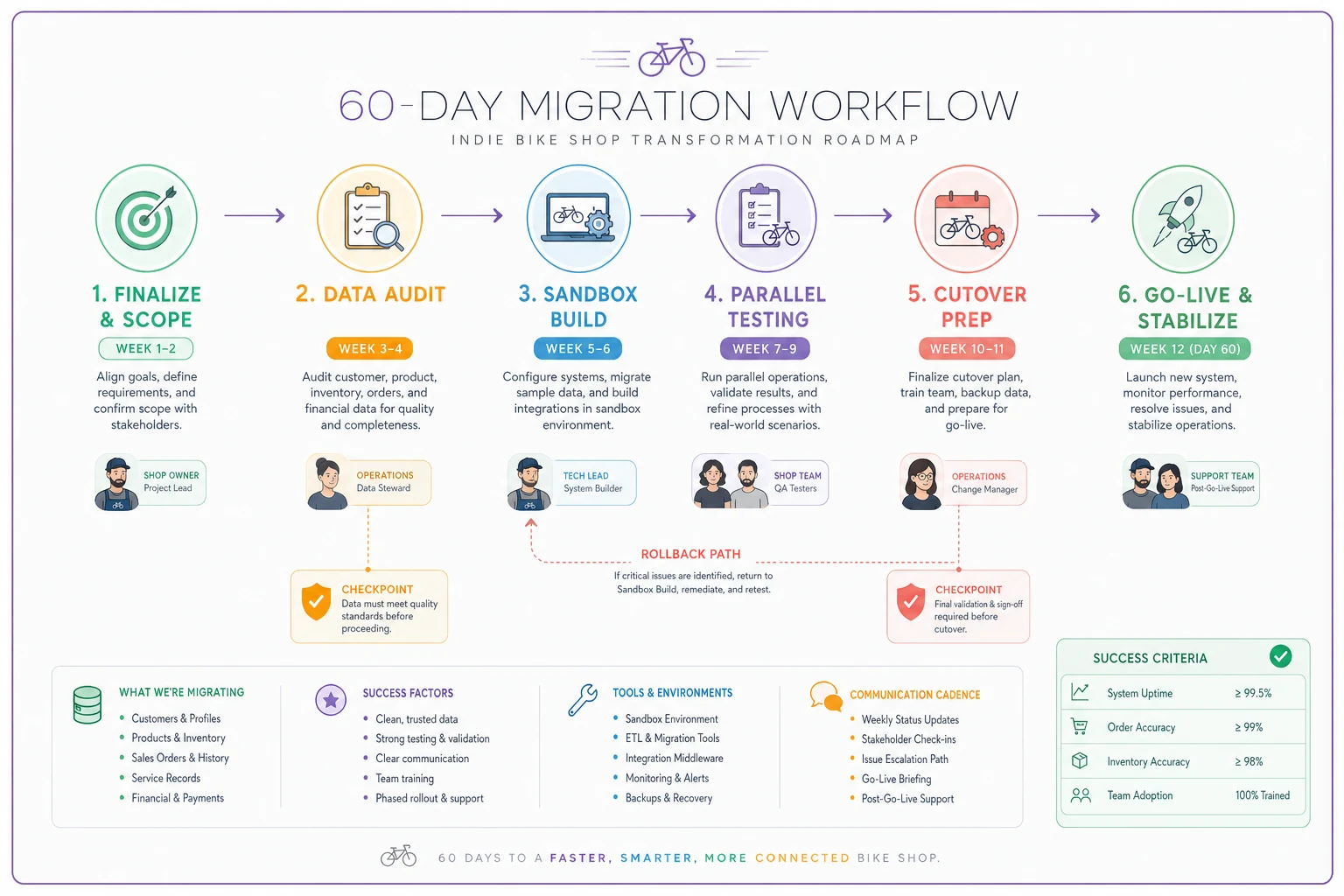
This sketch helps teams rehearse the flow and spot gate dependencies.
Days 1–7: Lock the scope and assign real owners
Before anyone touches an export file, nail down who owns what. Migrations stall when "the shop" is responsible for a task, because "the shop" is three people who all assume someone else is handling it.
-
Migration lead — usually the owner or GM. Owns the timeline, makes the go/no-go call.
-
Data owner — whoever knows the current system best, often your lead service writer or bookkeeper. Owns exports and mapping.
-
Floor tester — a mechanic who'll actually stress-test the service workflow.
-
Vendor contact — your named person on the software side, not a generic support queue.
Here's a realistic estimated-hours RACI for a four-person shop:
| Task | Migration lead | Data owner | Floor tester | Vendor |
|---|---|---|---|---|
| Contract & SLA review | 4h (A/R) | 1h (C) | — | 2h (R) |
| Data export & cleanup | 2h (A) | 14h (R) | — | 3h (C) |
| Field mapping | 3h (A) | 8h (R) | 1h (C) | 4h (C) |
| Sandbox config | 2h (A) | 4h (C) | 3h (R) | 10h (R) |
| Training sessions | 3h (A) | 3h (C) | 6h (R) | 4h (R) |
| Cutover weekend | 6h (A/R) | 5h (R) | 4h (R) | On-call (R) |
That's roughly 40–50 hours of owner/lead time spread across two months — around two to three hours a week until the final stretch. Shops that treat this as a weekend project are the ones still running parallel systems four months later.
While the contract's in front of you, pin down the SLA details that protect your service desk. We'll get to that.
Days 8–18: The data audit nobody wants to do
This phase decides whether your migration is boring or a disaster. Boring is the goal.
-
POS / sales history — transactions, line items, tax, payment type, discounts.
-
Inventory — SKUs, cost, retail, on-hand quantity, supplier, category, serial-tracked items (bikes).
-
Bookings / work orders — including open ones, scheduled dates, assigned mechanic, parts allocated.
-
Customers — contact info, bike/asset records, service history, store credit, notes.
-
Accounting — chart of accounts, tax rates, outstanding AR/AP, deposits held.
For each one, build a simple three-column mapping sheet: old field → new field → notes/transform. A typical row looks like:
old: cust_phone (format: 555.123.4567) → new: phone (format: 5551234567) → strip dots, drop leading 1
That sounds tedious because it is. But phone and email formatting mismatches are the single most common reason your SMS confirmations and review requests silently fail after go-live. If you've put effort into tightening your customer lifecycle and retention systems, a broken contact field quietly kills the entire automated follow-up chain.
Deduplicate before you import, not after. Sort customers by phone, then by email, then by last name. Merge the obvious pairs. For a shop with around 5,000 customer records, expect to find somewhere between 8% and 15% duplicates or dead records. Clearing them now is an hour of work. Clearing them after they've scattered across live service history is a weekend.
One thing most shops miss: your serial-tracked bikes and your component-level inventory often need different mapping logic. A $2,800 e-bike with a serial number, a warranty, and a registered owner is not the same record type as a box of brake pads, even if your old system crammed them into one table. Flag serialized items early so they land in the right place.
Days 19–32: Build and test in a sandbox
Never import into your live new system first. Build a sandbox or test environment, run the import there, and break it on purpose.
-
Record counts. Did 4,310 customers go in and 4,310 come out? If the numbers don't match exactly, find out why before moving on.
-
Spot-check the messy ones. Pull ten customers with long service histories, three open work orders, two store-credit balances, and your five highest-value serialized bikes. Confirm every field landed correctly.
-
Money totals. Your total inventory valuation and outstanding AR should match the old system within rounding. A gap means a mapping error in cost or quantity fields.
Run the import at least twice. The first run always surfaces problems; the second run proves you actually fixed them instead of hand-patching the data. If your inventory valuation keeps drifting between imports, that's usually a cost-field or units-of-measure mismatch — the same class of quiet, systematic problem that shows up in inventory shrink investigations, invisible until you count.
This is also where the AI-assisted side of modern platforms earns its keep — quietly. A decent system will flag likely duplicate customers, suggest category mappings for unmatched SKUs, and surface records that don't fit expected patterns: the serialized bike sitting in the accessories bucket, the work order with a part allocated but no price. It's not magic; it's pattern-matching that saves your data owner from eyeballing 5,000 rows. Use it to narrow the review, then have a human confirm the exceptions.
Days 33–46: Parallel testing and staff training
Now you run both systems side by side on a slice of real work. Not everything — pick a controlled sample so a mistake doesn't hurt anyone.
A practical approach: process every new service booking in both systems for two weeks while sales stay on the old one. Service is where the complexity lives — scheduling, parts allocation, status updates, the customer handoff — so test it hardest. Your floor tester runs a real tune-up ticket end to end in the new system: book it, allocate parts, update status, add a line for a surprise worn cassette, take payment, close it. If any step takes three extra clicks or hides a field the mechanic needs, you want to know now, not on a Saturday.
-
Week 1 of parallel two 45-minute sessions — basic navigation and ringing a sale.
-
Week 2 two sessions on service workflow and booking management.
-
Mid-week drop-ins 15 minutes on the floor answering real questions as they come up.
Training that happens in one four-hour block the day before go-live is why shops have brutal first Saturdays. People forget. Spacing it out and letting staff practice on the sandbox is what makes the new system feel normal by the time it's the only system.
Have each staff member pass a short scenario checklist before you'll authorize go-live:
-
[ ] Ring a sale with a split payment (card + store credit)
-
[ ] Create a work order and allocate parts
-
[ ] Look up a returning customer and their bike history
-
[ ] Process a deposit on a special-order bike
-
[ ] Issue a refund or store credit
-
[ ] Close a ticket and trigger the customer confirmation
If someone can't do all six smoothly, they need more reps — not a live Saturday to figure it out.
Protecting service SLAs through the switch
This part gets ignored and costs the most. Your service desk has promises baked in — turnaround times, deposit handling, pickup notifications. The migration must not break those, because a dropped confirmation text or a lost deposit turns into a one-star review fast.
Freeze new special-orders and layaways 48 hours before cutover. Anything involving money held over time is the riskiest record to migrate mid-flight. Pause new ones, finish what you can, and migrate the rest as a clean, hand-verified batch.
Keep a paper or spreadsheet shadow log of open tickets across cutover weekend. Every open work order gets listed: customer, bike, status, parts on order, deposit held. If the digital version hiccups, you can still tell a customer exactly where their bike is. This single habit has saved more go-live weekends than any software feature.
Keep a paper or spreadsheet shadow log of open tickets across cutover weekend.
Test your confirmation and reminder flows explicitly. Before go-live, send yourself test confirmations and reminders through the new system using real phone and email formats from your migrated data. If those fire correctly, your no-show prevention survives the switch. If they don't, you've caught it on a Tuesday instead of losing bays to no-shows on Saturday.
Don't cut over before a known demand spike. Avoid the first warm spring Saturday, a race weekend, or the kind of sudden booking surge that follows external cost pressure — the type of demand swing that hits during fuel and freight cost spikes. Pick a genuinely slow window. A boring Tuesday go-live beats a heroic Saturday one every single time.
Days 47–54: Cutover prep and the dry run
A week out, rehearse the actual switch. The dry run is where you find the thing nobody thought of.
Your cutover prep checklist:
-
[ ] Final data freeze scheduled and communicated to staff
-
[ ] Last incremental export/import tested in sandbox
-
[ ] Open work orders reconciled and shadow-logged
-
[ ] Deposits and store credits verified record-by-record
-
[ ] Payment processing tested with a live $1 transaction
-
[ ] Receipt printer, label printer, barcode scanner all confirmed working
-
[ ] Staff schedules set so your strongest people work go-live day
-
[ ] Vendor support confirmed on-call for the window
-
[ ] Rollback trigger and process written down
That last one is non-negotiable. Define in writing what makes you abort: payments not processing, inventory counts wildly off, service tickets not saving. And define how you'd roll back — which means keeping the old system fully intact and read-only, not canceled, for at least 30 days after go-live. Don't let the old vendor shut your account the day you switch.
Days 55–60: Go live, then stabilize
Go-live day isn't the finish line — the week after is. Expect a performance dip; that's normal. The goal is a dip, not a crater.
Plan for roughly 20–30% slower transactions on day one as people hunt for buttons. Staff the floor accordingly. Keep the shadow log running for the first few days. Have the migration lead on the floor, not in the office, catching problems in real time.
Each evening that first week, run three quick checks: did the day's sales total match between what you rang and what the system reports, did every open work order save correctly, and did confirmation messages go out. Fifteen minutes of nightly reconciliation catches drift before it becomes a month-end nightmare.
By day 60, you want three things true: service SLAs held through the transition, your books reconcile against the old system's final numbers, and your team isn't asking to go back. Once all three hold for a full week, you can plan to decommission the old system — read-only archive first, full shutdown later.
A real scenario: a two-bay shop moving mid-season
A two-mechanic shop running around 330 service tickets a month had outgrown a POS that didn't track parts allocation. Their first instinct was to switch over a single weekend in April — peak tune-up season. That's the version that goes wrong.
Instead they ran the 60-day plan starting in late winter. The data audit turned up roughly 600 duplicate or dead customer records out of about 4,800 — mostly old email-list imports with no service history attached. Cleaning those before import meant mechanics stopped pulling up three versions of the same regular.
Parallel testing caught the real landmine: their old system stored deposits as a note on the work order, not as a tracked balance. Twelve open special-order deposits, totaling a few thousand dollars, would have disappeared in a straight export. They hand-migrated those as verified records. On a naive copy-paste migration, that's twelve angry customers and a reputation hit during the busiest month of the year.
Go-live landed on a slow Tuesday. The first Saturday ran maybe 15% slower than usual — annoying, not damaging — and by week two throughput was back to normal with better parts tracking than before. No lost deposits, no reconciliation gap at month-end. The whole thing cost the owner roughly 45 hours spread across two months. Compared to a botched April weekend eating into peak revenue, that's the cheapest possible version of a painful project.
The one thing to get right
The migration lives or dies in the data audit and the rollback plan, not the go-live.
Everything else is scheduling.
Clean your records before you import, hand-verify anything involving money a customer has already paid, keep the old system alive as a safety net, and never cut over the weekend before you need every bay running.
Done this way, switching platforms stops being the scary project you keep postponing and becomes what it should be — a boring, well-rehearsed Tuesday where the hardest decision is which slow afternoon to pick.
Clean your records before you import, hand-verify anything involving money a customer has already paid, keep the old system alive as a safety net, and never cut over the weekend before you need every bay running. Done this way, switching platforms stops being the scary project you keep postponing and becomes what it should be — a boring, well-rehearsed Tuesday where the hardest decision is which slow afternoon to pick.
Ready to revolutionize your bike shop operations?
Join hundreds of bike shops using Bicyclly to save time, increase revenue, and deliver exceptional customer service.