

Most bike shop owners don't go looking for software when things are running fine. They go looking after a painful stretch — a repair ticket got lost between the counter and the bench, inventory drifted so far that Shimano reorders became guesswork, or the accountant spent three billable hours reconciling POS deposits that didn't match the bank. By that point the decision is emotional, and emotional software buying is how shops end up locked into a two-year contract with a platform nobody actually uses.
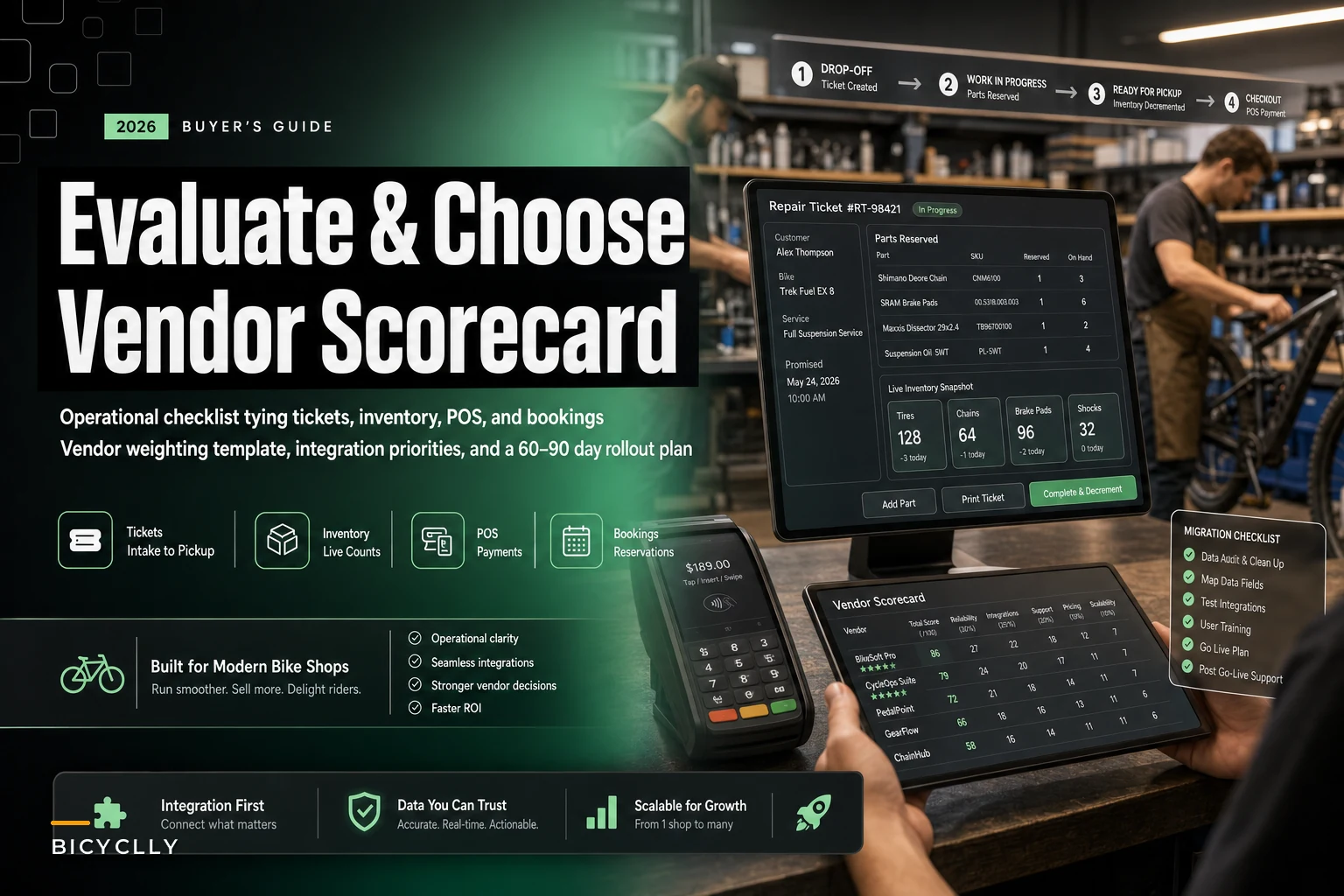
This guide skips the vendor feature lists — which all look identical in a sales deck — and starts with your operations instead. It translates real workflow problems into a feature checklist, gives you a weighted scorecard you can fill in yourself, and ends with a 60–90 day rollout. The goal is a ranked shortlist, not a bookmark folder of demo links you'll never open.
Start From Your Workflow, Not the Feature List
The single biggest mistake in evaluating bicycle shop software is comparing feature checkboxes. Every platform claims POS, repair ticketing, inventory, and CRM. On paper they all tie. The difference shows up in how those modules actually talk to each other during a busy Saturday.
The test that matters: walk one repair from intake to pickup and ask where the data lives at each step.
A workflow that exposes weak software goes something like this. A customer drops off a gravel bike for a drivetrain replacement. The service writer creates a ticket, but the parts aren't reserved against inventory — they're typed into a notes field. The mechanic pulls a cassette and chain off the wall. Nobody decrements stock. Two days later the POS still shows those parts as available, so the counter sells the last cassette to a walk-in. Now the original ticket is stuck, the customer gets a delay call, and your on-hand count was wrong the entire time.
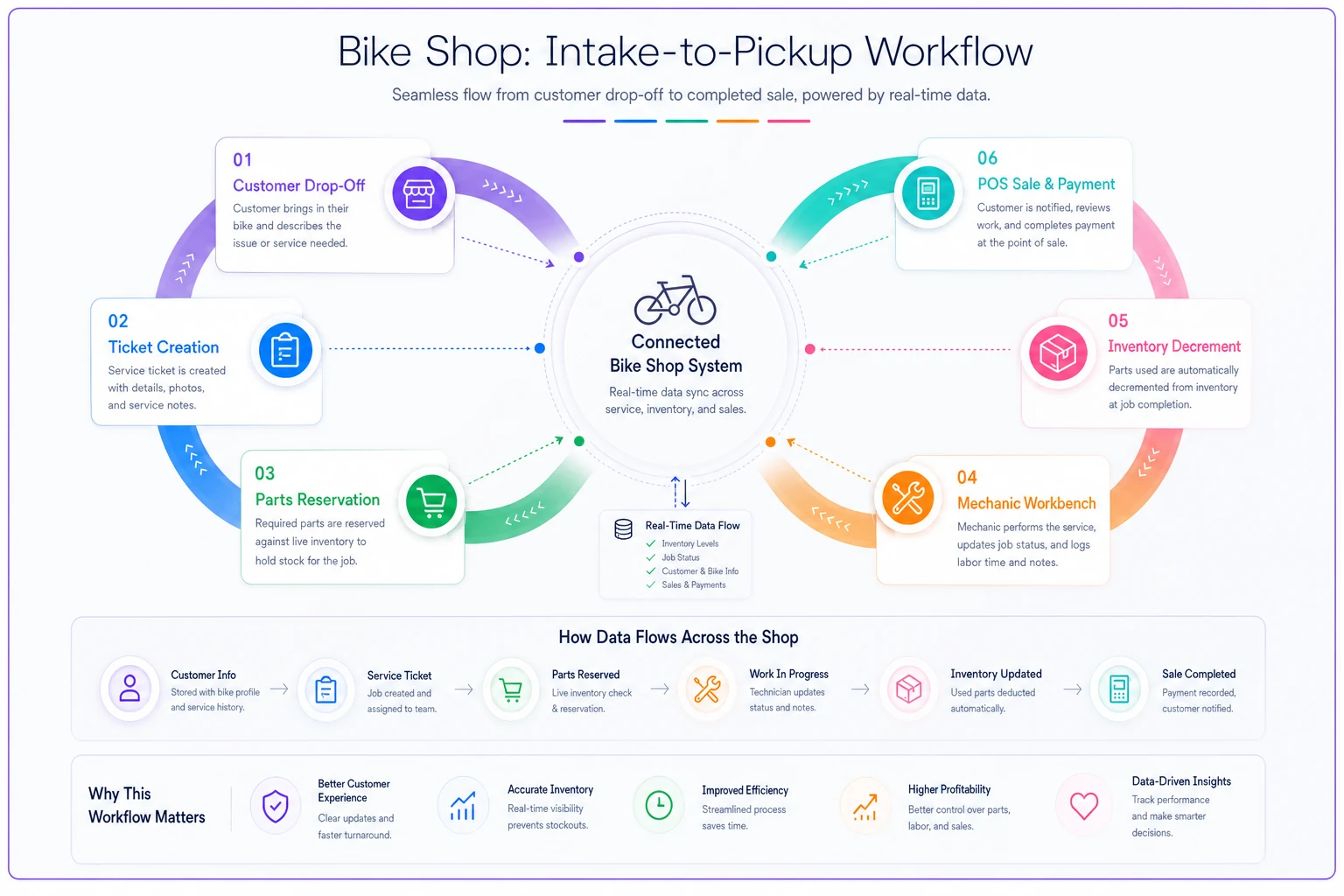
Here's a quick visual of the intake-to-pickup flow.
Good software kills that failure by making the repair ticket consume inventory in real time — reserving parts at intake, decrementing at job completion, flagging when a reserved part drops below reorder point. That's not something you'll see demoed unless you ask for it directly. Write down your three ugliest recurring workflow breakdowns and make every vendor walk through them live.
The Prioritized Feature Checklist
Not all features carry equal weight. Below is a prioritized checklist grouped by how much operational pain each area removes for a typical retail-plus-service shop. Treat the "Must-have" tier as disqualifiers — if a vendor fumbles these, the rest doesn't matter.
Never miss a sale or service appointment again.
Bicyclly helps you manage every sale, repair, and booking with ease and accuracy.
- Unified inventory and sales tracking
- Automated customer notifications
- Service appointment scheduling
No credit card required
Tier 1 — Must-have (disqualify if weak)
-
POS with integrated repair ticketing (one system, not two synced apps)
-
Parts reserved against live inventory from the ticket, decremented at completion
-
Serialized inventory tracking for bikes (frame numbers, not just SKUs)
-
Repair ticket status visible to the whole floor and to the customer
-
Accurate end-of-day totals that reconcile to your payment processor deposits
-
Role-based permissions (a seasonal hire shouldn't be able to void sales or edit cost)
Tier 2 — Strongly preferred
-
Appointment/booking tied to mechanic availability and bay capacity
-
Customer history
past repairs, bikes owned, parts installed, warranty dates
-
Purchase order creation with supplier catalogs and landed-cost tracking
-
Labor time templates for standard jobs (tune, overhaul, brake bleed)
-
Reporting
margin by category, service vs. retail contribution, dead-stock aging
Tier 3 — Multi-location controls (only if you have or plan 2+ stores)
-
Per-location inventory with inter-store transfer tracking
-
Centralized pricing with location-level overrides
-
Consolidated reporting that still breaks out by store
-
Ability to route a repair or part request between locations
Tier 4 — Nice-to-have
-
Built-in marketing/review requests
-
Loyalty or membership plan management
-
E-commerce sync for click-and-collect
A shop that has already built out its service pricing structure gets a lot more out of Tier 2's labor templates, because the time estimates and parts lists already exist. If you haven't done that yet, the work in a 3-tier cycle service menu maps almost directly onto how you'll configure service jobs in any decent platform. Doing it before setup makes configuration faster and quotes more consistent.
Integration Priorities: What Actually Has to Connect
Integrations are where shops get burned, because the sales rep says "yes, we integrate with that" — and technically they do, via a nightly CSV export you have to trigger by hand. "Integrates" and "integrates in real time without manual steps" are two different products.
Rank integrations in this order:
-
Payment processor — must be native or deeply embedded. If card transactions don't flow directly into the sale record, daily reconciliation becomes a manual matching chore. Non-negotiable.
-
Accounting (QuickBooks/Xero) — you want sales, COGS, and deposits syncing on a schedule you control. Ask specifically whether it posts summary journal entries or line-item detail, and whether returns and voids sync correctly.
-
Supplier/parts catalogs — catalog import for your main distributors (QBP, Hawley, etc.) saves enormous SKU-entry time and keeps costs current. Ask how often catalog pricing updates and whether it overwrites your retail prices.
-
E-commerce — only critical if you sell online or do click-and-collect. Confirm inventory is a single source of truth, not two systems you reconcile separately.
The integration that quietly causes the most accounting pain is the POS-to-accounting link. When deposits, fees, and refunds don't map cleanly, month-end close turns into forensic work.
The One-Page Vendor Scorecard
Here's the part most guides skip: how to actually decide. A scorecard forces you to weight what matters to your shop before you fall for a slick interface. Score each vendor 1–5 in each category, multiply by the weight, and total.
| Category | Weight | Vendor A (1–5) | Vendor B (1–5) | Vendor C (1–5) |
|---|---|---|---|---|
| Repair ticketing + live parts reservation | 20% | |||
| POS reliability + daily reconciliation | 15% | |||
| Inventory accuracy (serialized + reorder) | 15% | |||
| Payment + accounting integration quality | 15% | |||
| Ease of daily use (counter + bench) | 10% | |||
| Reporting that drives decisions | 8% | |||
| Multi-location controls (if applicable) | 7% | |||
| Support responsiveness + onboarding | 5% | |||
| Pricing fit vs. value | 5% | |||
| Total | 100% |
A few rules that keep the scorecard honest:
-
Score during live demos, not after. Memory inflates the pretty UI and forgets the clunky inventory screen.
-
Have at least two people score independently — one from the counter, one from the bench. Their gaps tell you where the real risk is.
-
Set weights before you see any vendors. If you're single-location, move that 7% into inventory or usability. Setting weights after demos lets bias creep in.
If a vendor scores high on reporting but the two must-have categories — ticketing and POS reconciliation — are 3s, it loses. Weighting is what stops a feature-rich-but-operationally-weak platform from winning on a technicality.
Pricing Models: What You're Actually Paying For
Software pricing in this space hides a lot of its real cost. Sticker price is rarely the full number. Below is how the common models actually behave for a working shop.
| Model | How it's priced | Best fit | Watch out for |
|---|---|---|---|
| SaaS, per-location | Flat monthly per store | Single or small multi-location | Overage fees, add-on modules priced separately |
| SaaS, per-terminal | Monthly per register/device | Shops with one or two checkout points | Costs balloon fast as you add bench terminals |
| SaaS, per-user | Monthly per login | Small teams | Seasonal hires inflate cost; shared logins become a security mess |
| On-premise license | One-time + annual maintenance | Shops wary of monthly fees, stable needs | You own backups, updates, and hardware failures |
| Transaction % | Cut of payment volume | Very low-volume shops | Scales against you in your busy season |
For most indie shops, SaaS per-location is the cleanest model — predictable, and it doesn't punish you for adding a second register during peak. Per-terminal looks cheap on a one-register demo and then surprises you when you add a service-desk checkout.
The real cost math has to include the stuff that isn't on the pricing page: payment processing rate (sometimes bundled and marked up), onboarding and data-migration fees, catalog integration fees, and support tiers. A platform at roughly $150/month with a baked-in processing rate that's half a point higher than your current one can quietly cost more than a $250/month platform with pass-through processing, once you run it against annual card volume.
Because cash isn't flat across the year, line the monthly commitment up against your real seasonal curve. Locking into an annual contract right before your slow quarter hurts. The logic in a 6-month rolling cash-flow plan helps you time the start date and choose monthly vs. annual billing so the spend lands when revenue can carry it.
Migration and Data-Mapping Checklist
This is the step that turns a good software choice into a bad launch.
Before you migrate anything, run a data audit. Garbage SKUs, duplicate customer records, and phantom stock should die in the old system, not carry forward. If your on-hand numbers are already suspect, it's worth working through the inventory shrink forensics playbook first so you're migrating numbers you actually trust.
-
Export and audit customer records. Dedupe by phone/email. Decide what historical fields you actually need — repair history is worth keeping, a 2016 email bounce isn't.
-
Clean the SKU list. Kill dead SKUs, standardize naming, confirm cost and category on active items. This is also your chance to fix the category structure your margin reports depend on.
-
Do a physical count before cutover. Whatever you migrate becomes the baseline. A fresh count means the new system starts honest.
-
Map every field, explicitly. Old field → new field. Costs, serial numbers, supplier codes, tax classes. Ask the vendor for their import template early and map against it, not after.
-
Migrate open repair tickets and layaways separately and carefully. These are in-flight commitments; a dropped open ticket is a lost customer.
-
Run parallel for a week or two if you can. Overlapping old and new systems during a quiet stretch catches mapping errors before they hit a real sale.
-
Reconcile day one. Match the first day's sales and deposits end-to-end before you trust the pipe.
Dirty data migrated as-is means you've paid to move your mess into a nicer box. The counts you were ignoring become the counts the new system reports — and now they're "official."
Red Flags to Walk Away From
Some warning signs show up before you ever sign.
-
"We'll build that for you" for a core feature. Custom promises during sales rarely ship on time, and you're now a captive beta tester.
-
No sandbox or trial. If you can't put your own hands on it with real-ish data, you're buying blind.
-
Vague on data export. If getting your data out is hard, that's by design. Ask exactly how you'd export inventory and customer history if you left tomorrow.
-
Payment processing locked to one provider with no rate transparency. This is often where the real margin gets taken.
-
Support only by email ticket. A frozen register on Saturday afternoon can't wait for a 24-hour response window. Ask for the actual average response time, not the SLA.
-
Pricing that requires a call for every number. Opacity now predicts opacity later.
-
A roadmap used to answer current-feature questions. "That's coming in Q3" means it doesn't exist today, and roadmaps slip.
Treat these as near-automatic disqualifiers:
A Realistic Example
A two-location shop — one storefront doing heavy service, a smaller satellite focused on retail — was running a general-purpose POS alongside a whiteboard-and-spreadsheet repair system. On-hand inventory accuracy sat somewhere around 70–75%, meaning roughly a quarter of reorders were guesses. Month-end reconciliation took the bookkeeper close to half a day because POS deposits never cleanly matched the bank.
They ran the scorecard above across three vendors. The flashiest option — best reporting dashboards — lost because it scored a 3 on live parts reservation and a 2 on multi-location transfers. The winner wasn't the prettiest platform. It just nailed the two must-have categories and had native payment reconciliation.
After migration — which included a full recount and killing around 400 dead SKUs — inventory accuracy climbed into the low 90s within a couple of months, mostly because tickets finally consumed parts automatically. Reconciliation dropped from half a day to under an hour. Nothing dramatic happened to revenue overnight. Fewer stalled repairs and a bookkeeper who stopped dreading month-end — that's the realistic outcome. Not a revenue explosion, just recovered hours and counts you can actually trust.
When This Whole Process Makes Sense — and When It Doesn't
When a full platform switch is worth it: you're running two or more disconnected systems, inventory accuracy is low enough that reorders are guesses, reconciliation eats hours every month, or you're adding a location and your current setup can't handle multi-store inventory. These are structural problems that better software genuinely fixes.
When it's a bad idea: if your real problem is that nobody's using the system you already have. New software doesn't fix a discipline problem — it just resets the learning curve and hides the issue behind a migration. Fix the process first, then decide if the tool is actually the bottleneck.
Who should slow down: a single-location shop doing solid numbers on a stable, paid-off system with no real pain points. "Everyone's on the cloud now" is not a reason to migrate. Churn has real costs — staff retraining, a dip in checkout speed during the learning curve, and migration risk. Don't buy a solution to a problem you don't have.
The 60–90 Day Rollout Plan
Once you've picked a platform, the launch window decides whether the software actually sticks.
Days 1–15 — Prep. Finalize the contract. Get the import templates. Start data cleanup: dedupe customers, kill dead SKUs, standardize categories. Schedule the cutover for your slowest stretch of the week — never a Saturday.
Days 16–40 — Configure and migrate. Load cleaned data. Build service job templates with labor times and parts lists. Set up roles and permissions. Connect payment and accounting. Do a physical count right before you flip the switch. Run parallel if your volume allows.
Days 41–60 — Go live with training. Train the counter and bench separately — their workflows differ. Keep a cheat sheet at every station for the first couple of weeks. Reconcile every single day for the first two weeks; catch mapping errors while they're still small.
Train the counter and bench separately — their workflows differ.
Days 61–90 — Tighten. Review your first full month of reports for accuracy. Fix category mappings that produce weird margin numbers. Collect counter and bench pain points and send them to the vendor as a batch. Confirm your reorder points and inventory counts are holding.
The shops that get this right treat it as an operations project, not an IT purchase. You're not buying features — you're buying a system that has to survive a busy Saturday, a seasonal hire, and a month-end close. Build your scorecard around that reality, migrate clean data, launch in your slow season, and you'll end up with a tool the whole shop actually uses — which is the only version of this that pays off.
Ready to revolutionize your bike shop operations?
Join hundreds of bike shops using Bicyclly to save time, increase revenue, and deliver exceptional customer service.