

Most shops pick their software for the wrong reason. They watch a slick demo, fall in love with one feature — usually the appointment calendar or a pretty POS screen — and sign a two‑year contract before anyone asks the boring questions. Six months later the parts catalog doesn't sync, serial tracking lives in a spreadsheet, and the accountant is manually re‑keying sales every month.
This guide is built to prevent that. It's structured as a decision process: what to actually require, how to pressure‑test vendors, how to price the real cost (not the sticker price), and how to move your shop onto a new system over 90 days without torching your service queue in peak season. If you've already read our broader checklist and vendor scorecard approach for shop operations, treat this as the hands‑on buying companion.
Start With Your Transaction Types, Not the Feature List
Every vendor's feature list looks roughly identical on paper. The differentiator isn't whether they "have" inventory — it's whether their data model matches how your shop actually makes money.
-
Walk‑in repair drop‑off (open ticket, parts + labor, pickup later)
-
Scheduled service appointment with a deposit
-
Retail sale of a complete bike (serialized)
-
Accessory and parts sale (non‑serialized)
-
Rental (hourly, daily, or multi‑day with a damage hold)
-
Warranty claim tied to an original purchase
-
Online order for pickup or shipping
-
Trade‑in or used bike intake
Now the real test: can one system handle all of those and connect them? Cheaper bicycle software almost always falls apart at the seam between service and retail. A customer books a tune‑up online, the mechanic finds a cracked derailleur hanger, you sell the part off the same ticket, and the whole thing needs to land in your books as one clean transaction. Systems built as "scheduling apps first" or "retail POS first" tend to fake the other half.
One pattern worth watching: if a vendor's repair ticket can't pull parts directly from live inventory and decrement stock the moment you add them to a job, you'll be double‑entering everything. That single gap quietly adds hours of admin per week and is the root cause of most of the POS‑vs‑inventory mismatches shops complain about.
The Must‑Have Feature Set (and the Sharp Questions Behind Each)
Here's the feature list that matters, framed as the question you should actually ask the vendor — not the checkbox they'll happily tick.
Never miss a sale or service appointment again.
Bicyclly helps you manage every sale, repair, and booking with ease and accuracy.
- Unified inventory and sales tracking
- Automated customer notifications
- Service appointment scheduling
No credit card required
Repair ticketing. Can a ticket hold multiple labor lines, multiple mechanics, parts pulled from stock, customer‑approved add‑ons, and a status history? Ask: "Show me a ticket where the customer approved an upsell by text mid‑repair." If they can't demo that flow, it doesn't exist.
Inventory & serial tracking. Serial capture on complete bikes is non‑negotiable for warranty, theft recovery, and recalls. Ask whether serials are a first‑class field — searchable, tied to the customer and the sale — or just a free‑text note. Free‑text is a red flag.
Appointments & capacity. Does the calendar understand mechanic skills and bay capacity, or is it just time slots? A booking engine that lets you overbook your only suspension tech is worse than a paper book.
Rentals. Separate rate tables, availability calendar, damage deposits, and the ability to convert a rental into a sale. A lot of "bike shop" systems bolt rentals on badly.
POS. Fast tendering, split payments, layaway, gift cards, and — critically — the ability to ring a mixed cart of serialized bike + parts + labor in one transaction.
E‑commerce. Real‑time inventory sync both directions. The failure mode is overselling: a part sells in‑store, the website doesn't update, and now you've promised stock you don't have.
| Feature area | Baseline (acceptable) | What actually separates good from great |
|---|---|---|
| Repair ticketing | Open/close ticket, labor + parts lines | Customer text approvals, multi‑mechanic time, status automation |
| Inventory | SKU counts, manual adjust | Serial tracking, kit/bundle support, supplier catalog import |
| Appointments | Time‑slot calendar | Skill/bay‑aware scheduling, deposit capture, no‑show rules |
| Rentals | Basic reservation | Damage holds, availability sync, rental‑to‑sale conversion |
| POS | Card + cash tendering | Mixed serialized/non‑serialized carts, layaway, offline mode |
| E‑commerce | Product listings | Two‑way live inventory, pickup workflow, ship‑from‑store |
The baseline column is table stakes. Vendors who only clear that bar are fine for a one‑bay shop and painful for anyone running service as a real profit center.
Integrations: The Part Everyone Underestimates
The integration layer is where total cost of ownership actually hides. A system can be cheap and still cost you $8k–$12k a year in labor if it won't talk to your other tools.
-
Payments. Is the processor built‑in, or do you bring your own? Built‑in is simpler but can mean worse rates. Ask for the effective rate including all fees on a $2,500 bike sale — not the headline percentage.
-
Accounting. Does it push a proper daily summary to QuickBooks or Xero — sales, tax, payments, COGS — or does it dump raw transactions your bookkeeper has to untangle? The daily‑summary approach is what keeps month‑end sane.
-
Parts & supplier catalogs. Can you import distributor catalogs (QBP, Hawley, etc.) so you're not hand‑keying SKUs and prices? This is a massive time saver and a common gap in generic retail POS systems repurposed for bikes.
-
Booking engine / website. If online booking and online sales live in two disconnected tools, you'll have two calendars and two inventory counts that drift apart within a week.
A realistic trap: a vendor says they "integrate with QuickBooks." Push on how. There's a real difference between a native, reconciled daily sync and a nightly CSV export you have to import manually. One keeps your books clean; the other recreates the exact problem you were trying to escape.
Pricing Models: Read Past the Monthly Number
Bicycle software is usually sold one of three ways, and the cheapest monthly fee is rarely the cheapest system.
-
Flat SaaS subscription — a fixed monthly or annual fee, sometimes tiered by location or register count. Predictable, good for budgeting.
-
Payments‑subsidized — low or no software fee, but you must use their payment processing, where they make their margin on your card volume.
-
Per‑seat / per‑module — base platform plus add‑ons for e‑commerce, rentals, extra users.
Run the math on your own volume. A "free software, 2.9% + 30¢" model sounds great until you process $600k a year in card sales — that's over $17k in processing, and a flat $300/month system with 2.5% processing would've saved you real money.
Watch for these cost landmines:
-
Onboarding / data migration fees ($500–$5,000 depending on how messy your current data is)
-
Per‑user charges that bite when you staff up for the season
-
Hardware you're forced to buy (proprietary card readers, printers)
-
Early‑termination clauses on multi‑year contracts
-
Charges for API access or extra integrations
When you staff up seasonally, per‑seat pricing can quietly spike — something to model against your hiring and labor plan before you commit.
A Weighted Evaluation Matrix You Can Actually Use
Scoring vendors on a 1–5 scale across equally‑weighted features is how shops end up choosing the wrong tool. A great rental module can't compensate for broken accounting sync if rentals are 10% of your revenue. Weight the categories to your shop.
| Category | Suggested weight | Score (1–5) | Weighted |
|---|---|---|---|
| Repair/service workflow | 25% | — | — |
| Inventory & serial tracking | 20% | — | — |
| Accounting integration | 15% | — | — |
| POS speed & reliability | 15% | — | — |
| Appointments/scheduling | 10% | — | — |
| E‑commerce sync | 8% | — | — |
| Rentals | 4% | — | — |
| Support & onboarding | 3% | — | — |
Adjust the weights as a team before you see any demos. Otherwise whichever demo is flashiest will quietly warp your scoring after the fact. A service‑heavy shop might push repair workflow to 30%. A rental‑dependent beach‑town shop flips rentals way up. Getting the weights right is the honest part of the process — the scores come later.
A Demo Script That Exposes the Weak Spots
Vendors control the demo by default. Take it back by sending them a script in advance and asking them to run your scenarios live, not their canned tour. Here's a tight one:
-
"A customer books a Saturday tune‑up online and pays a $20 deposit. Show me that landing on the calendar and assigned to a specific mechanic."
-
"During the repair, the mechanic finds a worn chain. Add the part to the ticket, pull it from inventory, and text the customer for approval."
-
"Customer approves. Close the ticket, take payment for the balance, and show me the deposit applied correctly."
-
"Now show me that same sale in the accounting export — sales, tax, and COGS."
-
"Pull up this bike by serial number and show the full service and purchase history."
-
"Sell a part in‑store and show the website inventory count drop within a minute."
-
"Run your month‑end service revenue and parts margin report."
If a vendor stumbles on steps 2, 4, or 6, you have your answer. Those are the exact seams where real shops lose hours every week. Also pay attention to who's driving — if it takes a specialist sales engineer ten minutes to do what your Saturday staffer needs to do in thirty seconds, that UI is too slow for a busy counter.
Build a Simple ROI Model Before You Sign
You don't need a fancy spreadsheet. Four lines and honest inputs.
Costs (annual): software subscription + payment processing + onboarding (amortized over 2 years) + hardware + any integration fees.
Savings/gains (annual): Admin time recovered — if the right system saves your front desk around 5 hours a week at roughly $20/hour, that's about $5,200 a year. Reduced overselling and stockouts mean fewer "sorry, we're actually out" moments and lost sales. Captured upsells add up fast if text‑based approvals lift parts attach on even 1 in 10 repairs. And fewer booking errors once deposit rules are enforced is money you were already leaving on the table.
Shops that actually run these numbers usually find the decision isn't about cost versus savings. It's that the cheaper system has a hidden $6k–$10k/year admin tax baked into its broken integrations. Model it honestly and the "expensive" option often wins.
The 90‑Day Migration Playbook
Rushing a migration into April is how shops end up running two systems in parallel during their busiest month. Plan backward from your slow season.
Days 1–30 — Clean and map.
Your data is the long pole. Export current inventory, customers, and open tickets. Dedupe SKUs, kill dead stock you don't want to carry forward, and standardize categories. Decide your master‑SKU rules now. Migrating messy data just moves the mess into a more expensive container.
-
Assign one person as data owner
-
Clean the SKU list (this is usually the ugliest job)
-
Map payment, tax, and accounting categories
-
Document your current workflows so you can rebuild them intentionally
Days 31–60 — Configure and parallel‑test.
Load catalogs, set up service menus and labor rates, configure the scheduling calendar with real mechanic skills and bays, and connect accounting. Then run a handful of real transactions through both systems and reconcile. This is where you catch the tax‑code mismatch before it corrupts three months of books.
Days 61–90 — Train, go live, stabilize.
Train in the order people actually work: front‑counter checkout first, then ticket creation, then reporting for managers. Go live on a Monday in a slower week — not a Saturday before a holiday. Keep the old system read‑only for 60 days so you can look things up without being tempted to keep using it.
-
[ ] All staff have logins and practiced a full transaction
-
[ ] Printers, drawers, and card readers tested on the counter
-
[ ] Opening inventory counts verified against the new system
-
[ ] A cheat sheet taped near each register for the first two weeks
-
[ ] Daily reconciliation run every night of week one
-
[ ] One person designated to log every bug or quirk for the vendor
The checklist sounds basic. But skipping even one item — usually the daily reconciliation — is how small discrepancies compound into a messy first month that takes your bookkeeper twice as long to unwind.
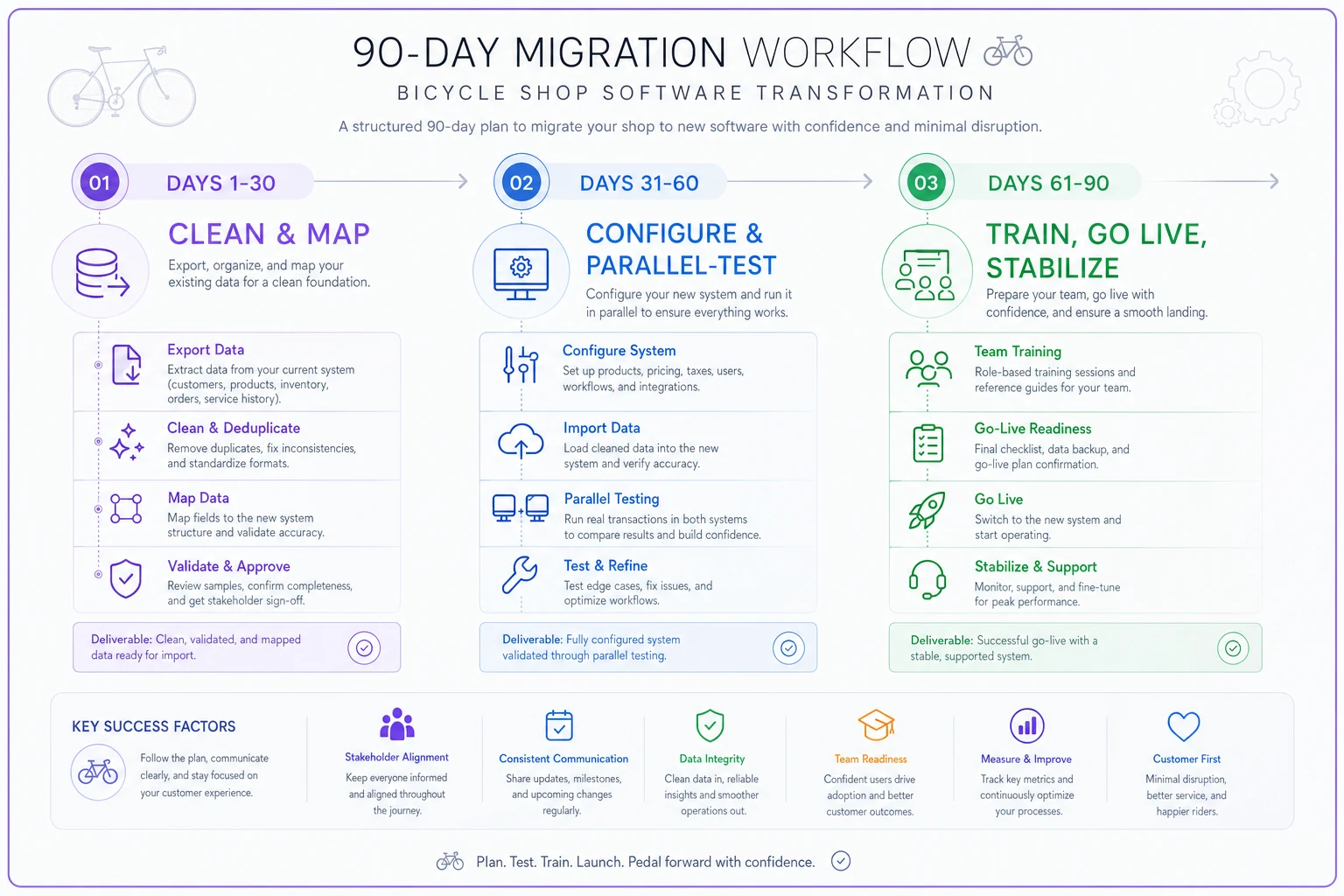
This visual outlines the 90‑day migration stages and key checkpoints for each period.
Vendor Questions Most Shops Forget to Ask
Beyond features, these questions tell you who you're actually signing up with:
-
"What happens to my data if I leave? Can I export everything, including service history and serials?"
-
"What's your actual support response time during a Saturday rush, and is support included or extra?"
-
"How often do you ship updates, and can you break my workflow without warning?"
-
"Who owns the payment relationship if there's a chargeback dispute?"
-
"Can I run two locations on one back‑end with shared inventory visibility?"
-
"What's the total first‑year cost including onboarding and hardware — in writing?"
Data portability is the one people skip and regret most. If getting your own history out requires a support ticket and a week of waiting, you're not a customer — you're a hostage. Ask the question directly and watch how comfortable the sales rep looks answering it.
Post‑Launch KPIs to Watch for the First Quarter
The point of new bicycle software isn't that it's new. It's that it should move numbers. Track these for 90 days after go‑live:
-
Service ticket turnaround time — should hold steady or improve once staff are fluent.
-
Parts attach rate per repair — the clearest sign your upsell approval flow is working.
-
Inventory accuracy — spot‑count a sample weekly; variance should shrink.
-
Admin hours per week — the whole point; it should drop.
-
Online‑to‑in‑store oversell incidents — should approach zero.
-
Month‑end close time — if your bookkeeper's job got easier, the accounting sync is real.
If turnaround time and admin hours both got worse 60 days in and staff aren't just still learning, that's not a training problem. It's a fit problem, and it's cheaper to admit it at day 60 than at year two.
Where Modern Tools Quietly Help
Once the fundamentals are solid, the systems worth paying for are the ones that remove repetitive decisions — suggesting reorder points based on actual repair‑ticket history, flagging a serial under recall before the customer rolls out, drafting the "your bike's ready" text so your counter staff aren't typing the same message forty times a day. That kind of automation isn't the reason to buy a system; it's the payoff after you've chosen one whose data model actually fits your shop.
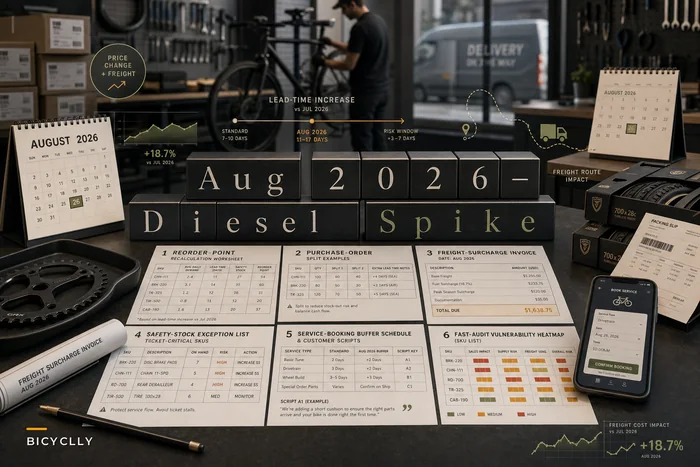
During volatile stretches — say, a sudden freight or diesel spike rippling into parts costs — a platform that surfaces reorder and margin signals early earns its keep fast. When your cost base shifts suddenly, the last thing you want is to find out three weeks later because the data was spread across two disconnected tools.
Bottom Line on Choosing
The shops that pick well don't pick the prettiest demo. They write down their real transactions, weight what matters before they look, send vendors a scenario script instead of watching the sales tour, model the true multi‑year cost, and migrate in the slow season with clean data.
Do those five things and the right bicycle software stops being a gamble and becomes what it's supposed to be — the quiet backbone that lets you spend your day fixing bikes and selling them, not re‑keying transactions at 9pm.
Do those five things and the right bicycle software stops being a gamble and becomes what it's supposed to be — the quiet backbone that lets you spend your day fixing bikes and selling them, not re‑keying transactions at 9pm.
Ready to revolutionize your bike shop operations?
Join hundreds of bike shops using Bicyclly to save time, increase revenue, and deliver exceptional customer service.