

Most shops don't switch software because their old system stopped working. They switch because they finally counted the hours lost to workarounds — the spreadsheet shadowing the POS, the whiteboard shadowing the booking calendar, the mechanic texting the front desk to ask if a part came in. By the time an owner starts shopping for bicycle software, the real cost isn't the monthly subscription. It's the year spent tolerating a tool that didn't fit.
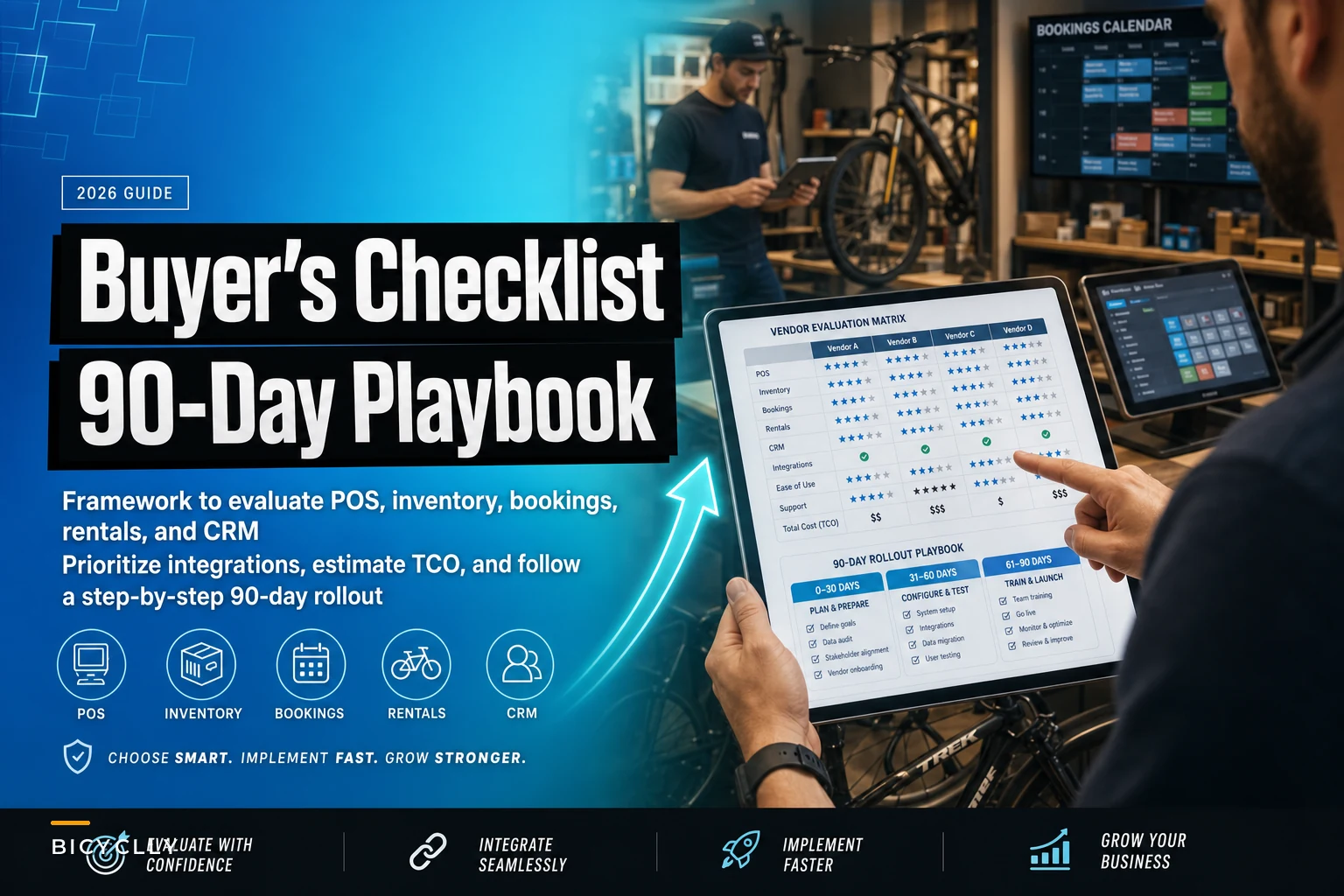
This guide is about not repeating that. Not the sales-demo version where everything looks smooth, but the messy middle: how to compare vendors honestly, what to actually ask, how to estimate full cost, and how to roll it out over 90 days without torching a busy season.
Start With the Jobs, Not the Feature List
Every vendor demo is designed to make you fall in love with features. The problem is that features don't run your shop — workflows do. Before you look at a single product, write down the five or six things your shop does most often and how many times a day each happens.
A typical independent shop's daily reality: 20–40 POS transactions, a dozen or so service check-ins, three or four phone calls asking "is my bike ready," a handful of special-order lookups, and one frustrating moment where inventory says you have a part you can't find. If software makes even three of those smoother, it's earning its keep. If it makes the flashy stuff — loyalty tiers, fancy dashboards — beautiful but the check-in clunky, you'll hate it by week two.
Have whoever runs your front counter and your lead mechanic each list their three biggest daily annoyances with the current system.
Shops tend to over-index on reporting during evaluation and under-index on the twenty-times-a-day interactions. Reports get looked at monthly. The service check-in screen gets used until your staff's fingers memorize it. Weight your evaluation accordingly.
One useful exercise: have whoever runs your front counter and your lead mechanic each list their three biggest daily annoyances with the current system. Those six items become your real spec. Everything else is negotiable.
What Actually Matters: A Category-by-Category Breakdown
Bicycle software usually bundles POS, inventory, service booking, rentals, and CRM, but the depth in each varies wildly. A tool can have a gorgeous POS and a service module that feels like an afterthought. Break it apart:
Never miss a sale or service appointment again.
Bicyclly helps you manage every sale, repair, and booking with ease and accuracy.
- Unified inventory and sales tracking
- Automated customer notifications
- Service appointment scheduling
No credit card required
POS and payments — Speed and offline behavior matter more than anything. Ask what happens when the internet drops mid-Saturday. Some cloud systems simply stop; others queue transactions locally. In a shop doing forty sales on a busy weekend, a fifteen-minute outage with no offline mode is real lost revenue and a line out the door.
Inventory — The make-or-break question is how it handles serialized items (bikes) versus bulk SKUs (tubes, cables, chain lube) versus kits. Shops that run tight kitting for common jobs need the software to decrement components correctly when a kit is sold or consumed on a ticket. If it can't, your counts drift within weeks. Getting this right upstream also makes loss investigations far cleaner — the kind of work covered in Inventory Shrink Forensics: A Lightweight Investigation Playbook for Bike Shops depends entirely on trustworthy counts.
Service booking — Look for the ability to attach a labor estimate, a parts list, and a promised-ready date to a single ticket, and to update the customer without re-typing everything. The shops that struggle most have booking living in one place and the repair ticket in another.
Rentals — Often the weakest module in generalist tools. If rentals are more than 10% of your revenue, evaluate this as if it were a separate product: deposit handling, damage tracking, availability calendars, and per-unit utilization reporting.
CRM — For most shops this means service history tied to the customer and the bike, plus the ability to trigger a follow-up. You don't need marketing-automation sophistication. You need to know that the guy who bought the $6,000 gravel bike is due for his 30-day check-in.
The mistake shops make here is buying for the module they're excited about instead of the module they use most. Rentals are fun to imagine. Service check-in is what you'll do 3,000 times a year.
A Vendor Evaluation Matrix You Can Actually Fill In
Score each vendor 1–5 in these categories, then weight them by how central each is to your business. Don't average blindly — a 5 in reporting doesn't rescue a 2 in service workflow.
| Category | What to test in the demo | Weight (adjust to your shop) |
|---|---|---|
| Service check-in speed | Time yourself creating a full ticket with parts + labor | High |
| Inventory accuracy (kits/serialized) | Sell a kit, confirm components decrement | High |
| POS speed + offline mode | Ask what happens during an outage | High |
| Reporting you'll actually use | Can you pull margin by category in under a minute? | Medium |
| Rentals (if applicable) | Book, return, assess damage, check utilization | Varies |
| CRM / follow-up triggers | Can it flag a service-due customer automatically? | Medium |
| Integrations (accounting, suppliers) | Confirm your specific tools are supported | High |
| Support responsiveness | Email support during the trial, time the reply | Medium |
| Data export / ownership | Can you export everything, anytime, in usable format? | High |
That last row gets skipped constantly and it's the one that bites hardest. If you can't cleanly export your data, you're not a customer — you're a hostage. Test the export during your trial, not when you're trying to leave.
Integrations: Decide the Order Before You Sign
The integrations that matter aren't the longest logo list — they're the two or three connections that eliminate double entry in your shop specifically. For most independents that's accounting (so you're not re-keying sales), your main distributor's catalog (so special orders don't require manual SKU creation), and payments.
Prioritize in this order:
-
Accounting sync — manual re-entry creates the exact POS-to-books mismatches that eat weekends to reconcile.
-
Supplier/distributor catalog feeds — manual SKU creation is where pricing and description errors sneak in.
-
Payments — usually bundled, but confirm the rates. A 0.4% difference on $600k of annual card volume is real money.
-
Everything else — email tools, review platforms, e-commerce. Nice, not urgent.
A quiet gotcha: some vendors advertise an accounting "integration" that's really just a CSV export. That's not an integration, that's homework. Ask specifically whether the sync is automatic, how often it runs, and whether it pushes line-item detail or just daily totals. Totals-only sync makes category-level margin analysis impossible on the accounting side.
Estimating Total Cost of Ownership (The Number That Isn't on the Pricing Page)
The sticker price is the smallest part of what you'll pay. A realistic TCO for the first year includes:
-
Subscription — often quoted per location or per register. Watch for per-user seat pricing that punishes you for adding seasonal staff.
-
Payment processing — frequently the largest ongoing cost. On a shop doing $700k–$900k in card sales, even a modest rate difference dwarfs the subscription.
-
Onboarding / setup fees — sometimes waived if you ask, sometimes $500–$2,500.
-
Data migration — either your labor or a paid service.
-
Hardware — scanners, receipt printers, iPads or terminals. Confirm compatibility before assuming your old gear works.
-
The transition tax — slower transactions and staff learning time for the first few weeks. This is real and rarely budgeted.
A typical example: a two-location shop looks at a system quoted around $250/month per location — call it $6k a year and it feels fine. Then setup runs $1,500, migration another $1,000 of a manager's time, two iPads and printers at roughly $1,800, and the first month's slower throughput costs a few hundred in efficiency. Year one lands closer to $10k–$11k, not $6k. Year two settles back down. Budget for the hump, not the plateau.
Negotiation Levers Most Shops Never Pull
Software pricing is more flexible than it looks, especially for multi-location shops or annual commitments. The levers that actually move:
-
Billing cadence — annual prepay commonly unlocks 10–20% off monthly rates. Only do this if you're confident past the trial.
-
Onboarding support — if they won't drop the setup fee, ask for extra onboarding hours or a dedicated migration contact instead. Support during week one is worth more than a discount.
-
User seats — negotiate seasonal flexibility. You may need eight seats in July and four in January; don't pay year-round for peak.
-
Locked pricing — get a written cap on annual increases. A "great" rate that jumps 25% in year two isn't great.
-
Payment processing rate — if they bundle payments, this is negotiable, particularly with your volume in hand. Bring a competitor's quote.
The single most useful move: never sign at the end of the demo. Vendors expect a follow-up. The quote you get after "let me think about it" is almost always better than the one in the room.
A 90-Day Rollout That Won't Wreck a Busy Season
The most common implementation mistake is timing. Switching systems three weeks before your spring rush is how shops end up hating a perfectly good tool. Pick your slowest stretch, then work backward. Getting your team ready is as much about roles and training as it is about the software itself — the same thinking behind a solid People & Talent Operating System for Indie Bike Shops applies here: someone owns the rollout, everyone knows their part.
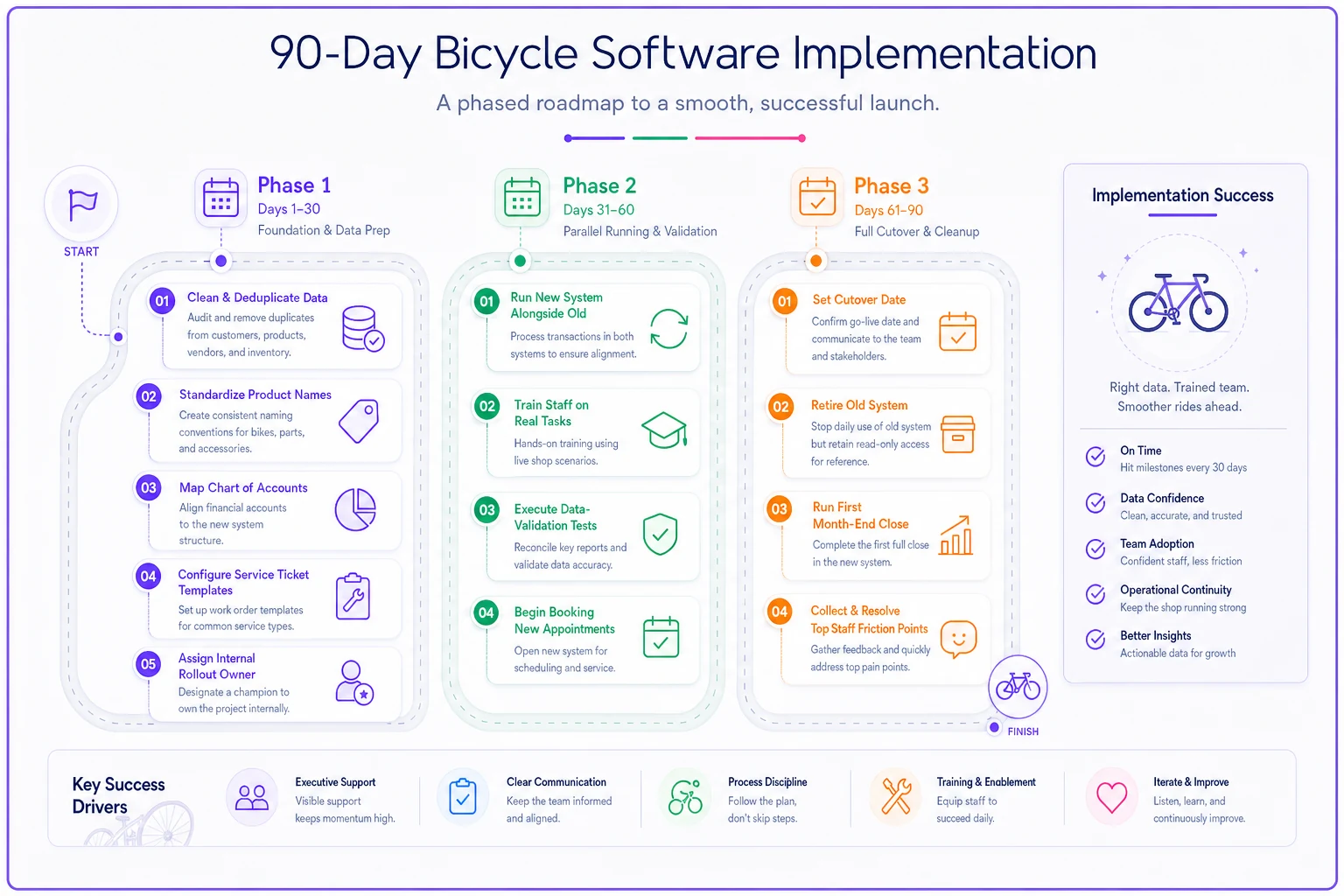
The timeline below summarizes the 90-day phases.
Days 1–30: Foundation and data prep
-
Clean and deduplicate existing data before migration
-
Standardize product naming and kill dead SKUs
-
Map chart of accounts with your bookkeeper
-
Configure service ticket template and POS layout
-
Assign one internal rollout owner
Days 31–60: Parallel running and validation
-
Run new system alongside old on low-risk transactions
-
Train staff on real tasks, not feature walkthroughs
-
Execute data-validation tests and fix mismatches
-
Begin booking new service appointments in new system
Days 61–90: Full cutover and cleanup
-
Set and communicate a hard cutover date
-
Retire old system for daily use, keep read-only access
-
Run first full month-end close in new system
-
Collect top five staff friction points and resolve them
Set a hard cutover date and communicate it to every staff member.
The Migration Checklist and Data-Validation Tests
Before you trust the new system with a single live transaction, confirm the data actually made it across intact. This is where quiet disasters hide — a shop discovers three months later that cost data didn't migrate and every margin report has been wrong since cutover.
-
Customer records with contact info and history transferred
-
Serialized bike inventory with correct serials
-
Bulk SKUs with correct costs and retail prices
-
Kits/assemblies rebuilt and tested
-
Open service tickets and deposits accounted for
-
Supplier/vendor records intact
-
Gift cards and store credit balances verified
-
Historical sales data (at least enough for year-over-year)
Data-validation tests to run before cutover:
-
Count spot-check — pick 20 random SKUs across categories, physically count them, and confirm the system matches.
-
Margin math — sell a test item and verify the system calculates margin using the migrated cost, not a default of zero.
-
Kit decrement — sell one kit, confirm every component quantity drops correctly.
-
Accounting round-trip — run a day of test sales, sync to accounting, confirm the totals and categories match.
-
Customer history — pull up three long-time customers and confirm their service history is present and readable.
-
Deposit / open ticket — verify an in-progress repair with a deposit shows the right balance owed.
If any of these fail, you're not ready to cut over. Fix it during parallel running, when a mistake costs nothing.
When Switching Software Makes Sense — and When It Doesn't
It makes sense when: you're maintaining shadow spreadsheets because the system can't do something core, your counts are chronically wrong no matter how carefully you count, you're opening a second location and the current tool won't scale, or reconciliation regularly eats a full day every month.
It's a bad idea when: your real problem is a process gap, not a tool gap. New software won't fix undefined check-in procedures or a team that doesn't follow SOPs — it'll just digitize the chaos. If your inventory is wrong because nobody's responsible for receiving, switching platforms changes nothing.
Who should probably wait: single-location shops in the middle of their busy season, and shops that haven't yet written down their actual workflows. Migrate a mess and you get a faster mess. This same "fix the process first" logic shows up whenever external pressure tempts shops into rushed operational changes — the kind of reactive scrambling described in the August 2026 Diesel Spike playbook, where shops that already had clean systems absorbed the shock and the ones improvising didn't.
A Real Scenario
A two-location shop running an aging POS with inventory tracked in a separate spreadsheet was losing roughly a day and a half each month to reconciliation, and their counts drifted enough that they were quietly reordering parts already on the shelf. Special orders required a mechanic to text the front desk, and "is my bike ready" calls interrupted the counter constantly.
They ran a proper evaluation — six vendors down to two, weighted heavily toward service check-in and inventory accuracy — and picked a system that unified booking, tickets, and inventory. The rollout took the full 90 days, timed to their slow late-fall window. The first month was rough; transactions were slower and staff grumbled.
By month three, monthly reconciliation dropped from a day and a half to about two hours because sales synced automatically to their accounting software. Counts stabilized enough that duplicate reorders mostly stopped, freeing up somewhere in the range of $2k–$4k of cash previously tied up in accidental overstock. The "is it ready" calls dropped noticeably once customers got automatic ready-for-pickup texts. Nothing magical — just fewer manual handoffs, one source of truth, and staff who stopped fighting the tool.
The Bottom Line for Your Buying Decision
Choosing bicycle software isn't really a technology decision — it's an operations decision that happens to involve technology. The shops that get it right start from their busiest daily workflows, weight their evaluation toward the twenty-times-a-day tasks, budget for the full first-year cost instead of the sticker price, and roll out during a season they can afford to be a little slower.
The ones that get it wrong chase feature lists, buy during peak season, skip the data validation, and discover the gaps only after the old system is gone. Take the extra weeks up front. The right tool, implemented carefully, quietly gives back the hours burned on workarounds — and eventually you stop noticing the software at all, which is exactly the point.
Choosing bicycle software isn't really a technology decision — it's an operations decision that happens to involve technology. The shops that get it right start from their busiest daily workflows, weight their evaluation toward the twenty-times-a-day tasks, budget for the full first-year cost instead of the sticker price, and roll out during a season they can afford to be a little slower.
The ones that get it wrong chase feature lists, buy during peak season, skip the data validation, and discover the gaps only after the old system is gone. Take the extra weeks up front. The right tool, implemented carefully, quietly gives back the hours burned on workarounds — and eventually you stop noticing the software at all, which is exactly the point.
Ready to revolutionize your bike shop operations?
Join hundreds of bike shops using Bicyclly to save time, increase revenue, and deliver exceptional customer service.