

Most bike shops treat their Google Business Profile like a phone book entry. Name, address, hours, maybe a photo of the storefront from 2019. Then they wonder why the shop two neighborhoods over shows up first when someone searches "bike tune up near me" — even though that shop has fewer mechanics and slower turnaround.
Local discovery for service work is winnable, but it doesn't happen by accident. It's won by shops that treat their profile like a service funnel instead of a listing. And the only way to know if any of it actually works is to run it like an experiment with a number at the end — booked service tickets.
This is a tight, tactical walkthrough. One problem: converting local discovery into service bookings. We'll cover the specific GBP fields that move the needle, review-capture timing that actually gets responses, response templates that signal reliability to both customers and Google, and a lead→ticket measurement loop so you can prove what's working.
Start With the Gap Between "Found" and "Booked"
Plenty of shops rank fine. They appear in the map pack, get profile views, even get clicks to call. And then actual service appointments stay flat.
That gap — between being found and being booked — is where most of the money leaks out. In practice, this usually happens because the profile answers "where are you" but never answers the questions a rider is actually asking before they commit a bike to your bench:
-
How fast is the turnaround?
-
Do you work on my kind of bike (e-bike, gravel, high-end road, kids)?
-
Can I book online or do I have to call during work hours?
-
Are people like me happy they came here?
A profile that leaves those unanswered forces the customer to do extra work. And extra work at the discovery stage means they bounce to the shop that made it easy. You're not losing on skill. You're losing on friction.
So before touching anything, define the metric you'll chase for the next 60 days: service tickets that originated from your Google Business Profile. Not views. Not calls. Tickets. We'll come back to how to tag those.
The GBP Fields That Actually Drive Service Bookings
Not every field matters equally. Some are vanity. Some quietly do the heavy lifting. Here's how they break down for a service-focused shop.
Never miss a sale or service appointment again.
Bicyclly helps you manage every sale, repair, and booking with ease and accuracy.
- Unified inventory and sales tracking
- Automated customer notifications
- Service appointment scheduling
No credit card required
| GBP Element | Impact on Service Bookings | Common Mistake |
|---|---|---|
| Primary category | High | Set to "Bicycle Store" only, missing "Bicycle Repair Shop" |
| Services list | High | Left empty or generic; no tune-up/overhaul tiers listed |
| Booking link / appointment URL | Very High | Points to homepage instead of service scheduler |
| Photos (bench, mechanics, before/after) | Medium-High | Only storefront and product shots |
| Q&A (seeded) | Medium | Ignored entirely, left to randos |
| Business description | Medium | Reads like an "About Us," not a service pitch |
| Attributes (e-bike repair, etc.) | Medium | Unset, so filters skip you |
| Google Posts | Low-Medium | Never used, or last post is 8 months old |
A few of these deserve more than a row in a table.
Primary and secondary categories. If your primary category is "Bicycle Store," Google may not surface you strongly for repair-intent searches. Set a repair-oriented category as primary if service is your profit center, and fill secondary categories accordingly. This single change has quietly moved shops up in repair searches more than any photo ever did.
The Services section. Genuinely underused. List your actual service tiers — "Basic Tune-Up," "Full Overhaul," "E-Bike Diagnostic," "Flat Repair," "Brake Bleed." Add short descriptions with rough price ranges where you can. When someone searches, these services can appear directly in results and pre-qualify the customer. If you've already built a tiered service menu, mirror that structure here. If you haven't, that's worth doing first and then feeding it into your profile.
The booking link. The number of shops sending their appointment URL to the homepage is genuinely painful. Someone searched for a repair, found you, tapped "Book" — and landed on a page selling bikes. Point it at your scheduler. If the link drops them one tap away from picking a service and a time, you've removed the single biggest source of fall-off.
Photos that show work, not products. Bench shots, a mechanic mid-repair, a clean before/after of a drivetrain. Service customers want proof you do the work and care about it. Storefront photos signal "retail." Work photos signal "we fix bikes well."
Seed the Questions Before Someone Else Does
The Q&A section on a profile is open to the public, which means a competitor, a confused customer, or nobody at all fills it. Better that you do.
-
"Do you work on e-bikes?" → Clear yes/no plus brands you're comfortable with.
-
"How long does a tune-up take?" → Honest range, not a fantasy same-day promise.
-
"Can I book online?" → Yes, with the link right in the answer.
-
"Do I need an appointment or can I walk in?" → Set the expectation so people show up correctly.
Seeding Q&A does two things. It answers the pre-booking questions that otherwise cause bounce, and it signals activity on the profile. The mistake shops make is assuming customers will ask first. They mostly don't — they just leave.
The Review-Capture Sequence That Fits Service Timing
Reviews are the part everyone knows matters and almost everyone executes badly. The problem isn't whether to ask. It's when and through what channel.
-
At pickup (in person) The person handing over the bike mentions it plainly — "If the repair holds up like it should this week, a quick Google review really helps us out." No pressure, just a human ask.
-
Within 2–4 hours (text) A short message with a direct review link. Short. One tap. Not a paragraph.
-
Day 4 (only if no review and no complaint) A single gentle follow-up. Then stop. More than two asks starts to feel pushy.
Two details make or break this. First, the link must go straight to the review form, not your profile page where they have to hunt for the button. Second, route unhappy signals away from the public review before they post. If the customer seemed frustrated at pickup, that's a recovery conversation, not a review request. The full logic of splitting happy from unhappy responses is laid out in the two-step feedback funnel for bike shops, and it's worth understanding before you scale the asks.
A quick note on volume and freshness
Google and customers both care about recency more than raw count. A shop with 40 reviews where the newest is from last week beats a shop with 180 reviews where the newest is from last spring. A steady trickle — even five or six new reviews a month — keeps the profile looking alive. Consistency beats bursts.
Response Templates That Do Double Duty
Responding to reviews isn't just courtesy. It's a ranking and trust signal, and it's a chance to repeat service keywords naturally. Copy-paste "Thanks for your review!" on every one and you've wasted the opportunity.
Positive review, service-specific:
> "Thanks, [Name] — glad the [overhaul/tune-up] got your [bike type] rolling smoothly again. Appreciate you trusting us with it, and we're here whenever it needs attention."
Positive but short ("Great service!"):
> "Thanks [Name]! Enjoy the smooth shifting — don't be a stranger when it's time for the next tune-up."
Negative or mixed review:
> "Appreciate the honest feedback, [Name]. A [specific issue] shouldn't have happened, and that's on us. I'd like to make it right — can you reach me directly at [number/email]? We'll get it sorted."
The insight most shops miss on negative responses: you're not writing for the angry customer. You're writing for the next 50 people who read that review while deciding whether to book. A calm, specific, accountable reply does more for your bookings than the one-star does to hurt them.
Keep the response window tight — within 24 to 48 hours. Slow responses read as "they don't pay attention," which is exactly the opposite of what a service customer wants to believe about the people touching their bike.
The Lead→Ticket Experiment
Everything above is guesswork until you connect it to booked tickets. This is the part most shops skip, and it's why they can't tell what's working.
Set the baseline (Week 0).
-
Pull current GBP metrics
profile views, calls, direction requests, booking link clicks.
-
Count service tickets in your POS for the prior 60 days.
-
Estimate current GBP-originated tickets honestly. If you've never tracked it, ask "how did you find us?" at intake for two weeks to get a rough share.
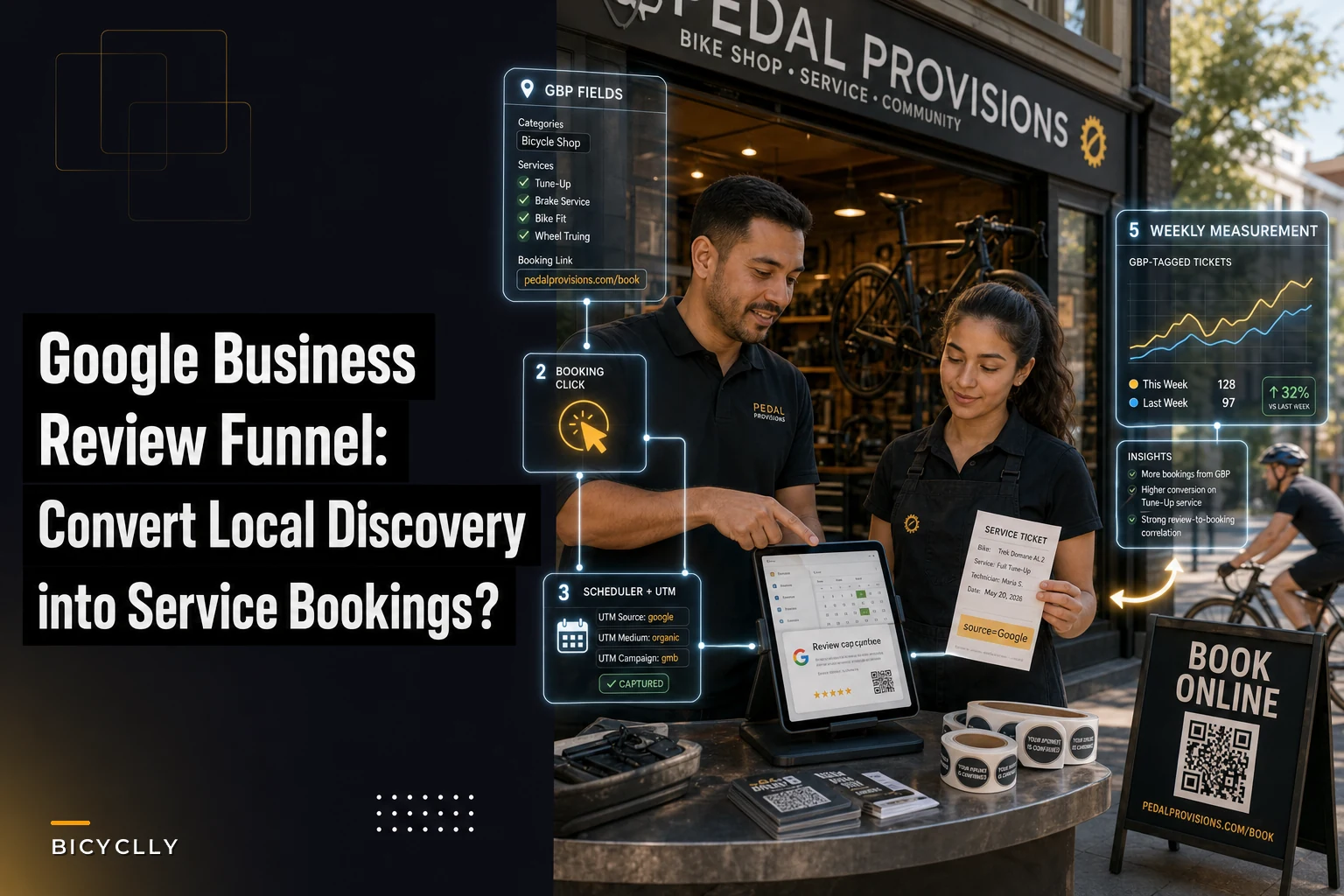
Tag the source. Add a required intake field: How did you book? with options including "Google / online search." If your scheduler supports UTM tags, put one on the GBP booking link so online bookings self-identify. Either method works — you just need every ticket to carry a source.
Run the changes in waves, not all at once. Changing everything on day one tells you nothing about what worked.
-
Week 1–2
Fix categories, services list, and booking link. Measure.
-
Week 3–4
Add work photos, seed Q&A. Measure.
-
Week 5–6
Launch the review-capture sequence. Measure.
-
Week 7–8
Hold steady, respond to every review within 48 hours. Measure.
Measure the one number that matters. Each wave, track GBP-tagged service tickets per week against your baseline. You're not looking for a hockey stick. You're looking for a believable, sustained lift.
What the numbers tend to look like
A mid-size shop running this honestly might start at roughly 12–15 GBP-originated service tickets a month. After fixing the booking link and services list alone, that often climbs into the low 20s — because friction was the bottleneck, not demand. Layer in a steady review trickle and faster responses, and shops frequently land somewhere around 28–35 a month by the end of the experiment.
At an average service ticket of $85–$140 depending on your mix, that's an extra couple thousand dollars a month in work that was already searching for you — it just couldn't find the door.
Visual workflow of the lead→ticket experiment:
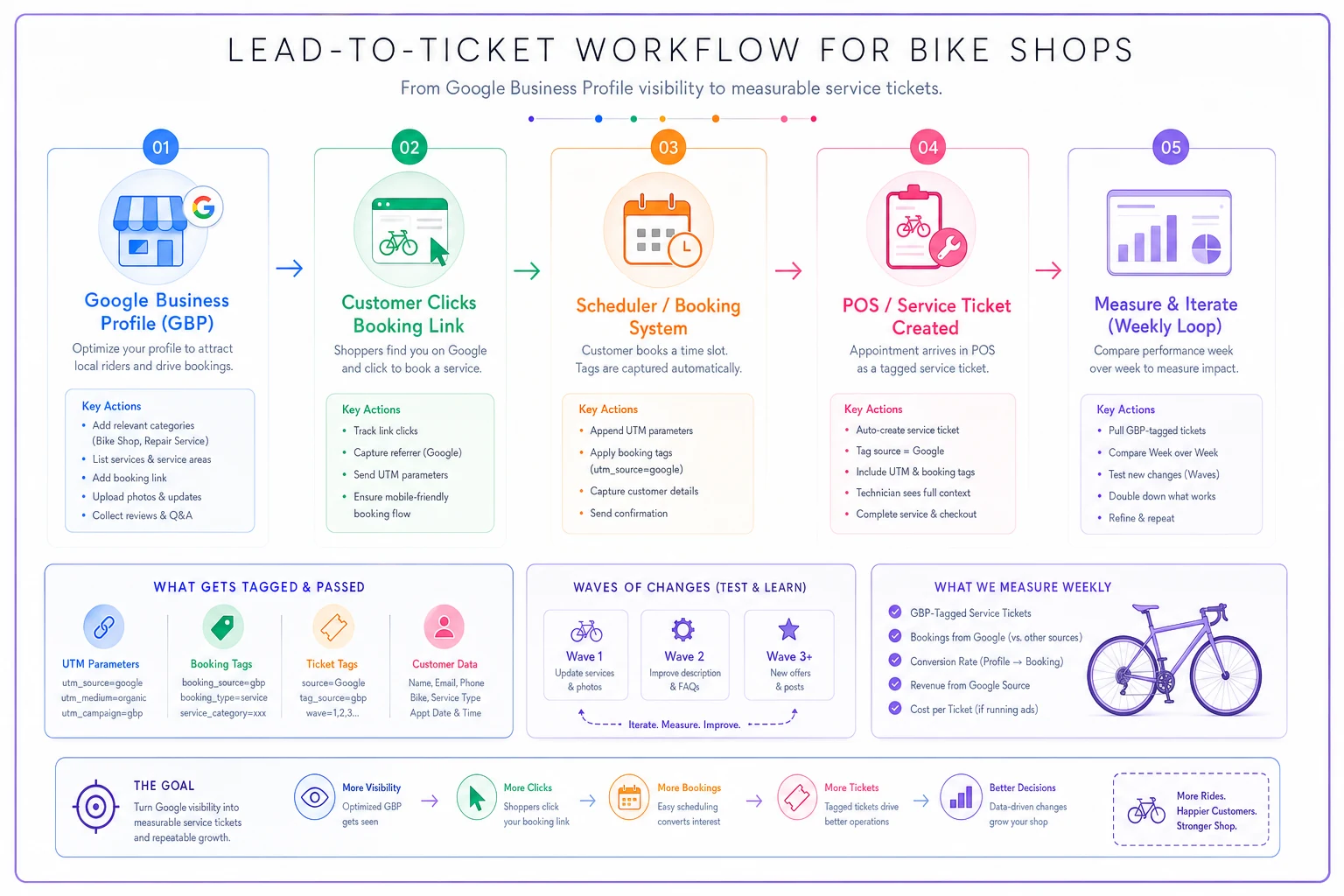
Each wave, track GBP-tagged service tickets per week against your baseline. You're not looking for a hockey stick. You're looking for a believable, sustained lift.
A Real Scenario
Single-location shop, about 1,000 sq ft, two mechanics, strong on repairs but quiet online. Their profile had the wrong primary category ("Bicycle Store"), no services listed, a booking link pointed at the homepage, and the newest review was four months old.
They ran the 60-day loop. Week one: switched primary category to repair, listed five service tiers with price ranges, repointed the booking link to the scheduler. By week three they'd added eight bench and before/after photos and seeded six Q&A entries. Week five, they started the at-pickup ask plus a two-hour text follow-up.
Going in, roughly 14 service tickets a month traced back to Google. By the end of month two they were at about 31, with review volume up from near-zero to five or six fresh ones monthly. Nothing dramatic happened in any single week — it was the drip of small fixes compounding. The owner's take was basically: "The demand was already there, we were just invisible to it."
When This Is Worth It — and When It Isn't
When it makes sense:
-
Service is a real profit center and you have bench capacity to absorb more tickets.
-
You're already ranking somewhere in local search but bookings lag views.
-
You can commit to responding to reviews consistently, not just this month.
When it's a bad idea:
-
Your bays are already slammed and turnaround is slipping. Driving more bookings into a backlog damages the exact reviews you're trying to earn. Fix throughput first.
-
You can't or won't maintain the review responses. A dead profile with a half-finished services list looks worse than a simple one.
Who should skip the review-capture part specifically: any shop whose current service quality or turnaround is shaky. Asking for reviews amplifies reality. If the reality is "we're slow and inconsistent right now," you'll just collect proof of it publicly. Shore up the service experience first — the same way you'd protect repeat business before chasing new, which the work on keeping repeat service customers gets into.
Keeping It Alive Without It Becoming a Chore
The honest challenge isn't setting this up. It's keeping it running once the novelty wears off. Reviews go unanswered, Google Posts go stale, the text follow-ups get skipped on busy Saturdays.
This is where lightweight automation earns its keep — an operational platform that fires the post-pickup review text automatically off the completed ticket, flags new reviews for a quick human response, and rolls GBP-tagged bookings into the same dashboard as the rest of your service numbers. The point isn't to remove the human voice from reviews; it's to make sure the sequence actually happens every time instead of only when someone remembers. The response still needs to sound like you. The trigger shouldn't depend on memory.
Automate the post-pickup review text from your POS so the ask happens consistently without relying on memory.
The shops that win local service discovery aren't doing anything exotic. They've closed the gap between being found and being booked, and they measure it instead of guessing. Fix the fields that answer real questions, ask for reviews when people are happiest, respond like someone who's actually paying attention, and tag every ticket so you know what's working. Do that for 60 days and you'll stop wondering whether your Google Business Profile drives service bookings — you'll have the number in front of you.
The shops that win local service discovery aren't doing anything exotic. They've closed the gap between being found and being booked, and they measure it instead of guessing. Fix the fields that answer real questions, ask for reviews when people are happiest, respond like someone who's actually paying attention, and tag every ticket so you know what's working. Do that for 60 days and you'll stop wondering whether your Google Business Profile drives service bookings — you'll have the number in front of you.
Ready to revolutionize your bike shop operations?
Join hundreds of bike shops using Bicyclly to save time, increase revenue, and deliver exceptional customer service.