

Your mechanic swaps out a customer's worn drivetrain for fresh Shimano 105 components. The old parts go into a bin marked "used." Three weeks later, someone counts them as service inventory during month-end. Two months after that, you find the same parts still sitting there, now worth half what they could've fetched. Meanwhile, a customer who needed exactly those parts bought them online because you never listed them.
This is how shops bleed margin on trade-ins. The parts are right there. The demand exists. But without a real bike shop part-out workflow, they become accounting headaches and missed revenue — nothing more.
The Double-Count Problem Hits Multiple Ways
Double-counting happens because most shops treat part-outs as an afterthought. No defined process means parts float between categories — sometimes service inventory, sometimes retail, sometimes just forgotten entirely.
A shop in Portland discovered they'd been counting the same batch of wheels as both "available for service" and "retail inventory" for six months. Their books showed $4,800 in inventory. Their actual sellable stock was worth maybe $1,200, and dropping fast.
Timing makes this worse. A one-month-old takeoff derailleur might fetch 70% of retail. After three months gathering dust, you're lucky to get 40%. Every week without a clear process costs real money.
Building Your Part-Out Valuation Framework
Forget complex spreadsheets. You need simple pricing bands that mechanics can apply quickly during teardown.
Never miss a sale or service appointment again.
Bicyclly helps you manage every sale, repair, and booking with ease and accuracy.
- Unified inventory and sales tracking
- Automated customer notifications
- Service appointment scheduling
No credit card required
Condition A (Like New): 70-80% of current retail
-
Less than 100 miles
-
No visible wear
-
All original hardware included
-
Example
Takeoff from new bike upgrade
Condition B (Light Use): 50-65% of current retail
-
Under 500 miles
-
Minor cosmetic marks
-
Functions perfectly
-
Example
Customer upgrades after one season
Condition C (Moderate Wear): 30-45% of current retail
-
Visible wear but fully functional
-
Missing minor hardware (bolts, spacers)
-
Needs basic cleaning
-
Example
Standard trade-in components
Condition D (Heavy Wear): 15-25% of current retail
-
Significant wear, near replacement
-
Works but not ideal
-
Best for budget repairs
-
Example
End-of-life components
Print the pricing bands and post them at the teardown station so mechanics can reference them during evaluation.
Anything below Condition D goes straight to recycling. Don't waste shelf space on parts worth less than $10 — the handling cost alone eats any potential return.
The Three-Tag System That Prevents Confusion
Physical tags solve the double-count problem, but only if everyone follows the same system. Each part needs three pieces of information immediately visible:
Tag Color = Status
-
Yellow
Awaiting evaluation
-
Green
Priced and ready for retail
-
Red
Reserved for service use
-
Blue
Online listing active
Tag Information
-
Date received
-
Condition grade (A/B/C/D)
-
Price
-
"Sell by" date (typically 60 days from receipt)
Location Code
-
S1-S10
Service bins
-
R1-R20
Retail floor
-
O1-O5
Online fulfillment area
-
H1-H3
High-value lockup
A shop near Denver implemented this after losing track of $3,000 worth of carbon components. Within two months, their part-out revenue went from around $800 monthly to $2,400. Not because they got more trade-ins — they just stopped losing track of what they already had.
Movement Triggers: When Parts Change Categories
The most critical piece of any part-out workflow is having clear triggers for moving inventory between channels. Parts that don't move lose value fast.
Day 1-7: Evaluation Period
-
Mechanic removes parts during service
-
Quick condition assessment
-
Yellow tag applied
-
Parts go to evaluation bin
Day 8-14: Prime Retail Window
-
Green tag replaces yellow
-
Move high-value items (Condition A/B) to retail floor
-
Price aggressively for quick turnover
-
Post on shop social media
Day 15-30: Expanded Channels
-
List online (eBay, Facebook Marketplace)
-
Blue tag added (keep green tag too)
-
Consider bundling slower items
-
First price reduction if needed (10-15%)
Day 31-45: Clearance Push
-
Move to clearance section
-
Second price cut (25-30% off original)
-
Bundle with similar items
-
Promote to budget-conscious customers
Day 46-60: Final Push
-
Final markdown (50% off)
-
Offer to mechanics for personal bikes
-
Consider donation for tax write-off
-
Last chance before disposal
Day 60+: Exit Strategy
-
Scrap metal for recycling credit
-
Donate to bike co-op
-
Remove from all inventory systems
-
Document the loss
This schedule works well as a repeating process. Once your team internalizes the cadence, it stops feeling like extra work and just becomes part of how things run.
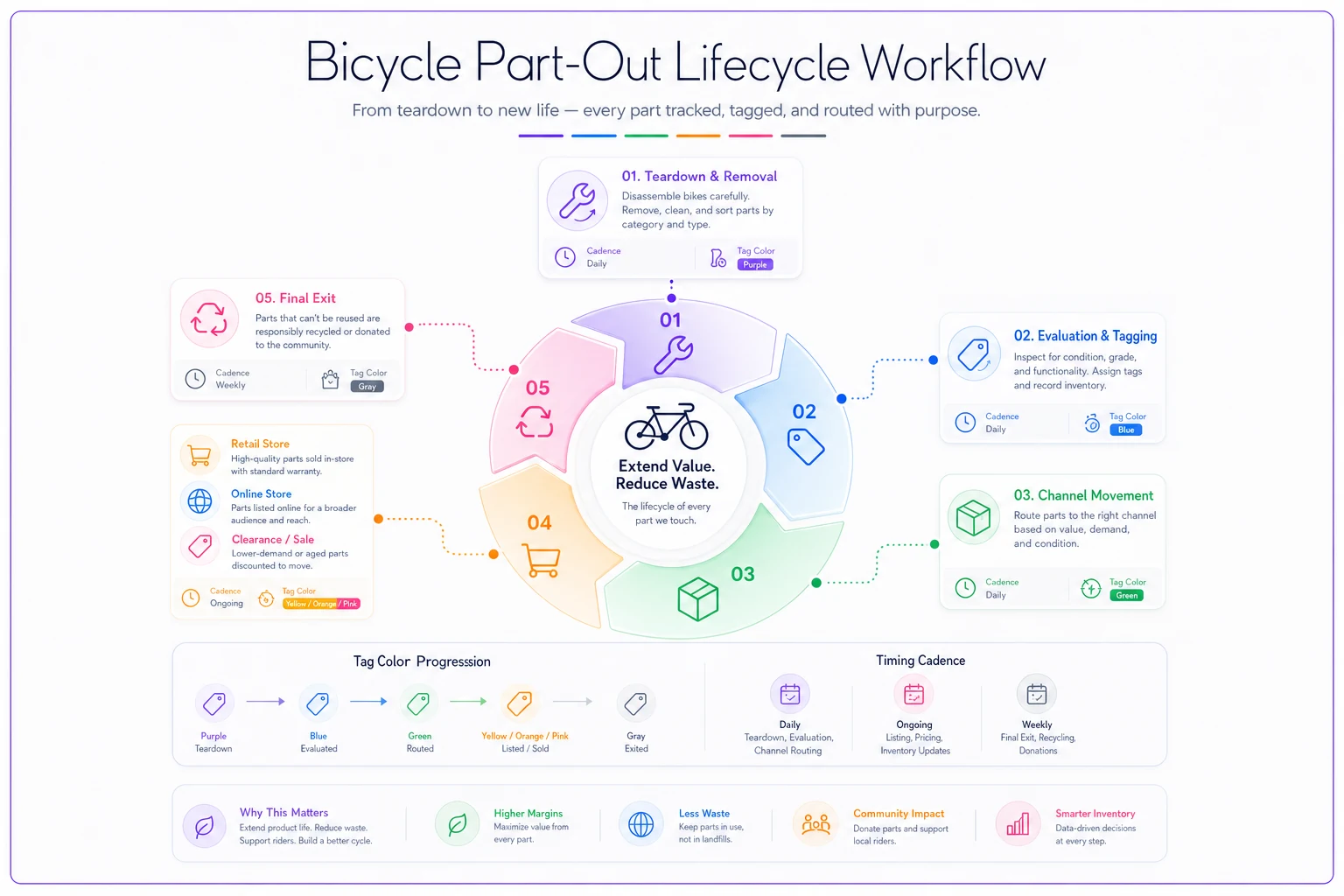
The diagram above maps the cadence from teardown through evaluation, tagging, retail/online listing, clearance, and exit.
Avoiding the Service Department Trap
The biggest failure point happens when mechanics grab used parts for repairs without updating inventory. Customer needs a quick fix, mechanic spots a compatible derailleur in the back, and your retail inventory quietly disappears into a service ticket with no record of it.
-
Scan or log the part removal
-
Note which repair ticket used it
-
Transfer the value from retail inventory to service parts
One shop tracks this with a basic clipboard. Part comes out, mechanic writes: "10/15 - Ticket #2847 - Used Deore derailleur - $35 retail value." Takes about eight seconds and saves hours of confusion later.
Real-World Impact: Tracking the Improvement
A shop in Boulder overhauled their used parts operation with these systems. Here's how the numbers changed:
| Metric | Before | After (3 months) |
|---|---|---|
| Monthly part-out revenue | $600-900 | $2,200-2,800 |
| Inventory accuracy issues | 3-4 per month | Zero |
| Average days to sell | 85 | 22 |
| Monthly write-offs from aged inventory | ~$400 | Under $100 |
The difference wasn't magic. They just stopped letting valuable parts disappear into operational chaos.
Common Pitfalls and How to Dodge Them
The "Too Good for Retail" Trap Some mechanics hold back the best used parts for "special customers" or future repairs. This kills cashflow. Set a firm rule: everything gets evaluated and tagged within 48 hours, no exceptions.
The Bundle Blindness Shops often price individual components when bundles actually sell faster. A used groupset might sit for months as separate pieces but move in a week as a complete package. Track what sells together and adjust accordingly.
The Online Listing Bottleneck Creating listings feels like busywork until you realize that's where most used part buyers look first. Batch photograph everything during a slow period. Twenty minutes of photos can drive a solid month of online sales.
Connecting to Your Existing Trade-In Process
This part-out workflow builds directly on any trade-in valuation system you've already established. The same evaluation skills apply — just at the component level instead of complete bikes.
If you're already using prebuilt repair kits, you already understand the value of having parts organized and ready to go. Your part-out system feeds directly into budget repair options, giving price-conscious customers real alternatives while protecting your margin.
Making Technology Work For You
Manual tracking works fine for shops processing under 20 part-outs a month. Beyond that, things start slipping through the cracks. AI-powered operational software handles the heavy lifting by automatically tracking parts from removal through sale, flagging when items hit movement triggers, blocking double-counts across departments, and surfacing pricing suggestions based on condition and current market rates.
The practical effect is that mechanics stay focused on evaluation and removal, while the system handles the tracking. Smaller shops end up running tighter operations without adding headcount.
Implementation Timeline
Don't overthink the rollout:
-
Week 1
Create tags, set up bins, train staff on categories
-
Week 2
Process all existing part-outs through the new system
-
Week 3
Implement movement triggers and tracking
-
Week 4
Review results, adjust pricing bands based on what sold
Within a month you'll have cleaner inventory, better cashflow, and a much clearer picture of what's actually on your shelves.
The Bottom Line
Shops resist formal part-out systems because they look like extra work upfront. In practice, a clear process reduces work by eliminating the confusion, lost parts, and inventory mysteries you'd otherwise spend hours untangling every month.
You're already taking in trade-ins. You're already pulling old parts during service. The only question is whether those parts generate revenue or just create problems. With clear condition grades, simple tags, and firm movement triggers, every part-out becomes a profit opportunity instead of something sitting forgotten in a bin for four months.
Once your team gets used to a proper system, they won't want to go back. No more double-counting. No more phantom inventory. Just cleaner operations and extra revenue from parts you're already handling.
Ready to revolutionize your bike shop operations?
Join hundreds of bike shops using Bicyclly to save time, increase revenue, and deliver exceptional customer service.