


Most bike shops don't have an automation problem. They have a sequencing problem. Owners buy a scheduling tool before their service menu is standardized, or they bolt on inventory forecasting while their POS and accounting still disagree about what's actually in the building. The software works fine. The shop still feels like chaos. That's because automation layered on top of an undefined workflow just makes the mess move faster.
The way out isn't a bigger tech stack. It's understanding that your shop moves through distinct stages of operational maturity, and each stage unlocks the next set of automation targets. Skip a stage and you end up paying for capability you can't use. The bike shop automation maturity roadmap below is how you figure out where you actually are, what to automate next, and how to know whether it's working before you spend another dollar.
The three stages, and why most shops are stuck between them
Think of maturity in three bands: basic, orchestrated, and predictive. These aren't marketing tiers. They describe how information flows through your shop and how many decisions still require a human to notice something and react.
-
Basic means your core records exist and are mostly accurate. Tickets get written. Inventory gets counted. Sales get rung up. But the systems don't talk to each other, and a lot of coordination lives in someone's head or on a whiteboard.
-
Orchestrated means your systems are connected and workflows trigger each other. A booking creates a ticket, a ticket reserves parts, a completed ticket closes out cleanly into your books. Humans still make the judgment calls, but the plumbing moves data without re-entry.
-
Predictive means your shop uses its own history to get ahead of demand. Reorder points adjust to seasonality. No-show risk gets flagged before the appointment. Staffing is planned against forecasted throughput, not last week's panic.
What we've seen across a lot of shops is that owners think they're orchestrated when they're really running a dressed-up basic stage. They've got five tools, but four of them require manual copy-paste to stay in sync. That's not orchestration. That's five basic systems and a tired bookkeeper.
The honest test: if one staff member quit tomorrow, how many workflows would silently break because the coordination lived with that person? If the answer makes you nervous, you're more basic than your software bill suggests.
Where it breaks as you grow
The failure points shift as volume climbs. A one-bay shop doing 15 tickets a week can run on memory and goodwill. The same operating style at 60 tickets a week produces missed parts, double-booked mechanics, and a reconciliation nightmare at month-end.
Never miss a sale or service appointment again.
Bicyclly helps you manage every sale, repair, and booking with ease and accuracy.
- Unified inventory and sales tracking
- Automated customer notifications
- Service appointment scheduling
No credit card required
Here's the pattern of what breaks, stage by stage:
| Stage | What usually works | What breaks first as volume grows |
|---|---|---|
| Basic | Accurate daily records, friendly service | Parts reservations, handoffs between front desk and bench, month-end close |
| Orchestrated | Clean data flow, less re-entry | Forecasting demand, flagging risk early, planning labor capacity |
| Predictive | Proactive ordering & staffing | Governance drift — models running on stale assumptions nobody re-checks |
Notice the last row. Predictive shops don't fail because the forecasting is wrong. They fail because nobody owns keeping the inputs clean. A reorder model is only as good as the ticket data feeding it, and if your ticket templates drift, your predictions quietly rot. That's why a solid data foundation — the kind laid out in A Shop-Sized Data Operating Model for Bike Shops — has to come before any predictive layer, not after.
Prioritized automation targets by stage
You don't automate everything. You automate the thing that's currently costing you the most coordination effort or the most margin leakage. Here's the priority order that holds up across most shops.
If you're at Basic, target these first
-
Booking-to-ticket creation. The single highest-leverage automation in a bike shop. When a customer books, a draft ticket should exist. No re-keying, no sticky notes. This alone removes a chunk of the front-desk friction that causes mis-scheduled work.
-
Parts reservation on ticket creation. The moment a job is scoped, the parts it needs should be soft-reserved against inventory. The classic basic-stage failure is promising a Thursday turnaround on a part that's actually committed to three other tickets.
-
POS-to-accounting sync. If your sales and your books disagree, every other number you automate inherits that error. Get this clean early. The mechanics of why these drift apart are covered well in When POS, Inventory and Accounting Don't Match.
If you're at Orchestrated, target these next
-
Automated customer status updates. "Your bike is ready" should fire on ticket completion, not when someone remembers.
-
No-show and confirmation sequencing. Layered reminders tied to the booking record.
-
Reorder triggers off actual consumption. Move from "we noticed we're low" to "the system flagged it when we hit the threshold."
If you're moving toward Predictive
-
Seasonal demand forecasting feeding purchase cadence.
-
Throughput forecasting feeding staffing and bay allocation.
-
Risk flagging — no-shows, SLA breaches, slow-moving stock — surfaced before they cost money.
The mistake owners make here is trying to run a predictive target while a basic one is still broken. Forecasting parts demand is useless if your parts reservations aren't accurate, because your consumption data is garbage. Fix the plumbing before you fix the crystal ball.
Safe recipes: how to roll out automation without blowing up the shop
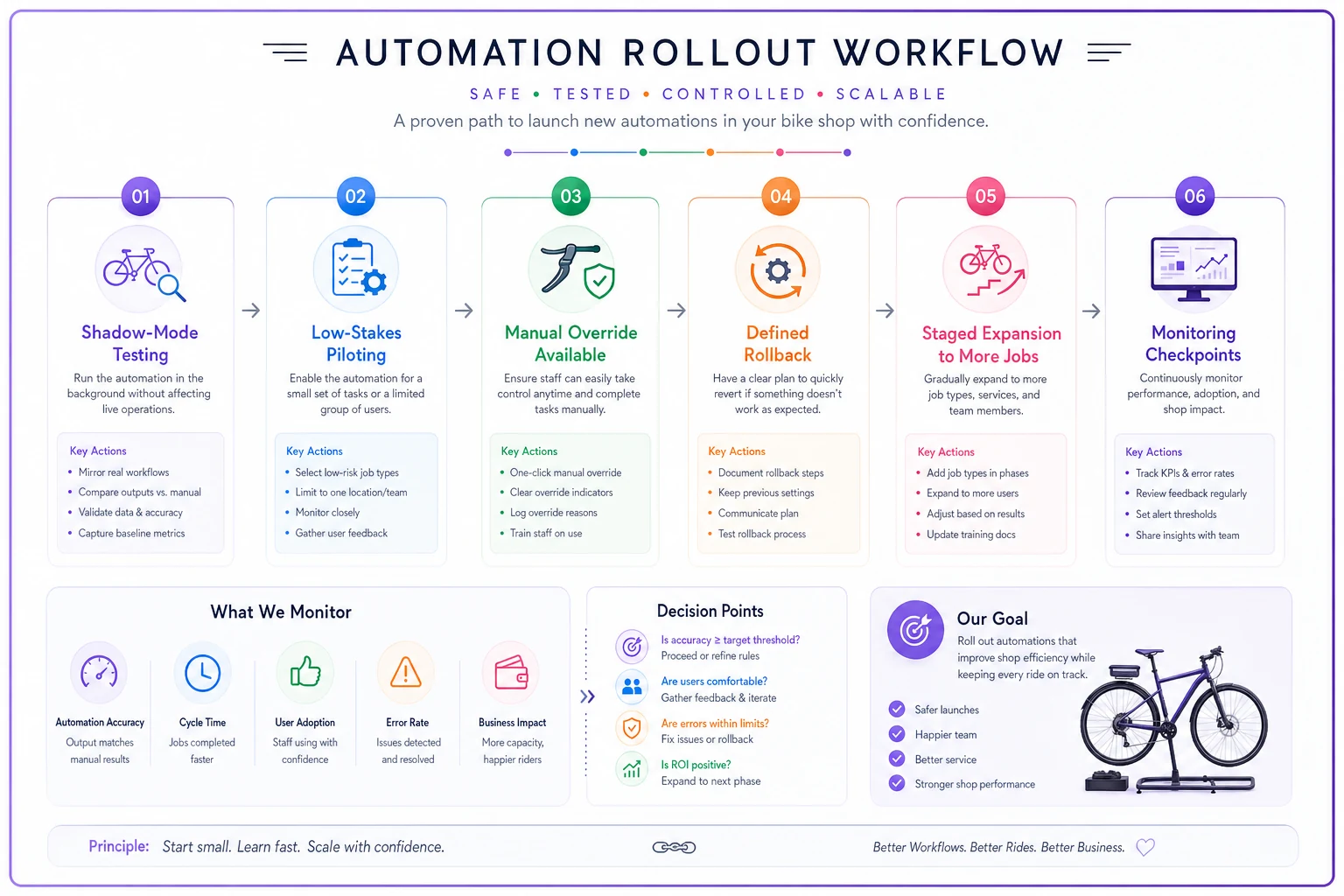
A "recipe" here just means a repeatable, low-risk way to introduce one automation. The goal is to never let a new automation take over a workflow before you trust it. Every safe recipe follows the same shape:
-
Run it in shadow mode first. The automation produces output, but a human still does the real work for a week or two. You compare. If the automated reorder suggestions match what your buyer would've done anyway roughly 85–90% of the time, you can trust it with the easy cases.
-
Start with low-stakes SKUs or jobs. Automate reorder triggers on tubes and cables before you let it touch a $1,200 wheelset order.
-
Keep a manual override that's easy to reach. If staff have to fight the system to fix an obvious error, they'll stop trusting it and route around it entirely.
-
Define the rollback. Before you switch anything on, know exactly how you turn it off and revert to the manual process. If you can't describe the rollback in one sentence, you're not ready.
A typical example: a shop wants automated status texts going out to customers. Instead of flipping it on for all tickets, they run it on tune-ups only — the most standardized job type — for two weeks. They watch for wrong-number sends, premature "ready" alerts, tone complaints. Once tune-ups run clean, they expand to overhauls, then warranty work, which has messier timing. Three weeks later it's shop-wide and nobody panicked.
Here's a simple rollout workflow diagram:
A typical example: a shop wants automated status texts going out to customers. Instead of flipping it on for all tickets, they run it on tune-ups only — the most standardized job type — for two weeks. They watch for wrong-number sends, premature "ready" alerts, tone complaints. Once tune-ups run clean, they expand to overhauls, then warranty work, which has messier timing. Three weeks later it's shop-wide and nobody panicked.
Observability: how you know it's actually working
Automation without observability is just hope with a subscription fee. For every automation you turn on, you need a cheap way to check that it's doing what you think.
-
Volume check Is it firing the expected number of times? If your booking-to-ticket automation created 40 tickets but you took 55 bookings, 15 fell through a crack.
-
Error surface Where do failures go? There must be a visible queue of things the automation couldn't handle — not a silent black hole.
-
Drift check Is the automation's behavior changing over time without anyone changing the rules? Reorder points creeping up for no reason is a signal your inputs shifted.
-
Human-override rate How often do staff manually correct the automation? A rising override rate means it's losing accuracy and needs attention.
-
Downstream reconciliation Does the automated output still agree with your books and counts at month-end?
Track human-override rate week-to-week to catch regressions early.
The shops that stay healthy at the predictive stage treat these checks as a standing routine, not a fire drill. A good model for weaving this into regular operations is the cadence thinking in the Event-First Automation Playbook for Small Bike Shop Owners — automation tied to clear triggers and reviewed on a schedule, rather than set-and-forget.
A 12-month investment plan with ROI and governance checkpoints
Here's a realistic sequence for a shop currently sitting in late-basic. Adjust the pace to your volume, but keep the order. Each quarter builds the foundation the next one needs.
Quarter 1 — Fix the foundation (Basic → clean Basic)
-
Investment
mostly time, plus whatever your POS/accounting connector costs. Often in the low hundreds per month.
-
Targets
standardize service tickets, clean up SKU records, get POS-to-accounting syncing.
-
ROI checkpoint (end of Q1)
Does month-end close take noticeably less time? Did reconciliation variances shrink? If close went from a day and a half to a couple hours, that's your first win.
-
Governance checkpoint
assign an owner for data accuracy. One named person. If nobody owns it, it drifts.
Quarter 2 — Connect the workflow (toward Orchestrated)
-
Targets
booking-to-ticket, parts reservation, automated status updates.
-
ROI checkpoint
fewer "where's my bike" calls, fewer parts-not-available surprises at the bench. A shop doing around 50 tickets a week often sees re-entry time drop by a few hours a week — call it $400–$600 a month in recovered labor, plus fewer blown turnaround promises.
-
Governance checkpoint
review the error queue weekly. Who clears it? What's the response time?
Quarter 3 — Add reactive intelligence
-
Targets
consumption-based reorder triggers, no-show sequencing, SLA breach flags.
-
ROI checkpoint
did stockouts on common service parts drop? Did no-shows fall? Even a modest reduction on a busy service calendar recovers real bay hours.
-
Governance checkpoint
monthly review of reorder thresholds and no-show rules. Are they still matching reality?
Quarter 4 — Introduce prediction (carefully)
-
Targets
seasonal forecasting, throughput planning for the next busy season.
-
ROI checkpoint
did pre-season ordering match actual demand better than last year's guess? Fewer panic orders and less dead stock going into the slow months.
-
Governance checkpoint
validate that the data feeding your forecasts is still clean. This is the step everyone skips, and it's the one that kills predictive accuracy.
Across the year, the compounding effect matters more than any single quarter. A shop that goes from a day of reconciliation pain and constant parts surprises to a mostly self-coordinating workflow often frees up the equivalent of a part-time role — roughly $8k–$12k a year in recovered time — while losing fewer customers to slow or missed service.
A real scenario
A two-bay neighborhood shop doing roughly 45–55 tickets a week was drowning in coordination, not volume. The front desk re-entered every booking into the ticket system by hand. Parts got promised that weren't actually available. Month-end close ate most of a Saturday because POS and the books never agreed.
They didn't buy anything predictive. They spent Q1 just cleaning SKUs and connecting POS to accounting. Close dropped from most of a day to about two hours. In Q2 they turned on booking-to-ticket and parts reservation, running both in shadow mode for two weeks first. "Where's my bike" calls dropped off noticeably, and the bench stopped discovering missing parts mid-job.
The numbers weren't dramatic month to month — a few hundred dollars of recovered labor here, a handful fewer lost jobs there. But by the end of two quarters, the owner stopped working Saturdays on paperwork and the shop handled a busier spring than the year before with the same two mechanics. That's what orchestration actually buys you: the same team absorbing more volume without the wheels coming off.
When moving up a stage is a bad idea
Not every shop should chase the predictive stage, and some shouldn't even rush to orchestrated.
-
Don't automate if your underlying records are wrong. Automation amplifies whatever it's built on. Bad data automated is bad data at scale.
-
Don't jump to predictive if you're under around 40 tickets a week. The data volume is too thin for forecasting to beat a knowledgeable buyer's gut. You'll spend money for noise.
-
Don't orchestrate right before your busy season. Roll out plumbing changes in the slow months when a glitch costs you less. Changing your booking workflow in peak spring is asking for a bad week.
-
Don't add an automation nobody owns. If no one is accountable for its error queue and drift checks, it will quietly fail and you won't notice until it's expensive.
The owners who get the most out of this roadmap are the ones comfortable staying at clean orchestrated for a long time. Predictive is not a status symbol. For a lot of single-location shops, a tight, well-connected orchestrated stage is the right permanent home.
Pulling it together
The reason automation disappoints bike shops isn't the tools. It's sequence and ownership. Automate the booking-to-ticket flow before the forecasting. Clean your data before you connect your systems. Assign a human owner to every automation's error queue, and run the observability checks on a schedule instead of waiting for something to break.
Figure out which of the three stages you're honestly in — not where your software bill suggests you are. Then automate the next target, prove it works in shadow mode, check it at your quarterly ROI and governance points, and only then reach for the stage above. Do that, and the stack stops feeling like a pile of subscriptions and starts feeling like a shop that runs itself a little more every quarter.
Ready to revolutionize your bike shop operations?
Join hundreds of bike shops using Bicyclly to save time, increase revenue, and deliver exceptional customer service.