

Most bike shops don't have a data problem because they lack data. They have a data problem because three or four systems are each telling a slightly different version of the truth, and nobody owns the moment where those versions collide.
Your POS says you sold a chain. Your inventory count still shows it on the shelf. Your accounting software never saw the cost of goods move. And the repair ticket that consumed the part? It lives in a completely separate world that only your lead mechanic really understands.
This isn't a software-selection issue. You can buy great tools and still end up with this mess. The missing piece is an operating model — a defined way your systems talk to each other, in what order, with what guardrails, and who checks it monthly. That's what this article lays out. Not a tech stack recommendation, but the connective tissue underneath one.
If you've read our piece on why POS, inventory, and accounting drift apart, think of this as the layer above it — the model that keeps the drift from happening in the first place.
Your systems aren't integrated, they're just adjacent
Most shops think they're "integrated" because their POS has a Shopify connector and their accounting software imports sales once a day. But adjacency isn't integration.
Adjacency means System A dumps data into System B on a schedule, nobody validates it, and when it breaks, you find out three weeks later when the numbers don't reconcile.
Integration means every meaningful business event — a ticket gets created, a part gets consumed, a payment settles — produces a clean, predictable signal that every other system can trust and react to.
The difference shows up at scale. A single-location shop doing maybe 25 service tickets a week can survive on adjacency, because the owner mentally reconciles everything. You are the integration layer. You remember that the Shimano cassette came off a trade-in, so you don't panic when inventory looks off.
But the moment you add a second mechanic, a weekend counter person, or a second location, that mental reconciliation breaks. Nobody else carries the full picture in their head. And now the gaps between your adjacent systems become real dollars — miscounted stock, uncosted labor, and a P&L you quietly stop trusting.
Think in events, not screens
The core idea of a shop-sized data operating model is to stop thinking about screens (the POS screen, the inventory screen) and start thinking about events.
Never miss a sale or service appointment again.
Bicyclly helps you manage every sale, repair, and booking with ease and accuracy.
- Unified inventory and sales tracking
- Automated customer notifications
- Service appointment scheduling
No credit card required
An event is just a thing that happened in your business, described in a way any system can read. Three events carry most of the weight in a bike shop:
-
ticket-created— a repair or build job enters the system -
part-consumed— a part leaves inventory to be installed on a bike -
payment-settled— money actually clears, not just "sale rung up"
If these three events are defined clearly and fire reliably, most of your reconciliation pain disappears, because every system is reacting to the same source of truth instead of inventing its own.
We went deeper on the philosophy behind this in the event-first automation playbook, but here the goal is more concrete: actually define the contracts, so your tools stop guessing.
What a "contract" means in plain terms
A contract is just an agreement about what an event always contains. If part-consumed sometimes has a cost field and sometimes doesn't, every downstream system has to handle both cases — and that's where bugs and mismatches live.
Below are sample contracts you can adapt. These aren't theoretical. They're the minimum fields that keep a shop's numbers honest.
ticket-created
{ "event": "ticket-created", "ticketid": "T-10294", "createdat": "2026-03-14T09:12:00", "locationid": "SHOP-01", "customerid": "C-4471", "jobtype": "overhaul", // tune | repair | build | overhaul "assignedtech": "M-03", // nullable until dispatched "promiseddate": "2026-03-17", "estimatelabor": 145.00, "estimate_parts": 60.00 }
part-consumed
{ "event": "part-consumed", "ticketid": "T-10294", "sku": "CHN-SRAM-GX12", "qty": 1, "unitcost": 38.50, // actual cost, not retail "source": "stock", // stock | trade-in | special-order "consumedat": "2026-03-16T14:40:00", "techid": "M-03" }
payment-settled
{ "event": "payment-settled", "paymentid": "P-88213", "ticketid": "T-10294", // nullable for retail-only sales "settledat": "2026-03-17T16:05:00", "gross": 258.75, "tax": 18.75, "tender": "card", "processorfee": 7.21 }
Notice the small decisions baked in here. unit_cost on part-consumed is actual cost — the only way your true cost-per-service holds up, especially when a part came off a trade-in and has a weird cost basis. payment-settled captures the processor fee separately because shops that ignore fees routinely overstate margin by two or three points without realizing it.
The contract is the discipline. Once you decide what these events always carry, you've solved half your reconciliation problems before they start.
Integration sequencing: the order matters more than the tools
The mistake almost everyone makes when they finally decide to "get their systems connected" is trying to wire everything to everything at once. POS to inventory, inventory to accounting, accounting to e-commerce, e-commerce back to inventory. Six connectors in a weekend.
Then something breaks on Tuesday and there's no way to tell which connection caused it, because they all went live together.
Sequencing solves this. You connect systems in a deliberate order, let each one stabilize, and only move to the next once the previous link is boring and reliable. Our data governance guide covers the master-SKU foundations this depends on — because none of this sequencing works if your SKUs don't match across systems first.
-
Master SKU alignment first. Before any connector goes live, your SKUs have to mean the same thing everywhere. Unglamorous and non-negotiable.
-
POS → inventory. The highest-frequency event flow. Get sales decrementing stock reliably before anything else.
-
Service tickets → inventory (
part-consumed). Now parts leaving for repairs also move stock. This is where most shops have a blind spot. -
POS + tickets → accounting (
payment-settled). Revenue and COGS flow into the books, with fees broken out. -
E-commerce / channels last. Online is the most volatile source and the one most likely to create phantom stock. Connect it only after the internal loop is solid.
Why this order and not another
The logic is risk-weighted. You sequence from most understood and highest volume to least understood and most volatile. Your in-store POS sales are the flow you know best, so you connect it first and build confidence. Your e-commerce channel — with its overselling, returns, and delayed settlement — is the one most likely to throw garbage into your system, so it goes last, once you have guardrails that can catch it.
A shop that connects e-commerce first usually spends a month chasing phantom inventory before the basics ever work. Resist the urge.
A simple visual can make sequencing easier to communicate to staff and vendors.
Start with the highest-frequency flow (POS→inventory) and don't add another connector until its daily volume and error rate are stable for a month.
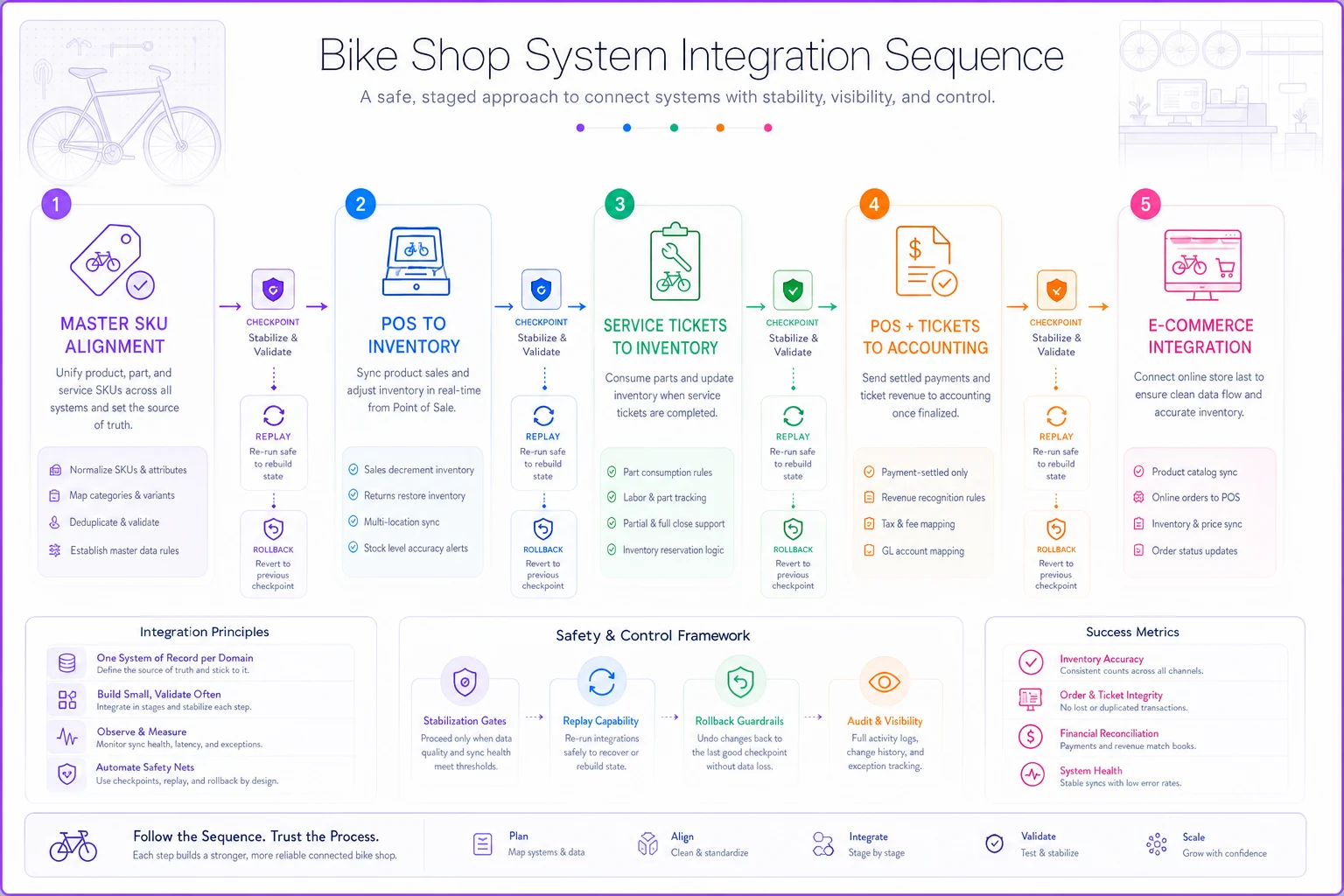
A visual like this helps vendors and staff see the single-path rollout and where to pause for stabilization.
Observability: three checks that take ten minutes a day
You don't need a monitoring dashboard built by engineers. You need three simple checks that tell you whether your event flows are alive and honest.
Check 1 — Event freshness.
Did each event type fire recently? If no part-consumed events have appeared in 48 hours during a busy week, something's broken — probably a mechanic logging parts on paper again. You're not checking the numbers yet, just the pulse.
Check 2 — Volume sanity.
Does the count roughly match reality? If you rang up 40 service tickets but only 12 ticket-created events fired, you have a capture gap. The exact number doesn't matter; the order of magnitude does.
Check 3 — Cross-system match.
Pick one number that should agree in two places. Example: total payment-settled gross for the day vs. the POS daily total. If they're within a few dollars (fees, rounding), fine. If they're off by $200, you've caught a problem the same day instead of at month-end.
The thing almost nobody does: write down the expected range. Something like "we normally see 30–50 tickets a day, 60–120 part-consumed events, and daily settled gross within $15 of POS total." Once you have a baseline for normal, abnormal becomes obvious. Without it, every number looks plausible.
| Metric | Normal range/example |
|---|---|
| tickets per day | 30–50 tickets a day |
| part-consumed events | 60–120 part-consumed events |
| daily settled gross vs POS | within $15 of POS total |
Once you have a baseline for normal, abnormal becomes obvious — and that makes a ten-minute check highly actionable.
Rollback guardrails: assume connections will break
Every integration will fail eventually. A connector times out, an API changes, someone fat-fingers a config. The shops that survive this aren't the ones with perfect integrations — they're the ones who planned for failure.
A rollback guardrail is a pre-decided answer to "what do we do when this link goes down?" You decide it before it breaks, when you're calm, not at 4pm on a Saturday with a line at the counter.
-
Manual fallback mode. Every event flow needs a paper or spreadsheet backup that staff already know how to use. If the ticket-to-inventory link dies, mechanics log consumed parts on a pad and someone keys them in that evening. Not elegant, but it keeps the data whole.
-
Replay capability. Your events should be re-runnable. If accounting missed a day of
payment-settledevents, you want to resend that day, not reconstruct it by hand. When evaluating tools, this is a real question to ask vendors — covered in our software buyer's checklist. -
Freeze-and-flag. When a cross-system check fails badly — say, inventory going negative — the system should stop auto-syncing and flag it rather than propagate the bad number everywhere. A loud error beats silent corruption every time.
Most owners treat a broken integration as an emergency to fix immediately. A better frame: a broken integration should degrade gracefully into a manual process you've already practiced, buying you time to fix the root cause properly.
A monthly governance routine you can actually run
Governance sounds like a word for companies with compliance departments. For a bike shop it's just one scheduled hour a month where you confirm the model still works and decide what to adjust. No dev team required.
-
Run the three observability checks across the full month, not just a day. Did any event type have suspicious gaps? Note them.
-
Reconcile one hard number end-to-end. Pick service revenue. Trace it from tickets → payments → accounting. It should tie out within a tolerance you've defined.
-
Review guardrail triggers. How many times did freeze-and-flag fire? Each trigger is a story. A spike usually means a specific connector is flaky.
-
Check SKU drift. Did anyone create duplicate or mismatched SKUs this month? This is the silent killer of integrations and it creeps back constantly.
-
Update your "normal" ranges. As the shop grows or the season shifts, yesterday's normal becomes today's alarm. Adjust the expected ranges so your checks stay meaningful.
-
Decide the next integration, if any. Only after everything above is clean do you consider adding a new connection.
This takes a focused hour if your model is healthy, and two or three if something's been quietly wrong. Either way it's cheaper than discovering a broken part-consumed flow at tax time, after six months of untracked cost.
A real scenario
A two-location shop — mid-sized, doing roughly 90–110 service tickets a week across both stores — had the classic adjacency problem. POS and inventory were connected, but service tickets lived in a separate scheduling tool and parts were decremented manually when a mechanic remembered to do it.
The symptom: reported service margin looked great, around 68%, but actual profit never matched. At month-end, inventory was always short by a few thousand dollars of parts nobody could account for.
The fix wasn't new software. It was defining the part-consumed event, making mechanics log it at the bench via a tablet in the service area, and adding the daily volume-sanity check. Within the first full month they found the leak: somewhere between 15–20% of parts used in repairs were never being recorded, because the manual step got skipped during busy afternoons.
Once part-consumed fired reliably, true service margin landed closer to 54%. Lower, but real. That mattered more than the pretty number. They repriced two job types, tightened parts-sourcing on a few SKUs, and within a quarter were running a service department they could actually trust. The inventory shortfall dropped to near noise.
The problem was never the margin. It was that nobody owned the event where parts left the shelf.
When this model makes sense — and when it doesn't
This makes sense when:
-
You have more than one person touching sales or service, so mental reconciliation no longer covers you
-
You run retail and service, which multiplies the ways data drifts
-
You're planning a second location, because adjacency completely falls apart across sites
This is overkill when:
-
You're a solo operation doing low volume and you genuinely carry the full picture in your head
-
You're mid-season-crunch — don't start sequencing integrations the week before your busiest Saturday
-
Your SKUs are a mess; fix that first, because an operating model built on inconsistent SKUs just automates the confusion faster
Who should not do this yet:
anyone still choosing their core systems. Get your POS and service platform decided and stable before you start wiring event contracts between them. Building the plumbing before you've picked the fixtures just means tearing it out later.
The point of all this
A data operating model isn't about having more dashboards. It's about building a business where every important thing that happens produces a clean signal, your systems react to the same truth, and when something breaks, you've already decided what to do.
The shops that scale smoothly aren't the ones with the fanciest tools. They're the ones who defined their events early, sequenced their integrations with patience, and spend one quiet hour a month making sure the whole thing still tells the truth. Start with the three events. Define the contracts. Everything else is built on top of that.
Ready to revolutionize your bike shop operations?
Join hundreds of bike shops using Bicyclly to save time, increase revenue, and deliver exceptional customer service.