



Most bike shops don't lose money because their governance is bad. They lose it because they never decided who owns the "one true version" of a part number, a price, or a bike's status. So the POS says one thing, the supplier catalog says another, the accounting export rounds it off differently, and somewhere in the middle a mechanic is typing a description freehand because the SKU didn't scan.
That drift is quiet. It doesn't blow up on a Tuesday. It shows up three months later when your inventory value is off by a few thousand dollars and nobody can explain why. Data governance sounds like a corporate word, but for a shop it just means having agreed-upon rules for how product and transaction data gets created, named, connected, and checked. This is the playbook a non-technical owner can actually run.
Why shop data drifts in the first place
Here's the pattern almost every growing shop hits. In year one, one person enters everything. The naming is inconsistent but it's inside one head, so it works. A "Shimano 105 rear derailleur" and a "105 RD" mean the same thing because the same person typed both.
Then you add a second location, a part-timer who does receiving, a website that pulls from a supplier feed, and an accountant who wants clean monthly exports. Now four people and two systems are creating records with no shared rulebook. That's when the same physical part exists under three SKUs, a tire shows up twice in inventory, and a trade-in bike gets counted as both a used asset and a service line.
The root cause is almost never carelessness. It's that the shop never wrote down which system is the source of truth for each type of data. When ownership is ambiguous, every tool assumes it's in charge and every person invents their own shortcut.
A useful way to think about it: your data has "owners" whether you assign them or not. If you don't assign them on purpose, the default owner becomes whoever touched it last. That's the real enemy.
The foundation: master‑SKU rules
Everything downstream — pricing, reconciliation, website listings, reorder logic — depends on the SKU being trustworthy. If your SKUs are messy, no amount of clever accounting fixes the numbers. So this is where governance starts.
Never miss a sale or service appointment again.
Bicyclly helps you manage every sale, repair, and booking with ease and accuracy.
- Unified inventory and sales tracking
- Automated customer notifications
- Service appointment scheduling
No credit card required
A master SKU is the single, canonical identifier for a stock item that every other system maps back to. The goal isn't a perfect taxonomy. It's a set of boring rules everyone follows the same way.
-
One physical product = one master SKU. If it's the same part, same size, same color, it gets one code — even if two suppliers sell it.
-
Supplier part numbers are aliases, not SKUs. Keep them as a linked field so scanning works, but they never replace the master.
-
Structure the code so a human can read it. Something like
CATEGORY-BRAND-MODEL-VARIANT. For example,TIRE-CONTI-GP5000-700x25. Nobody memorizes it, but anyone can sanity-check it. -
No freehand item creation at the register. New items get created through one intake step, by people with permission — not on the fly during a busy Saturday.
-
Retire, don't delete. When a product is discontinued, mark it inactive so history stays intact. Deleting breaks past reports.
-
Variants are explicit. Size and color are separate SKUs, never lumped into one "misc" line.
The single biggest mistake shops make here is letting the register be a place where new products are born. A mechanic can't find the SKU, so they ring it up as "Misc Part $18." Do that forty times a month and your parts revenue is now a black hole you can't reconcile or reorder against.
One more overlooked rule: decide who can create SKUs and keep that list short. Two or three people, tops. Governance dies the moment eight people can all mint new part numbers their own way.
Deciding your source of truth for each data type
Before you connect anything, write down — literally on one page — which system owns each kind of data. This single decision prevents most integration headaches.
| Data type | Source of truth | Who reads it | Common failure when undefined |
|---|---|---|---|
| Master SKU & product details | Inventory / POS | Website, accounting, reorder | Duplicate SKUs, mismatched descriptions |
| On-hand quantity | Inventory system | POS, website | Website oversells parts you don't have |
| Retail price | POS | Website, receipts | Website and register disagree at checkout |
| Cost / landed cost | Purchasing / receiving | Accounting, margin reports | Wrong margin math, bad reorder calls |
| Customer record | POS / CRM | Service, marketing | Duplicate customers, lost history |
| Service ticket status | Service module | POS, customer texts | Bike marked "done" in one place, not another |
| Revenue by category | POS | Accounting | Books don't match daily sales |
The rule: each data type has exactly one owner, and every other system copies from it — never the reverse. When your website tries to "correct" your inventory count, or your accounting export starts overriding prices, you've inverted the flow and you'll spend weekends untangling it.
If you've already lived through the pain of systems disagreeing, our deeper walkthrough on reconciling POS, inventory, and accounting mismatches covers the mapping spec in more detail. This article sits one level up — it's the governance layer that keeps those mappings stable over time.
Integration order: connect systems in the right sequence
This is the part shops get backwards constantly. They buy a slick e-commerce plugin and connect the website first because it's exciting, then discover the product data feeding it was garbage. Now the mess is live and public.
Integrations should be sequenced so that each one is built on clean, already-governed data. Connecting a downstream system to dirty upstream data just spreads the mess faster.
-
Clean the master SKU list first. No integrations until the product data is deduplicated and rule-compliant. Unglamorous work. Also the whole ballgame.
-
Connect inventory ↔ POS. These two have to agree before anything else touches them. On-hand counts and SKUs must sync reliably.
-
Connect purchasing/receiving into inventory. So cost and quantity update at the source when goods arrive, not manually days later.
-
Connect accounting. Once revenue categories and costs are stable, wire up the export. Now your books pull from trustworthy numbers instead of guesses.
-
Connect the website / online channels last. By now product data, prices, and stock counts are governed. The website becomes a clean mirror instead of a liability.
-
Connect customer-facing automation last of all. Text confirmations, review requests, reorder alerts — these ride on top of everything else being right.
The insight most people miss: integration order is a risk-management decision, not a technical one. Every integration you add before the underlying data is governed doubles the number of places you have to fix the same error. Connect the website to bad SKUs and you're now fixing each duplicate in two places.
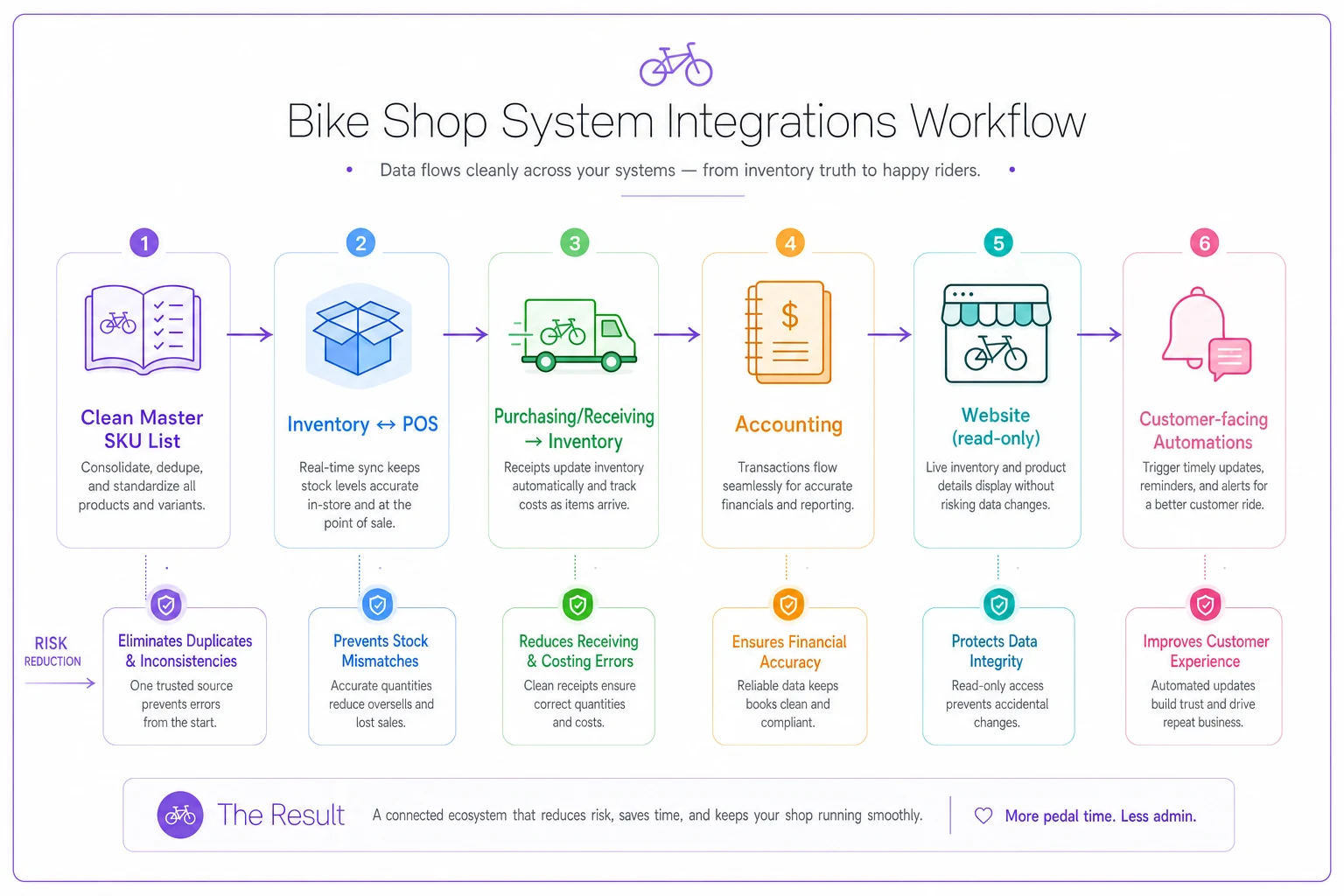
If you're mid-growth and already have a tangle of half-connected systems, don't rip everything out. Freeze new integrations, clean the SKU master, get inventory and POS agreeing, then re-sequence outward from there.
A simple event model owners can actually understand
"Event model" sounds technical, but it's just naming the moments when your data changes and deciding what should happen at each one. For a shop, the events that matter are small in number:
-
Product created → gets a master SKU, category, cost, price. Only through intake.
-
Goods received → quantity goes up, landed cost recorded, PO closed.
-
Sale made → quantity goes down, revenue booked to a category.
-
Service ticket opened → parts reserved, labor tracked.
-
Service ticket closed → parts consumed, revenue booked, bike status updated.
-
Trade-in taken → used asset created once, valued once (this is where double-counting sneaks in).
-
Return / refund → quantity goes back up, revenue reversed.
-
Item retired → marked inactive, not deleted.
The point of writing these out is that each event should update the source-of-truth system, and everything else copies from there. When a service ticket closes, the parts should decrement from inventory automatically at that event — not get counted again during a monthly stock count, and not get re-entered on a separate parts invoice.
The classic shop mistake lives right here: the same real-world event gets recorded as two separate data events. A used bike comes in as a trade-in and gets logged both as inventory and as a credit that never links back, so it's valued twice. Naming the event and deciding "this happens once, here" is what prevents it.
You don't need software to define the event model. You need it written down so everyone recording data agrees on what each moment means.
Reconciliation queries any owner can run
Governance without checking is just wishful thinking. You need a handful of dead-simple queries — or even filtered reports out of your POS — that surface drift before it becomes a mystery. None of these require a database background.
-
Duplicate SKU check. Group products by description; anything with a near-identical name and different SKU is a suspect. Duplicates are the #1 source of count errors.
-
Zero-or-negative on-hand with recent sales. If a SKU shows negative stock, either receiving was missed or the SKU is a duplicate. Negative inventory is impossible in the real world, so it's always a data problem.
-
"Misc" and freehand line report. Total up every generic/misc sale line. If this number is climbing, your SKU discipline is slipping and reorder data is rotting.
-
Category revenue vs. accounting export. Do this month's POS category totals match what landed in the books? A gap here is your earliest warning of a mapping break.
-
Cost-missing SKUs. Any active product with no cost recorded can't produce accurate margin. Flag and fix.
-
Inactive items still showing stock. Retired products with on-hand quantity mean either the retirement was wrong or a physical item is unaccounted for.
Run the duplicate SKU and misc-line reports before the monthly meeting so fixes can be assigned during the session.
A realistic first-run outcome: a shop with roughly 4,000 SKUs finds 60–90 duplicates, a dozen negative-stock items, and a "misc parts" line that quietly added up to a few thousand dollars over the quarter. None of that is theft or incompetence. It's ungoverned data doing what ungoverned data does.
For the accounting side of these checks, our one-page inventory accounting and KPI dashboard pairs well with this reconciliation set — the dashboard tells you the "what," these queries tell you the "why it's off."
This is also where an operational platform that runs scheduled checks and flags exceptions pays for itself — not by making decisions, just by surfacing the handful of records that broke a rule so a human can look. The rules stay yours; the software does the tedious watching.
The one‑hour monthly governance meeting
Here's what makes all of the above actually stick: a short, boring, recurring meeting. Governance fails not because the rules are wrong but because nobody revisits them, so drift compounds silently. One hour a month prevents the quarterly fire drill.
Keep the attendee list tight — owner or manager, whoever runs receiving, and whoever owns the books (even a part-time bookkeeper on a call). Same agenda every month:
Monthly governance meeting agenda (60 minutes):
-
Review reconciliation results (15 min). Walk the six queries above. What broke a rule this month?
-
Duplicate & misc-line cleanup decisions (10 min). Assign fixes with names and dates. Not "someone should" — "Dana, by Friday."
-
New SKU creation review (10 min). How many new products this month, created by whom, and do they follow the naming rules?
-
Source-of-truth check (5 min). Did any system start overriding data it shouldn't? Any new tool someone connected without discussing?
-
Trade-in / used inventory audit (10 min). Every item taken in this month — counted once, valued once, still where it should be?
-
One improvement (10 min). Pick a single rule to tighten or clarify. Update the one-page rulebook.
The discipline is that it's the same six things every month. It gets faster as your data gets cleaner — a shop that's been running this cadence for six months often finishes in 30 minutes because there's just less to fix.
If you want a natural on-ramp to this routine, run the first meeting right after a seasonal count. Pairing it with something like our two-hour pre-season inventory audit means you're catching physical and data problems in the same pass.
A real scenario: what this looks like in practice
The shop: a two-location bike shop, retail plus a busy service department, around 4,000 active SKUs and a website pulling from a supplier feed.
The problem: monthly inventory value was swinging by $3k–$5k with no obvious cause, the website occasionally sold parts that weren't in stock, and the bookkeeper spent a full day each month manually matching POS categories to the accounting export. Nobody trusted the margin numbers, so reorder decisions were basically vibes.
Digging in turned up the usual suspects. About 70 duplicate SKUs across the two locations. A "Misc Part" line that absorbed roughly $2,600 in parts sales over a quarter — invisible for reordering. The website was connected as a source of stock counts instead of a mirror, so its edits were fighting the inventory system. And trade-in bikes were getting logged twice.
What changed: they froze new integrations, spent about two weeks cleaning the SKU master, then re-sequenced — inventory and POS first, accounting second, website last as a read-only mirror. They ran the six reconciliation queries and started the one-hour monthly meeting.
The outcome after a couple of months: monthly inventory swing dropped to under $1k, mostly explainable. The bookkeeper's reconciliation day shrank to about an hour. The website stopped overselling because it could no longer overwrite the source of truth. The "misc" line fell close to zero once freehand register creation was locked down. Not dramatic, not overnight — just numbers that finally matched reality.
When tight governance makes sense — and when it's overkill
When this is worth it: the moment you have more than one person creating data, more than one location, or any system pulling from another — a website, an accounting integration, a supplier feed. At that point ungoverned data isn't a risk, it's a guarantee.
When it's overkill: a true single-operator shop with one person entering everything and no online channel probably doesn't need the full meeting cadence yet — though a basic master-SKU rule set still saves pain later. Don't build a governance committee for a business that fits inside one person's head.
Who should hold off: if you're switching POS systems or migrating platforms in the next few months, don't invest weeks perfecting integrations you're about to tear out. Clean the SKU master (that migrates with you) and wait until you're on the system you'll actually keep.
Data governance is unglamorous work that will never generate a single sale on its own. What it does is make every number you rely on trustworthy — margins, reorder points, inventory value, category revenue. Those are the numbers you run the shop by. Get the plumbing right once, keep an hour a month on the calendar to maintain it, and you stop paying the quiet tax of systems that don't agree with each other.
Ready to revolutionize your bike shop operations?
Join hundreds of bike shops using Bicyclly to save time, increase revenue, and deliver exceptional customer service.