

Most bike shop owners don't fail at software because they picked the wrong POS. They fail because they had no real framework for deciding — so every vendor pitch sounded equally good, every integration felt equally urgent, and every rollout landed in the middle of March when the repair queue was already 40 tickets deep.
A tech stack is a chain of dependencies, not a shopping list. Your booking tool feeds your service board. Your service board feeds labor tracking. Labor tracking feeds your books. Bolt on a slick new tool that doesn't respect that chain and you don't get an upgrade — you get a new place for data to disappear.
This is a bike shop tech stack decision framework built for people who don't write code and don't want to. Scorecards, thresholds, sequencing logic, rollback rules — the stuff I'd hand a service manager who's about to spend real money and can't afford a six-week outage.
Why shops end up with a Frankenstein stack
Nobody plans a messy stack. It accumulates.
A shop buys a POS in year one. Adds a standalone booking widget in year three because the phone won't stop ringing. Grabs a separate email tool for reminders. Someone starts tracking mechanic hours in a spreadsheet. Then the accountant asks for a report that touches all four, and suddenly you're exporting CSVs at 11pm trying to figure out why service revenue in the POS doesn't match what the booking tool says happened.
Each tool was bought to solve one urgent pain, in isolation, with no thought about what it needed to talk to. Each decision was reasonable. The sum of them is a swamp.
The pattern is almost always the same: the tools are fine individually. The connections between them are where the money leaks. A missed sync, a field that doesn't map, a manual re-entry step someone forgets — that's where your numbers stop matching reality. If you've ever fought the gap between what your register, your stockroom, and your bookkeeper each believe is true, that's the same root problem described in When POS, Inventory and Accounting Don't Match.
The vendor evaluation scorecard
The fastest way to cut through a sales demo is to score every vendor on the same sheet before you get emotionally attached to a slick interface. Demos are designed to make you feel good. A scorecard forces you to compare the boring stuff that actually determines whether the tool survives your busy season.
Never miss a sale or service appointment again.
Bicyclly helps you manage every sale, repair, and booking with ease and accuracy.
- Unified inventory and sales tracking
- Automated customer notifications
- Service appointment scheduling
No credit card required
Here's a structure that works for shops without an IT person. Weight each category by how much it matters to your operation, then score each vendor 1–5.
| Category | What you're actually checking | Weight | Why it matters |
|---|---|---|---|
| Core fit | Does it handle service tickets AND retail, or just one? | High | Half-fit tools create the export problem |
| Data export | Can you get YOUR data out anytime, in a clean format? | High | Prevents vendor lock-in and dead-end migrations |
| Integrations | Does it natively connect to your accounting + payments? | High | Manual re-entry is where errors breed |
| Field mapping | Can SKUs, customers, and tickets map cleanly across tools? | Medium | Master-data mismatches corrupt reports |
| Onboarding support | Real human help, or a knowledge base and good luck? | Medium | Rollouts fail from lack of support, not features |
| Total cost | Monthly + per-terminal + transaction + add-on modules | Medium | The sticker price is rarely the real price |
| Offline behavior | What happens when the internet drops mid-transaction? | Low–Med | A dead register during a Saturday rush is real risk |
The mistake shops make most often: weighting "features" at the top and "data export" near the bottom. It should be the reverse. Features are what you notice in month one. Data portability is what determines whether you're trapped in year three when the vendor raises prices 30% and you realize you can't leave without losing your customer history.
One more scoring rule — if a vendor won't give you a straight answer about exporting your own data, score that category a 1 and move on. That evasiveness tells you exactly how the relationship goes later.
ROI thresholds: what actually justifies a purchase
Every vendor will hand you an ROI story. The problem is their math assumes you'll use 100% of the tool and lose zero hours to the transition. Neither is true.
A tool needs to pay for itself in labor hours saved or margin recovered within 6–9 months, after accounting for the switching cost.
Put numbers on it. Say a booking-and-reminder system costs about $180/month, so roughly $2,160 a year. If it cuts no-shows and manual confirmation calls, you need it to save at least that much in recovered bookings and staff time. If your average service ticket is around $85 and you're losing maybe six no-shows a month you could've saved, that's roughly $510 a month in recovered revenue — well past threshold. Easy yes.
Flip it. A shiny inventory analytics dashboard costs $250/month. It produces nice charts. But if nobody on your team will actually change a reorder decision based on those charts, the ROI is zero regardless of the price. A tool only returns value when a decision or action changes because of it.
-
Under $100/month Should save at least 3–4 hours of staff time monthly, or it's not worth the mental overhead of another login.
-
$100–$300/month Needs a clear, measurable operational change — fewer errors, faster turnaround, recovered revenue — within two months.
-
$300+/month Should touch the core of the business (POS, service board, or books) and have an owner accountable for the outcome. Anything at this price that lives on the edge of your operation is a luxury, not an investment.
That's the filter most shops skip. Don't ask "is this a good tool." Ask "what specific action will change, who will take it, and how often." If you can't answer that in one sentence, the ROI is imaginary.
Integration sequencing: the order you connect things matters more than what you connect
This is the part almost nobody plans, and it's where the most pain comes from.
Your systems have a natural dependency order. Connect them out of sequence and you spend weeks fixing data that never lined up in the first place. The correct sequence for most retail-plus-service shops:
-
Master data first. Clean up your SKUs, customer records, and service categories before connecting anything. Garbage in, garbage everywhere. This is non-negotiable and it's the single most-skipped step. The reasoning behind why this comes first is laid out in Data Governance for Bike Shops.
-
POS + payments. This is your source of truth for what actually sold. Get it rock-solid alone before adding anything on top.
-
Inventory sync. Now connect stock so sales draw down inventory automatically. Test this hard — it's where phantom stock levels are born.
-
Service board / booking. Once retail and inventory are stable, wire in service so tickets pull parts from the same inventory pool.
-
Accounting. Connect books last, after the operational layer is proven. Your accountant should be reconciling clean data, not chasing mysteries from three half-connected tools.
-
Reporting / dashboards. Only meaningful once everything below it is trustworthy. A dashboard sitting on bad data is a very expensive way to make confident wrong decisions.
Clean master data first — it's the single best way to avoid cascading mapping errors.
A quick visual of the correct sequence often helps teams remember the order during a rollout.
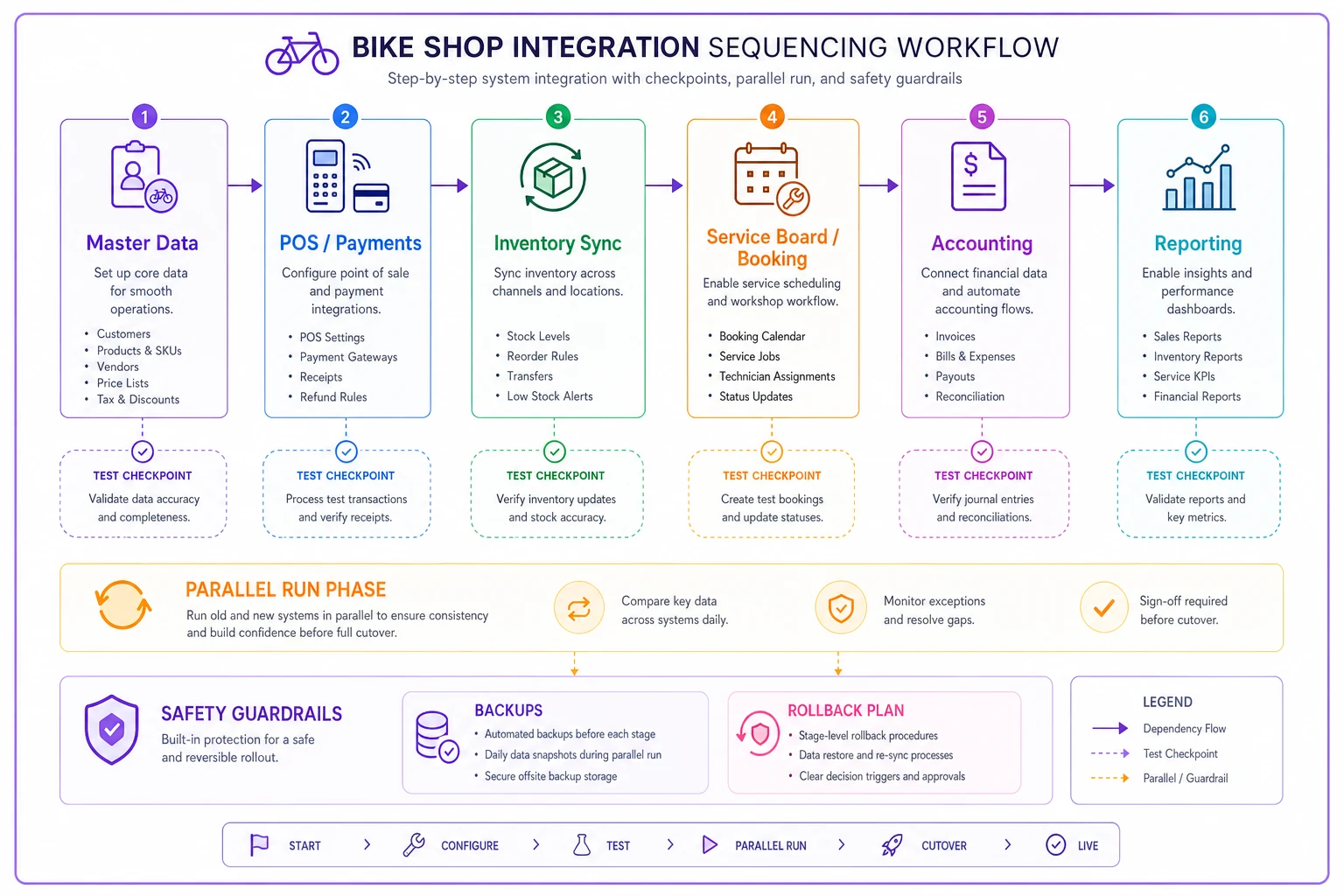
Each layer depends on the layer below it being correct. If you connect accounting before inventory is stable, your books inherit every inventory error and you'll never trust the reports. Sequencing isn't bureaucracy — it's how you avoid debugging five systems at once.
Rollback guardrails: assume something will break
This is the part vendors never talk about. What happens when the new tool doesn't work?
If you flip a switch on a new POS the morning of a Saturday rush and it chokes, "we'll figure it out" is not a plan — it's a lost day of revenue and a line of annoyed customers. Every rollout needs guardrails before you go live.
-
[ ] Full data backup taken and verified before migration — not "we exported something," but a restore you've actually tested.
-
[ ] Parallel run period where old and new systems run side-by-side for 1–2 weeks so you can compare outputs.
-
[ ] A defined "kill switch" threshold — e.g., "if transactions fail more than X times in a day, we revert." Decide the number now, not in the panic.
-
[ ] The old system stays accessible (read-only is fine) for at least 60 days. Don't cancel the old contract the day you go live.
-
[ ] One named person who has authority to call the rollback. Committees don't make fast decisions during a meltdown.
-
[ ] A go-live date that avoids your peak. Nobody should migrate a POS in the two weeks before your busiest weekend.
The shops that get burned are the ones who treat go-live as a point of no return. The ones who do it well treat it as a reversible experiment with an exit ramp. You want to be able to say "this isn't working, we're back on the old system by tomorrow" — calmly, because you planned for it.
A 90-day safe implementation runbook
Rolling out a new core tool over 90 days sounds slow. It's not — it's the difference between a controlled transition and a fire drill. Here's how the phases break down, with a governance checkpoint at the end of each.
Days 1–30: Foundation and cleanup
-
Clean master data
dedupe customers, standardize SKUs, fix service categories.
-
Document your current workflows exactly as they run today — including the ugly manual workarounds. You can't improve a process you haven't written down.
-
Assign owners
who owns POS, who owns service board, who owns the books.
-
Take and verify your data backup.
Governance checkpoint (Day 30): Owner reviews cleaned data and signs off that it's migration-ready. If the data isn't clean, you do not proceed. Full stop. This checkpoint saves more rollouts than any feature ever will.
Days 31–60: Parallel run
-
Process a slice of real transactions in the new system while the old one remains the official record.
-
Compare outputs daily at first, then a few times a week. Where do the numbers diverge? Every discrepancy is a mapping problem you want to catch now.
-
Train staff on real workflows, not demo scenarios. Let them break things while it's safe.
-
Track a simple issue log — what failed, who fixed it, was it a config problem or a training problem.
Governance checkpoint (Day 60): Owner reviews the issue log and the discrepancy report. Are new-system numbers matching the old within an acceptable tolerance? If not, extend the parallel run. Do not advance on hope.
Days 61–90: Cutover and stabilize
-
Cutover happens on a deliberately slow day.
-
Old system stays accessible read-only.
-
Watch reconciliation closely for the first two weeks. The habits from When POS, Inventory and Accounting Don't Match are exactly what you want running here.
-
Retire manual workarounds one at a time, confirming each is genuinely handled by the new system before dropping it.
Governance checkpoint (Day 90): Owner confirms full reconciliation matches, staff are working without workarounds, and the rollback window can safely close. This is when you finally cancel the old contract — not a day sooner.
A real scenario
A two-mechanic shop doing roughly $600k a year had grown into a four-tool tangle: a POS, a separate online booking widget, a spreadsheet for mechanic hours, and a bookkeeper working off monthly exports. Service revenue never quite matched between the POS and the booking tool, and the owner was spending most of a Sunday each month trying to reconcile it by hand.
They didn't rush to buy a new all-in-one. They ran the framework. The scorecard killed two flashy vendors on the data-export question alone. The ROI threshold cut a $300/month analytics tool nobody would've acted on. They sequenced properly — cleaned master data first, then wired POS, inventory, service, and books in order over about ten weeks.
The results weren't dramatic-sounding, which is exactly the point. The monthly reconciliation dropped from a full Sunday to under an hour. The gap between booking and POS revenue basically closed. No-shows fell because reminders now fired automatically off the service board instead of a separate tool. Nothing exploded during the transition because the parallel run caught two mapping errors before cutover. That's what a good rollout looks like — quiet, not heroic.
When this framework is overkill
Not every shop needs a 90-day runbook. If you're a single-person operation running one POS and a paper service board, and it works, don't manufacture complexity. The framework earns its keep once you have:
-
More than one tool that needs to share data
-
More than one or two people entering data
-
Reports you actually make decisions from
-
A busy season you can't afford to disrupt
If none of those apply yet, keep it simple and revisit when you grow. Buying enterprise-grade process for a two-person shop is its own kind of waste.
Where automation quietly fits
Once your stack is sequenced and stable, the manual glue steps between tools become obvious — and those are the natural candidates to automate. A booking that automatically opens a service ticket, a completed ticket that automatically decrements parts, a reminder that fires without anyone touching it. This is where an AI-assisted operational platform earns its place: not as a shiny standalone tool, but as the connective layer that removes the re-entry steps where errors live. If you want to see how shops wire these event-based triggers together, the Event-First Automation Playbook walks through the pattern.
The important sequencing point: automate last, not first. Automating a broken workflow just makes the mistakes happen faster. Get the foundation clean and the integration order right, and automation becomes a multiplier instead of an accelerant for chaos.
The takeaway
Buying software isn't the decision that matters — sequencing it, thresholding it, and rolling it out with guardrails is. A shop with a modest, well-connected stack will run circles around a shop with expensive tools that don't talk to each other. Use the scorecard to filter vendors honestly, hold every purchase to a real ROI threshold, connect systems in dependency order, and never go live without a rollback plan and a governance checkpoint you'll actually enforce. Do that, and your tech stack stops being a source of Sunday-night reconciliation headaches and starts being what it's supposed to be: the quiet infrastructure that lets you focus on bikes and customers instead of chasing why the numbers don't add up.
Ready to revolutionize your bike shop operations?
Join hundreds of bike shops using Bicyclly to save time, increase revenue, and deliver exceptional customer service.